Spring MVC学习
自学导航
idea版+黑马程序员学习视频
笔记源码资料:
链接:https://pan.baidu.com/s/1hcgH_mkHJYuQQcM3VQaBWQ 提取码:rt0t 复制这段内容后打开百度网盘手机App,操作更方便哦–来自百度网盘超级会员V2的分享
eclipse版+尚硅谷学习视频
笔记源码资料:
链接:https://pan.baidu.com/s/1vNq5JTAp4sAu6e_eM_2qww 提取码:f8ac 复制这段内容后打开百度网盘手机App,操作更方便哦–来自百度网盘超级会员V2的分享
推荐:(本人采用) eclipse版+ssm(spring+spring mvc+mybatis)+尚硅谷_雷丰阳 学习视频
笔记资料工具:
链接:https://pan.baidu.com/s/1vi8-mYl8h5BLeO2QMN_-ww 提取码:czx8 复制这段内容后打开百度网盘手机App,操作更方便哦–来自百度网盘超级会员V2的分享
一、Spring MVC简介
MVC:新的软件架构模式
M:Model模型:封装和映射数据(JavaBean)
V:View视图:界面显示工作(.jsp)
C:Controller控制器:控制整个网站的跳转逻辑(Servlet)

二、HelloWorld:
新建Web动态工程:


1、导包
spring相关jar包(spring-5.2.9)
链接:https://pan.baidu.com/s/15X79BzT2_dGS_wviCJiKYQ 提取码:8e71 复制这段内容后打开百度网盘手机App,操作更方便哦–来自百度网盘超级会员V2的分享
- 核心容器模块:

- web模块:

2、写配置
- web.xml:
配置springmvc的前端控制器,指定springmvc配置文件位置
<?xml version="1.0" encoding="UTF-8"?>
<web-app xmlns:xsi="http://www.w3.org/2001/XMLSchema-instance" xmlns="http://xmlns.jcp.org/xml/ns/javaee" xsi:schemaLocation="http://xmlns.jcp.org/xml/ns/javaee http://xmlns.jcp.org/xml/ns/javaee/web-app_3_1.xsd" id="WebApp_ID" version="3.1">
  <display-name>1.SpringMVC_helloWorld</display-name>
  <welcome-file-list>
    <welcome-file>index.jsp</welcome-file>
  </welcome-file-list>

  <!-- SpringMVC思想是有一个前端控制器能拦截所有请求,并智能派发
  		这个前端控制器是一个Servlet:应该在web.xml中配置这个servlet来拦截所有请求
   -->
   <!-- The front controller of this Spring Web application, responsible for handling all application requests -->
	<servlet>
		<servlet-name>springDispatcherServlet</servlet-name>
		<servlet-class>org.springframework.web.servlet.DispatcherServlet</servlet-class>
		<init-param>
		<!-- contextConfigLocation:指定springMVC配置文件位置 -->
			<param-name>contextConfigLocation</param-name>
			<param-value>classpath:springmvc.xml</param-value>
		</init-param>
		<!-- servlet启动加载,servlet原本是第一次访问创建对象;
		load-on-startup:服务启动的时候创建对象:值越小优先级越高,越先创建对象;
		 -->
		<load-on-startup>1</load-on-startup>
	</servlet>

	<!-- Map all requests to the DispatcherServlet for handling -->
	<servlet-mapping>
		<servlet-name>springDispatcherServlet</servlet-name>
		<!--
		   /*和/都是拦截所有请求;/:会拦截所有请求,但不会拦截*.jsp;能保证jsp访问正常;
		   /*的范围更大;还会拦截到*.jsp这些请求;一旦拦截jsp页面就不能显示了;
		 -->
		<url-pattern>/</url-pattern>
	</servlet-mapping>

</web-app>
- 框架自身
springmvc.xml:
<?xml version="1.0" encoding="UTF-8"?>
<beans xmlns="http://www.springframework.org/schema/beans"
	xmlns:xsi="http://www.w3.org/2001/XMLSchema-instance"
	xmlns:context="http://www.springframework.org/schema/context"
	xsi:schemaLocation="http://www.springframework.org/schema/beans http://www.springframework.org/schema/beans/spring-beans.xsd
		http://www.springframework.org/schema/context http://www.springframework.org/schema/context/spring-context-4.3.xsd">

	<!-- 扫描所有组件 -->
	<context:component-scan base-package="com.lql"/>
	<!-- 配置一个视图解析器:能帮我们拼接页面地址 -->
	<bean class="org.springframework.web.servlet.view.InternalResourceViewResolver">
		<property name="prefix" value="/WEB-INF/pages/"></property>
		<property name="suffix" value=".jsp"></property>
	</bean>
</beans>
Controller类:
package com.lql.controller;

import org.springframework.stereotype.Controller;
import org.springframework.web.bind.annotation.RequestMapping;

/**
 * 1.告诉SpringMVC这是一个处理器,可以处理请求
 * 		@Controller,表示哪个组件是控制器
 * @author 陆乾龙
 *
 */
@Controller
public class MyFirstController {
	/**
	 *  /代表从当前项目下开始:处理当前项目下的hello请求
	 */
	@RequestMapping("/hello")
	public String myfirstRequest(){
		System.out.println("请求收到了....正在处理中");
		//视图解析器自动拼串
		//<property name="prefix" value="/WEB-INF/pages/"></property>
		//<property name="suffix" value=".jsp"></property>
		//    (拼接)/WEB-INF/pages/+返回值(success)+后缀(.jsp)
		return "success";
	}

	public MyFirstController() {
		// TODO Auto-generated constructor stub
	}

}
- 总体架构:

3、测试
4、HelloWorld细节
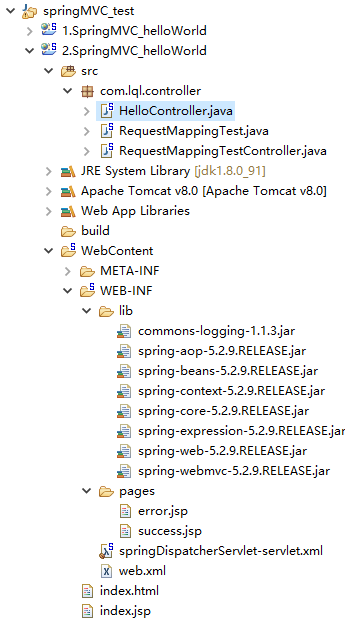
3.总体架构:
4.web.xml:
<?xml version="1.0" encoding="UTF-8"?>
<web-app xmlns:xsi="http://www.w3.org/2001/XMLSchema-instance" xmlns="http://xmlns.jcp.org/xml/ns/javaee" xsi:schemaLocation="http://xmlns.jcp.org/xml/ns/javaee http://xmlns.jcp.org/xml/ns/javaee/web-app_3_1.xsd" id="WebApp_ID" version="3.1">
  <display-name>2.SpringMVC_helloWorld</display-name>
  <welcome-file-list>
    <welcome-file>index.jsp</welcome-file>
  </welcome-file-list>

  <!-- The front controller of this Spring Web application, responsible for handling all application requests -->
	<servlet>
		<servlet-name>springDispatcherServlet</servlet-name>
		<servlet-class>org.springframework.web.servlet.DispatcherServlet</servlet-class>
		<!-- <init-param>
			<param-name>contextConfigLocation</param-name>
			<param-value>classpath:springmvc.xml</param-value>
		</init-param> -->
		<load-on-startup>1</load-on-startup>
	</servlet>

	<!-- Map all requests to the DispatcherServlet for handling -->
	<!-- /:拦截所有请求,不拦截jsp页面(*.jsp请求)
		 /*:拦截所有请求,拦截jsp页面(*.jsp请求)


		 处理*.jsp是tomcat做的事,所有项目的小web.xml都是继承于大web.xml
		 DefaultServlet是Tomcat中处理静态资源的;
		 	除过jsp和servlet外剩下的都是静态资源,
		 	index.html是静态资源,tomcat就会在服务器下找到这个资源并返回;
		 	我们前端控制器的/禁用了tomcat服务器中的DefaultServlet

		 1)服务器的大web.xml中有一个DefaultServlet是url-pattern=/
		 2)我们的配置中前端控制器url-pattern=/
		 	静态资源会来到DispatcherServlet(前端控制器)看哪个方法的RequestMapping是这个index.html
		 3)为什么jsp能访问呢?因为我们没有覆盖服务器中的JspServlet的配置
		 4)/* 直接就是拦截所有请求;写/,也是为了迎合后来的Rest风格的URL地址
		 		REST:资源表现层状态转化
	 -->
	<servlet-mapping>
		<servlet-name>springDispatcherServlet</servlet-name>
		<url-pattern>/</url-pattern>
	</servlet-mapping>

</web-app>
5.springDispatcherServlet-servlet.xml:
<?xml version="1.0" encoding="UTF-8"?>
<beans xmlns="http://www.springframework.org/schema/beans"
	xmlns:xsi="http://www.w3.org/2001/XMLSchema-instance"
	xmlns:context="http://www.springframework.org/schema/context"
	xsi:schemaLocation="http://www.springframework.org/schema/beans http://www.springframework.org/schema/beans/spring-beans.xsd
		http://www.springframework.org/schema/context http://www.springframework.org/schema/context/spring-context-4.3.xsd">

<context:component-scan base-package="com.lql"></context:component-scan>

	<!-- 视图解析器,可以简化方法的返回值,返回值就是作为目标页面地址,
		   只不过视图解析器可以帮我们拼串
	 -->
 	<bean class="org.springframework.web.servlet.view.InternalResourceViewResolver">
 		<property name="prefix" value="/WEB-INF/pages/"></property>
 		<property name="suffix" value=".jsp"></property>
 	</bean>

</beans>
6.Controller类:
package com.lql.controller;

import org.springframework.stereotype.Controller;
import org.springframework.web.bind.annotation.RequestMapping;

/**
 * 1.告诉SpringMVC这个类是一个处理器
 * @author 陆乾龙
 *
 *
 *HelloWorld 细节:
 *1、运行流程:
 *		1)、客户端点击链接会发送http://localhost:8080/springmvc/hello
 *		2)、来到tomcat服务器
 *		3)、SpringMVC的前端控制器收到所有请求
 *		4)、来看请求地址和@RequestMapping标注的哪个匹配,来找到底使用哪个类的哪个方法
 *		5)、前端控制器找到了目标处理器类和目标方法,直接利用反射执行目标方法
 *		6)、方法执行完成以后会有一个返回值,SpringMVC认为这个返回值就是要去的页面地址
 *		7)、拿到方法返回值以后,用视图解析器进行拼串得到完整的页面地址
 *		8)、拿到页面地址,前端控制器帮我们转发到页面
 *
 *2、@RequestMapping:
 *		就是告诉SpringMVC,这个方法用来处理什么请求;
 *		这个/是可以省略的,即使省略了,也是默认从当前项目下开始
 *		习惯加上比较好  /hello
 *		@RequestMapping的使用(后面再说)
 *
 *3、如果不指定配置文件位置
 *	也会默认去找一个文件:/WEB-INF/springDispatcherServlet-servlet.xml
 *	就在web应用的/WEB-INF下创建一个名叫 前端控制器名-servlet.xml
 */
@Controller
public class HelloController {

	@RequestMapping("/hello03")
	public String hello(){
		return "error";
	}

	@RequestMapping("/handle01")
	public String hilo(){
		return "success";
	}

	@RequestMapping("/hello02")
	public String hi(){
		System.out.println("hi.....");
		return "success";
	}
}
===============================================================

package com.lql.controller;

import org.springframework.stereotype.Controller;
import org.springframework.web.bind.annotation.PathVariable;
import org.springframework.web.bind.annotation.RequestMapping;

/**
 * @RequestMapping 模糊匹配功能
 * @author 陆乾龙
 *
 * URL地址可以写模糊的通配符:
 * 	?:能替代任意一个字符
 * 	*:能替代任意多个字符,和一层路径
 * 	**:能替代多层路径
 *
 */
@Controller
public class RequestMappingTest {

	@RequestMapping("/antTest01")
	public String antTest01(){
		System.out.println("antTest01...");
		return "success";
	}

	/**
	 * ?匹配一个字符(0个多个都不行)
	 * 		模糊和精确多个匹配情况下,精确优先。
	 */

	@RequestMapping("/antTest0?")
	public String antTest02(){
		System.out.println("antTest02...");
		return "success";
	}

	/**
	 * *匹配任意多个字符
	 * @return
	 */

	@RequestMapping("/antTest0*")
	public String antTest03(){
		System.out.println("antTest03...");
		return "error";
	}
	/**
	 * *:匹配一层路径
	 * @return
	 */
	@RequestMapping("/a/*/antTest01")
	public String antTest04(){
		System.out.println("antTest04...");
		return "error";
	}
	/**
	 * **:匹配多层路径
	 * @return
	 */
	@RequestMapping("/a/**/antTest01")
	public String antTest05(){
		System.out.println("antTest05...");
		return "error";
	}

	//路径上可以有占位符,占位符语法就是可以任意路径的地方写一个{变量名}
	//   /user/admin	/user/lql
	//路径上的占位符只能占一层路径
	@RequestMapping("/user/{id}")
	public String pathVariableTest(@PathVariable("id")String id){
		System.out.println("路径上的第一个占位符的值:"+id);
		return "success";
	}

}
===============================================================

package com.lql.controller;

import org.springframework.stereotype.Controller;
import org.springframework.web.bind.annotation.RequestMapping;
import org.springframework.web.bind.annotation.RequestMethod;
/**
 * 为当前类所有的方法的请求地址指定一个基准路径
 * @author 陆乾龙
 *
 */
@Controller
@RequestMapping("/haha")
public class RequestMappingTestController {

	@RequestMapping("/handle01")
	public String handle01(){
		System.out.println("RequestMappingTestController....handle01");
		return "success";
	}

	/**
	 * RequestMapping的其他属性
	 * method:限定请求方式
	 * 		HTTP协议中的所有请求方式:
	 * 			【GET】, HEAD, 【POST】, PUT, PATCH, DELETE, OPTIONS, TRACE
	 * 		GET、POST
	 * 		method=RequestMethod.POST:只接收这种类型的请求,默认是什么都可以;
	 * 			不是规定的方式报错:4xx:都是客户端错误
	 * 				Request method 'GET' not supported(a标签是GET请求)
	 *
	 * params:规定请求参数
	 * params 和 headers支持简单的表达式:
			param1: 表示请求必须包含名为 param1 的请求参数
				eg:params={"username"}:
					发送请求的时候必须带上一个名为username的参数,没带404;

			!param1: 表示请求不能包含名为 param1 的请求参数
				eg:params={"!username"}:
					发送请求的时候必须不携带一个名为username的参数,带了404;

			param1 != value1: 表示请求包含名为 param1 的请求参数,但其值不能为 value1
				eg:params={"username!=123"}:
					发送请求的时候携带username的值必须不是123(不带username或者username不是123)

			{"param1=value1", "param2"}: 请求必须包含名为 param1 和param2 的两个请求参数,且 param1 参数的值必须为 value1
				eg:params={"username!=123","pwd","!age"}
					请求参数必须满足以上规则:
					请求的username不能是123,必须有pwd的值,不能有age
	 * headers:规定请求头,也和params一样,能写简单的表达式
	 *
	 * consume:只接受内容类型是哪种的请求,规定请求头中的Content-type
	 * produces:告诉浏览器返回的内容类型是什么,给响应头加上Content-type/html;charset=utf-8
	 */
	@RequestMapping(value="/handle02",method=RequestMethod.POST)
	public String handle02(){
		System.out.println("handle02....");
		return "success";
	}

	@RequestMapping(value="/handle03",params={"username!=123","pwd","!age"})
	public String handle03(){
		System.out.println("RequestMappingTestController....handle03");
		return "success";
	}

	/**
	 * User-Agent:浏览器信息
	 * 让火狐能访问,谷歌不能访问(自己查浏览器的User-Agent)
	 *
	 * 谷歌:
	 * User-Agent: Mozilla/5.0 (Windows NT 10.0; Win64; x64) AppleWebKit/537.36 (KHTML, like Gecko) Chrome/86.0.4240.198 Safari/537.36
	 *
	 * 火狐:
	 *
	 * User-Agent: Mozilla/5.0 (Windows NT 10.0; Win64; x64; rv:82.0) Gecko/20100101 Firefox/82.0
	 * @return
	 */

	@RequestMapping(value="/handle04",headers={"User-Agent=Mozilla/5.0 (Windows NT 10.0; Win64; x64; rv:82.0) Gecko/20100101 Firefox/82.0"})
	public String handle04(){
		System.out.println("handle04....");
		return "success";
	}

}
7.index.jsp:
<%@ page language="java" contentType="text/html; charset=UTF-8"
    pageEncoding="UTF-8"%>
<!DOCTYPE html PUBLIC "-//W3C//DTD HTML 4.01 Transitional//EN" "http://www.w3.org/TR/html4/loose.dtd">
<html>
<head>
<meta http-equiv="Content-Type" content="text/html; charset=UTF-8">
<title>Insert title here</title>
</head>
<body>
<!-- 以前一个servlet配置url-pattern(/hello) -->
<a href="handle01">你好</a><br>
<a href="hello02">你好</a><br>
<a href="hello03">你好</a><br>
<hr>
<h1>RequestMapping测试</h1>

<a href="handle01">test01-写在方法上的requestMapping</a><br>
<a href="haha/handle01">test01-写在类上的requestMapping</a><br>
<h1>测试RequestMapping的属性</h1>
<a href="haha/handle02">handle02</a><br><br>
<form action="haha/handle02" method="post">
	<input type="submit"/>
</form>

<a href="haha/handle03">handle03--测试params属性</a><br>
<a href="haha/handle04">handle04--测试headers</a><br>
<hr/>
<h1>RequestMapping-Ant风格的URL</h1>
<a href="antTest01">精确请求地址-antTest01</a>
<br><br><br>
<a href="user/admin">测试PathVariable</a>

</body>
</html>
三、HiddenHttpMethodFilter (==REST==)
REST即表述性状态传递(英文:Representational State Transfer,简称REST)是Roy Fielding博士在2000年他的博士论文中提出来的一种软件架构风格。
1、REST风格是什么?
① REST:即 Representational State Transfer。(资源)表现层状态转化。是目前最流行的一种互联网软件架构。它结构清晰、符合标准、易于理解、扩展方便,所以正得到越来越多网站的采用
-
资源(Resources):网络上的一个实体,或者说是网络上的一个具体信息。
它可以是一段文本、一张图片、一首歌曲、一种服务,总之就是一个具体的存在。
可以用一个URI(统一资源定位符)指向它,每种资源对应一个特定的 URI 。
获取这个资源,访问它的URI就可以,因此 URI 即为每一个资源的独一无二的识别符。
-
表现层(Representation):把资源具体呈现出来的形式,叫做它的表现层(Representation)。比如,文本可以用 txt 格式表现,也可以用 HTML 格式、XML 格式、JSON 格式表现,甚至可以采用二进制格式。
-
状态转化(State Transfer):每发出一个请求,就代表了客户端和服务器的一次交互过程。HTTP协议,是一个无状态协议,即所有的状态都保存在服务器端。因此,如果客户端想要操作服务器,必须通过某种手段,让服务器端发生“状态转化”(State Transfer)。
而这种转化是建立在表现层之上的,所以就是 “表现层状态转化”。
-
具体说,就是 HTTP协议里面,四个表示操作方式的动词:GET、POST、PUT、DELETE。
它们分别对应四种基本操作:GET 用来获取资源,POST 用来新建资源,PUT 用来更新资源,DELETE 用来删除资源。
② URL风格
示例:
| 请求路径 | 请求方法 | 作用 |
|---|---|---|
| -/user/1 | HTTP GET | 得到id为1的user |
| -/user/1 | HTTP DELETE | 删除id为1的user |
| -/user/1 | HTTP PUT | 更新id为1的user |
| -/user | HTTP POST | 新增user |
③ HiddenHttpMethodFilter
浏览器 form 表单只支持 GET 与 POST 请求,而DELETE、PUT 等 method 并不支持,
Spring3.0 添加了一个过滤器,可以将这些请求转换为标准的 http 方法,使得支持 GET、POST、PUT 与 DELETE 请求。
@Override
	protected void doFilterInternal(HttpServletRequest request, HttpServletResponse response, FilterChain filterChain)
			throws ServletException, IOException {
		//获取表单上_method的值
		HttpServletRequest requestToUse = request;

        //判断如果表单是一个post而且_method有值
		if ("POST".equals(request.getMethod()) && request.getAttribute(WebUtils.ERROR_EXCEPTION_ATTRIBUTE) == null) {
			String paramValue = request.getParameter(this.methodParam);
			if (StringUtils.hasLength(paramValue)) {
				String method = paramValue.toUpperCase(Locale.ENGLISH);
				if (ALLOWED_METHODS.contains(method)) {
					requestToUse = new HttpMethodRequestWrapper(request, method);
				}
			}
		}
		//直接放行
		filterChain.doFilter(requestToUse, response);
	}
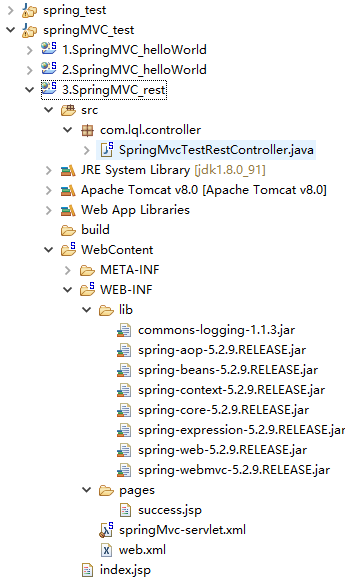
2、总体架构
3、web.xml
<?xml version="1.0" encoding="UTF-8"?>
<web-app xmlns:xsi="http://www.w3.org/2001/XMLSchema-instance" xmlns="http://xmlns.jcp.org/xml/ns/javaee" xsi:schemaLocation="http://xmlns.jcp.org/xml/ns/javaee http://xmlns.jcp.org/xml/ns/javaee/web-app_3_1.xsd" id="WebApp_ID" version="3.1">
  <display-name>3.SpringMVC_rest</display-name>
  <welcome-file-list>
    <welcome-file>index.jsp</welcome-file>
  </welcome-file-list>

  <!-- The front controller of this Spring Web application, responsible for handling all application requests -->
	<servlet>
		<servlet-name>springMvc</servlet-name>
		<servlet-class>org.springframework.web.servlet.DispatcherServlet</servlet-class>
		<!-- <init-param>
			<param-name>contextConfigLocation</param-name>
			<param-value>location</param-value>
		</init-param> -->
		<load-on-startup>1</load-on-startup>
	</servlet>

	<!-- Map all requests to the DispatcherServlet for handling -->
	<servlet-mapping>
		<servlet-name>springMvc</servlet-name>
		<url-pattern>/</url-pattern>
	</servlet-mapping>

	<!-- 配置转化请求转化 -->
	<filter>
		<filter-name>HiddenHttpMethodFilter</filter-name>
		<filter-class>org.springframework.web.filter.HiddenHttpMethodFilter</filter-class>
	</filter>
	<filter-mapping>
		<filter-name>HiddenHttpMethodFilter</filter-name>
		<url-pattern>/*</url-pattern>
	</filter-mapping>

</web-app>
4、springMvc-servlet.xml
<?xml version="1.0" encoding="UTF-8"?>
<beans xmlns="http://www.springframework.org/schema/beans"
	xmlns:xsi="http://www.w3.org/2001/XMLSchema-instance"
	xmlns:context="http://www.springframework.org/schema/context"
	xsi:schemaLocation="http://www.springframework.org/schema/beans http://www.springframework.org/schema/beans/spring-beans.xsd
		http://www.springframework.org/schema/context http://www.springframework.org/schema/context/spring-context-4.3.xsd">

	<context:component-scan base-package="com.lql"></context:component-scan>

	<bean class="org.springframework.web.servlet.view.InternalResourceViewResolver">
		<property name="prefix" value="/WEB-INF/pages/"></property>
		<property name="suffix" value=".jsp"></property>
	</bean>
</beans>
5、Controller类
package com.lql.controller;

import org.springframework.stereotype.Controller;
import org.springframework.web.bind.annotation.PathVariable;
import org.springframework.web.bind.annotation.RequestMapping;
import org.springframework.web.bind.annotation.RequestMethod;

@Controller
public class SpringMvcTestRestController {

	//添加图书
	@RequestMapping(value="/book",method=RequestMethod.POST)
	public String addBook(){
		System.out.println("成功添加图书");
		return "success";
	}

	//查询图书
	@RequestMapping(value="/book/{bid}",method=RequestMethod.GET)
	public String selectBook(@PathVariable("bid")Integer bid){
		System.out.println("成功查询到"+bid+"号图书");
		return "success";
	}

	//修改图书
	//@ResponseBody
	@RequestMapping(value="/book/{bid}",method=RequestMethod.PUT)
	public String updateBook(@PathVariable("bid")Integer bid){
		System.out.println("成功修改"+bid+"号图书");
		return "success";
		//return "redirect:/success";//重定向到一个没有指定 method的 Handler方法
	}

	/*@RequestMapping(value="/success")
	public String successGenecal(){
		return "success";//由该方法 转发到success.jsp页面
	}*/

	//删除图书
	//@ResponseBody
	@RequestMapping(value="/book/{bid}",method=RequestMethod.DELETE)
	public String deleteBook(@PathVariable("bid")Integer bid){
		System.out.println("成功删除"+bid+"号图书");
		return "success";
		//return "redirect:/success";//重定向到一个没有指定 method的 Handler方法
	}


}
6、index.jsp
<%@ page language="java" contentType="text/html; charset=UTF-8"
    pageEncoding="UTF-8"%>
<!DOCTYPE html PUBLIC "-//W3C//DTD HTML 4.01 Transitional//EN" "http://www.w3.org/TR/html4/loose.dtd">
<html>
<head>
<meta http-equiv="Content-Type" content="text/html; charset=UTF-8">
<title>Insert title here</title>
</head>
<body>

<!-- 发起图书的增删改查请求:使用Rest风格的URL地址:
请求url	请求方式	表示含义
/book/1	GET		查询1号图书
/book/1	DELETE	删除1号图书
/book/1	PUT		更新1号图书
/book	POST	添加图书

从页面发起PUT、DELETE形式的请求?Spring提供了对Rest风格的支持:
1)、SpringMVC中有一个Filter,可以把普通的请求转化为规定形式的请求
配置这个filter:
<filter>
		<filter-name>HiddenHttpMethodFilter</filter-name>
		<filter-class>org.springframework.web.filter.HiddenHttpMethodFilter</filter-class>
	</filter>
	<filter-mapping>
		<filter-name>HiddenHttpMethodFilter</filter-name>
		<url-pattern>/*</url-pattern>
	</filter-mapping>

2)、如何发起其他形式请求?
	按照以下要求:
		1、创建一个post类型的表单
		2、表单项中携带一个_method的参数
		3、这个_method的值就是DELETE、PUT
 -->

<form action="book" method="post">
	<input type="submit" value="添加图书"/>
</form><br>

<form action="book/1" method="get">
	<input type="submit" value="查询图书"/>
</form><br>

<form action="book/1" method="post">
	<input type="hidden" name="_method" value="delete"/>
	<input type="submit" value="删除图书"/>
</form><br>

<form action="book/1" method="post">
	<input type="hidden" name="_method" value="put"/>
	<input type="submit" value="修改图书"/>
</form><br>

</body>
</html>
7、success.jsp:
<%@ page language="java" contentType="text/html; charset=UTF-8"
    pageEncoding="UTF-8" isErrorPage="true" %>
<!DOCTYPE html PUBLIC "-//W3C//DTD HTML 4.01 Transitional//EN" "http://www.w3.org/TR/html4/loose.dtd">
<html>
<head>
<meta http-equiv="Content-Type" content="text/html; charset=UTF-8">
<title>Insert title here</title>
</head>
<body>
<h1>成功了,666!</h1>

</body>
</html>
==注意==:
高版本Tomcat:Rest支持有问题:
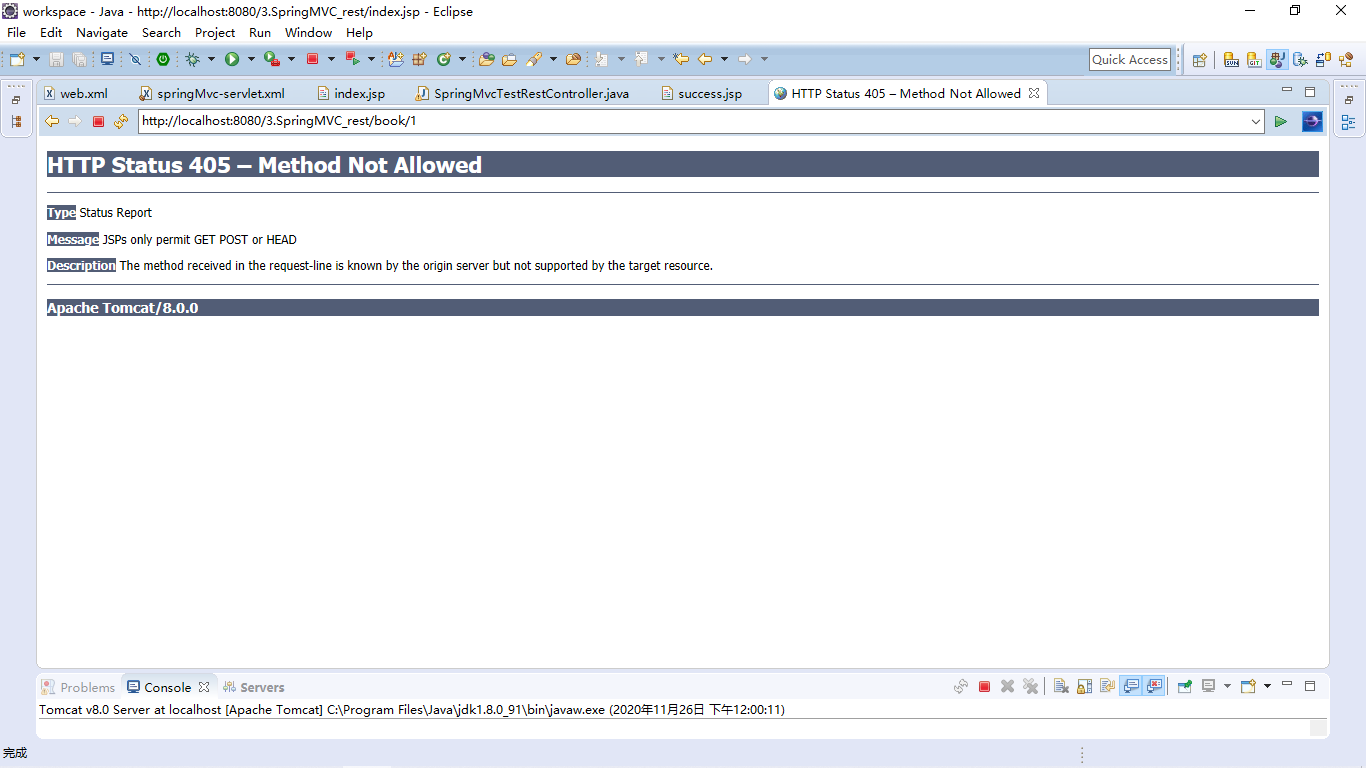
解决方案(两种方式):
1.重定向:见上图Controller类里配置。
2.修改jsp: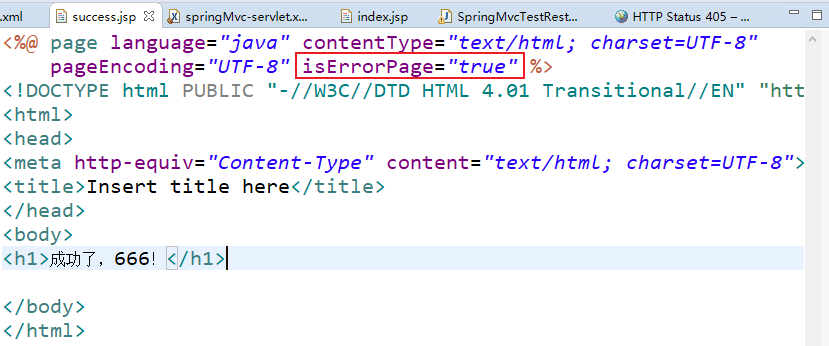
四、请求参数
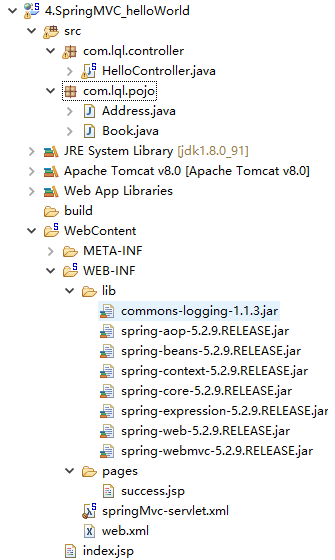
1、总体架构
2、web.xml
<?xml version="1.0" encoding="UTF-8"?>
<web-app xmlns:xsi="http://www.w3.org/2001/XMLSchema-instance" xmlns="http://xmlns.jcp.org/xml/ns/javaee" xsi:schemaLocation="http://xmlns.jcp.org/xml/ns/javaee http://xmlns.jcp.org/xml/ns/javaee/web-app_3_1.xsd" id="WebApp_ID" version="3.1">
  <display-name>4.SpringMVC_helloWorld</display-name>
  <welcome-file-list>
    <welcome-file>index.jsp</welcome-file>
  </welcome-file-list>

  <!-- The front controller of this Spring Web application, responsible for handling all application requests -->
	<servlet>
		<servlet-name>springMvc</servlet-name>
		<servlet-class>org.springframework.web.servlet.DispatcherServlet</servlet-class>
		<!-- <init-param>
			<param-name>springMvc</param-name>
			<param-value>classpath:springmvc.xml</param-value>
		</init-param> -->
		<load-on-startup>1</load-on-startup>
	</servlet>

	<!-- Map all requests to the DispatcherServlet for handling -->
	<servlet-mapping>
		<servlet-name>springMvc</servlet-name>
		<url-pattern>/</url-pattern>
	</servlet-mapping>

	<!-- 配置一个字符编码的Filter;一定注意filter一般都在其他Filter之前;-->
	<filter>
		<filter-name>CharacterEncodingFilter</filter-name>
		<filter-class>org.springframework.web.filter.CharacterEncodingFilter</filter-class>
		<!-- encoding:指定解决POST请求乱码 -->
		<init-param>
			<param-name>encoding</param-name>
			<param-value>UTF-8</param-value>
		</init-param>
		<init-param>
		<!-- forceResponseEncoding:顺手解决响应乱码;response.setCharacterEncoding(encoding); -->
			<param-name>forceResponseEncoding</param-name>
			<param-value>true</param-value>
		</init-param>
		<init-param>
			<param-name>forceRequestEncoding</param-name>
			<param-value>true</param-value>
		</init-param>
	</filter>

	<filter-mapping>
		<filter-name>CharacterEncodingFilter</filter-name>
		<url-pattern>/*</url-pattern>
	</filter-mapping>

	<!-- 支持Rest风格的Filter -->
	<filter>
		<filter-name>HiddenHttpMethodFilter</filter-name>
		<filter-class>org.springframework.web.filter.HiddenHttpMethodFilter</filter-class>
	</filter>
	<filter-mapping>
		<filter-name>HiddenHttpMethodFilter</filter-name>
		<url-pattern>/*</url-pattern>
	</filter-mapping>


	<!-- 使用SpringMVC控制器,写完就直接写字符编码过滤器;
		Tomcat一装上,上手就是server.xml的8080处添加URIEncoding="UTF-8" -->
</web-app>
3、springMvc-servlet.xml
<?xml version="1.0" encoding="UTF-8"?>
<beans xmlns="http://www.springframework.org/schema/beans"
	xmlns:xsi="http://www.w3.org/2001/XMLSchema-instance"
	xmlns:context="http://www.springframework.org/schema/context"
	xsi:schemaLocation="http://www.springframework.org/schema/beans http://www.springframework.org/schema/beans/spring-beans.xsd
		http://www.springframework.org/schema/context http://www.springframework.org/schema/context/spring-context-4.3.xsd">

	<context:component-scan base-package="com.lql"></context:component-scan>

	<bean class="org.springframework.web.servlet.view.InternalResourceViewResolver">
		<property name="prefix" value="/WEB-INF/pages/"></property>
		<property name="suffix" value=".jsp"></property>
	</bean>
</beans>
4、Pojo
package com.lql.pojo;

public class Address {

	private String province;
	private String city;
	private String street;
	public String getProvince() {
		return province;
	}
	public void setProvince(String province) {
		this.province = province;
	}
	public String getCity() {
		return city;
	}
	public void setCity(String city) {
		this.city = city;
	}
	public String getStreet() {
		return street;
	}
	public void setStreet(String street) {
		this.street = street;
	}
	@Override
	public String toString() {
		return "Address [province=" + province + ", city=" + city + ", street=" + street + "]";
	}


}

===============================================================
package com.lql.pojo;

public class Book {

	private String bookName;
	private String author;
	private Double price;
	private Integer stock;
	private Integer salse;
	private Address address;


	public Address getAddress() {
		return address;
	}
	public void setAddress(Address address) {
		this.address = address;
	}
	public String getBookName() {
		return bookName;
	}
	public void setBookName(String bookName) {
		this.bookName = bookName;
	}
	public String getAuthor() {
		return author;
	}
	public void setAuthor(String author) {
		this.author = author;
	}
	public Double getPrice() {
		return price;
	}
	public void setPrice(Double price) {
		this.price = price;
	}
	public Integer getStock() {
		return stock;
	}
	public void setStock(Integer stock) {
		this.stock = stock;
	}
	public Integer getSalse() {
		return salse;
	}
	public void setSalse(Integer salse) {
		this.salse = salse;
	}
	@Override
	public String toString() {
		return "Book [bookName=" + bookName + ", author=" + author + ", price=" + price + ", stock=" + stock
				+ ", salse=" + salse + ", address=" + address + "]";
	}
}
5、Controller类
package com.lql.controller;

import java.io.BufferedReader;
import java.io.PrintWriter;

import javax.servlet.ServletInputStream;
import javax.servlet.ServletOutputStream;
import javax.servlet.http.HttpServletRequest;
import javax.servlet.http.HttpServletResponse;
import javax.servlet.http.HttpSession;

import org.springframework.stereotype.Controller;
import org.springframework.web.bind.annotation.CookieValue;
import org.springframework.web.bind.annotation.RequestHeader;
import org.springframework.web.bind.annotation.RequestMapping;
import org.springframework.web.bind.annotation.RequestParam;

import com.lql.pojo.Book;

@Controller
public class HelloController {

	@RequestMapping("/hello")
	public String handle01(){
		System.out.println("handle01....");
		return "success";
	}

	/**
	 * SpringMVC如何获取请求带来的各种信息
	 * 默认方式获取请求参数:
	 * 		直接给方法入参写一个和请求参数名相同的变量,这个变量就来接收请求参数的值
	 * 		带:有值; 没带:null;
	 *
	 * @RequestParam:获取请求参数(参数默认是必须带的)
	 * 		@RequestParam("user")String username
	 * 		解释username = request.getParameter("user")
	 *
	 * @RequestParam("user")
	 * @PathVariable("user")  /book/【{user}pathvariabale】?【use=admin(ReqeestParam)】
	 *
	 * 属性:
	 * 		value:指定要获取的参数key
	 * 		required:这个参数是否必须的
	 * 		defaultValue:默认值,没带默认是null
	 *
	 *
	 * @RequestHeader:获取请求头中某个key的值
	 * 		request.getHeader("User-Agent");
	 * 		@RequestHeader("User-Agent")String userAgent:
	 * 		userAgent = request.getHeader("User-Agent")
	 * 如果请求头中没有这个值,就会报错
	 * value()
	 * required()
	 * defaultValue()
	 *
	 * @CookieValue:获取某个cookie的值;
	 * 以前的操作获取某个cookie:
	 * cookie[] cookies = request.getCookies();
	 * for(cookie c:cookies){
	 * 		if(c.getName().eqals("JSESSIONID")){
	 * 			String cv = c.getValue();
	 * }}
	 */
	@RequestMapping("/handle01")
	public String handle02(@RequestParam(value="user33",required=false,defaultValue="你没带")String username,
						   @RequestHeader(value="Agent",required=false,defaultValue="她也没带")String userAgent,
						   @CookieValue(value="JSESSIONIDhaha",required=false)String jid){
		System.out.println("这个变量的值:"+username);
		System.out.println("请求头中浏览器的信息:"+userAgent);
		System.out.println("cookie中的jid的值:"+jid);
		return "success";
	}

	/**
	 * 如果我们的请求参数是一个POJO,
	 * SpringMVC会自动的为这个POJO进行赋值:
	 * 1)、将POJO中的每一个属性,从request参数中尝试获取出来,并封装即可;
	 * 2)、还可以级联封装:属性的属性
	 * 3)、请求参数的参数名和对象中的属性名一一对应就行
	 *
	 *
	 * 提交的数据可能有乱码:
	 * 请求乱码:
	 * 	GET请求:改server.xml:在8080端口处URIEncoding="UTF-8"(我的里面没有)
	 * 	POST请求:
	 * 		在第一次获取请求参数之前设置
	 * 		request.setCharacterEncoding("UTF-8");
	 * 		自己写一个filter;SpringMVC有这个filter
	 * 响应乱码:
	 * 		response.setContentType("text/html;charset=utf-8")
	 * @param book
	 * @return
	 */
	@RequestMapping("/book")
	public String addbook(Book book){
		System.out.println("我要保存的图书"+book);
		return "success";
	}

	/**
	 * SpringMVC可以直接在参数写原生API:
	 * HttpServletRequest
	 * HttpServletResponse
	 * HttpSession
	 *
	 * java.security.Principal
	 * Locale:国际化有关的区域信息对象
	 * InputStream:
	 * 		ServletInputStream inputStream = request.getInputStream();
	 * Outputstream:
	 * 		ServletOutputStream outputStream = response.getOutputStream();
	 * Reader:
	 * 		BufferedReader reader = request.getReader();
	 * Writer:
	 * 		PrintWriter writer = response.getWriter();
	 */
	@RequestMapping("/handle03")
	public String handle03(HttpSession session,
			HttpServletRequest request,HttpServletResponse response){
		request.setAttribute("reqParam", "我是请求域中的");
		session.setAttribute("sessionParam", "我是Session域中的");

		return "success";

	}

}
6、index.jsp
<%@ page language="java" contentType="text/html; charset=UTF-8"
    pageEncoding="UTF-8"%>
<!DOCTYPE html PUBLIC "-//W3C//DTD HTML 4.01 Transitional//EN" "http://www.w3.org/TR/html4/loose.dtd">
<html>
<head>
<meta http-equiv="Content-Type" content="text/html; charset=UTF-8">
<title>Insert title here</title>
</head>
<body>
<a href="hello">hello</a><br>
<a href="handle01?user=tomcat">handle01</a><br>
<a href="handle03">handle03</a><br>

<form action="book" method="post">
	书名:<input type="text" name="bookName"/><br>
	作者:<input type="text" name="author"/><br>
	价格:<input type="text" name="price"/><br>
	库存:<input type="text" name="stock"/><br>
	销量:<input type="text" name="salse"/><br>
	<hr>
	省:<input type="text" name="address.province"/>
	市:<input type="text" name="address.city"/>
	街道:<input type="text" name="address.street"/><br>
	<input type="submit"/>
</form>

</body>
</html>
***************************************************************
===============================================================
<%@ page language="java" contentType="text/html; charset=UTF-8"
    pageEncoding="UTF-8"%>
<!DOCTYPE html PUBLIC "-//W3C//DTD HTML 4.01 Transitional//EN" "http://www.w3.org/TR/html4/loose.dtd">
<html>
<head>
<meta http-equiv="Content-Type" content="text/html; charset=UTF-8">
<title>Insert title here</title>
</head>
<body>
<h1>成功了,66666666666666</h1>
请求:${reqParam }<br>
session:${sessionScope.sessionParam}
</body>
</html>
五、数据输出
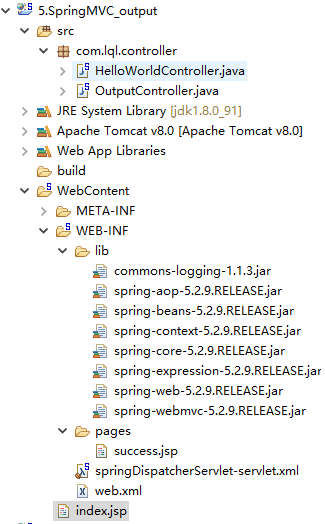
1、总体架构
2、web.xml
<?xml version="1.0" encoding="UTF-8"?>
<web-app xmlns:xsi="http://www.w3.org/2001/XMLSchema-instance" xmlns="http://xmlns.jcp.org/xml/ns/javaee" xsi:schemaLocation="http://xmlns.jcp.org/xml/ns/javaee http://xmlns.jcp.org/xml/ns/javaee/web-app_3_1.xsd" id="WebApp_ID" version="3.1">
  <display-name>5.SpringMVC_output</display-name>
  <welcome-file-list>
    <welcome-file>index.html</welcome-file>
    <welcome-file>index.htm</welcome-file>
    <welcome-file>index.jsp</welcome-file>
    <welcome-file>default.html</welcome-file>
    <welcome-file>default.htm</welcome-file>
    <welcome-file>default.jsp</welcome-file>
  </welcome-file-list>

  <!-- The front controller of this Spring Web application, responsible for handling all application requests -->
	<servlet>
		<servlet-name>springDispatcherServlet</servlet-name>
		<servlet-class>org.springframework.web.servlet.DispatcherServlet</servlet-class>

		<load-on-startup>1</load-on-startup>
	</servlet>

	<!-- Map all requests to the DispatcherServlet for handling -->
	<servlet-mapping>
		<servlet-name>springDispatcherServlet</servlet-name>
		<url-pattern>/</url-pattern>
	</servlet-mapping>

	<!-- 字符编码过滤器 -->
	<filter>
		<filter-name>CharacterEncodingFilter</filter-name>
		<filter-class>org.springframework.web.filter.CharacterEncodingFilter</filter-class>
			<init-param>
				<param-name>encoding</param-name>
				<param-value>UTF-8</param-value>
			</init-param>
			<init-param>
				<param-name>forceRequestEncoding</param-name>
				<param-value>true</param-value>
			</init-param>
			<init-param>
				<param-name>forceResponseEncoding</param-name>
				<param-value>true</param-value>
			</init-param>
	</filter>
	<filter-mapping>
		<filter-name>CharacterEncodingFilter</filter-name>
		<url-pattern>/*</url-pattern>
	</filter-mapping>
</web-app>
3、springDispatcherServlet-servlet.xml
<?xml version="1.0" encoding="UTF-8"?>
<beans xmlns="http://www.springframework.org/schema/beans"
	xmlns:xsi="http://www.w3.org/2001/XMLSchema-instance"
	xmlns:context="http://www.springframework.org/schema/context"
	xsi:schemaLocation="http://www.springframework.org/schema/beans http://www.springframework.org/schema/beans/spring-beans.xsd
		http://www.springframework.org/schema/context http://www.springframework.org/schema/context/spring-context-4.3.xsd">

	<context:component-scan base-package="com.lql"></context:component-scan>
	<bean class="org.springframework.web.servlet.view.InternalResourceViewResolver">
		<property name="prefix" value="/WEB-INF/pages/"></property>
		<property name="suffix" value=".jsp"></property>
	</bean>

</beans>
4、Controller类
package com.lql.controller;

import java.util.Map;

import org.springframework.stereotype.Controller;
import org.springframework.ui.Model;
import org.springframework.ui.ModelMap;
import org.springframework.web.bind.annotation.RequestMapping;
import org.springframework.web.bind.annotation.SessionAttributes;
import org.springframework.web.servlet.ModelAndView;

/**
 * SpringMVC除过在方法上传入原生request和session外还能怎么样把数据带给页面:
 *
 * 1)、可以在方法处传入Map或者Model或者ModelMap;
 * 		给这些参数里面保存的所有数据都会放在请求域中,可以在页面获取
 * 	关系:
 * 		Map、Model、ModelMap:最终都是BindingAwareModelMap在工作;
 * 		相当于给BindingAwareModelMap中保存的东西都会放在请求域中;
 *
 * 		Map(interface(jdk))		Model(interface(spring))
 * 			||						 //
 * 			||						//
 * 			\/					   //
 * 		ModelMap(class)			  //
 * 					\\			 //
 * 					 \\			//
 * 					ExtendedModelMap
 * 					   ||
 * 					   \/
 * 					BindingAwareModelMap
 *
 * 2)、方法的返回值可以变为ModelAndView类型:
 * 		既包含视图信息(页面地址)也包含模型数据(给页面带的数据);
 * 		而且数据是放在请求域中;
 * 		request  session  application
 *
 * 3)、SpringMVC提供了一种可以临时给Session域中保存数据的方式:
 * 	使用一个注解	@SessionAttributes(只能标在类上)
 * 	@SessionAttributes(value="msg"):
 * 给BindingAwareModelMap中保存的数据,或者ModelAndView中的数据,
 * 同时给session放一份;
 * value指定保存数据时要给session中放的数据的key;
 *
 * value={"haha","msg"}:只要保存的是这种key的数据,给Session中放一份
 * types={String.class}:只要保存的是这种类型的数据,给Session中也放一份
 *
 * 后来推荐@SessionAttributes就别用了,可能会引发异常;
 * 		给session中放数据请使用原生API;
 *
 * @author 陆乾龙
 *
 */
@SessionAttributes(value={"haha","msg"},types={String.class})
@Controller
public class OutputController {
	// args:如何确定目标方法每一个参数的值,最难?
	// method.invoke(this,)
	@RequestMapping("/handle01")
	public String handle01(Map<String,Object> map){
		map.put("msg","你好");
		map.put("hahaha", "哈哈哈");
		System.out.println("map的类型:"+map.getClass());
		return "success";
	}

	/**
	 * Model:一个接口
	 * @param model
	 * @return
	 */
	@RequestMapping("/handle02")
	public String handle03(Model model){
		model.addAttribute("msg", "你好坏!");
		model.addAttribute("haha",18);
		System.out.println("model的类型:"+model.getClass());
		return "success";
	}

	@RequestMapping("/handle03")
	public String handle03(ModelMap modelMap){
		modelMap.addAttribute("msg", "你好棒!");
		System.out.println("modelMap的类型:"+modelMap.getClass());
		return "success";
	}

	/**
	 * 返回值是ModelAndView;可以为页面携带数据
	 * @return
	 */

	@RequestMapping("/handle04")
	public ModelAndView handle04(){
		//之前的返回值我们就叫视图名;视图名视图解析器是会帮我们最终拼串得到页面的真实地址;
		//ModelAndView modelAndView = new ModelAndView("success");
		ModelAndView modelAndView = new ModelAndView();
		modelAndView.setViewName("success");
		modelAndView.addObject("msg", "你好哦!");
		return modelAndView;
	}

}
5、index.jsp
<%@ page language="java" contentType="text/html; charset=UTF-8"
    pageEncoding="UTF-8"%>
<!DOCTYPE html PUBLIC "-//W3C//DTD HTML 4.01 Transitional//EN" "http://www.w3.org/TR/html4/loose.dtd">
<html>
<head>
<meta http-equiv="Content-Type" content="text/html; charset=UTF-8">
<title>Insert title here</title>
</head>
<body>
<a href="hello">hello</a><br>
<!-- SpringMVC如何给页面携带数据过来 -->
<a href="handle01">handle01</a><br>
<a href="handle02">handle02</a><br>
<a href="handle03">handle03</a><br>
<a href="handle04">handle04</a><br>
</body>
</html>
6、success.jsp
<%@ page language="java" contentType="text/html; charset=UTF-8"
    pageEncoding="UTF-8"%>
<!DOCTYPE html PUBLIC "-//W3C//DTD HTML 4.01 Transitional//EN" "http://www.w3.org/TR/html4/loose.dtd">
<html>
<head>
<meta http-equiv="Content-Type" content="text/html; charset=UTF-8">
<title>Insert title here</title>
</head>
<body>
<h1>hello</h1>
pageContext:${pageScope.msg }<br>
request:${requestScope.msg }<br>
session:${sessionScope.msg }--${sessionScope.haha }--${sessionScope.hahaha }<br>
application:${applicationScope.msg }<br>
<%System.out.println("来到页面了...."); %>
</body>
</html>
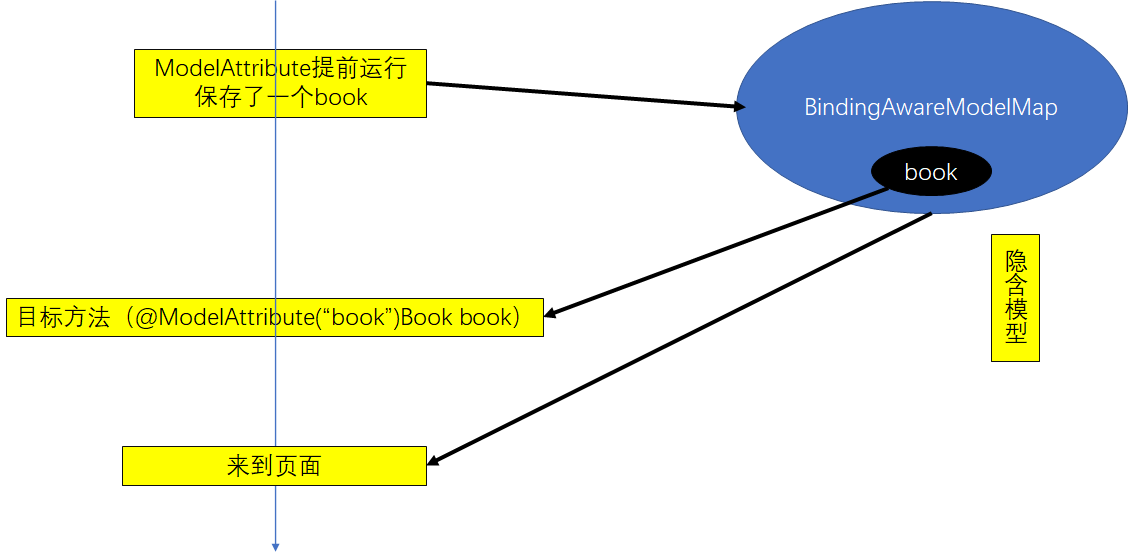
7、ModelAttribute原理:
六、SpringMVC源码
1、前端控制器
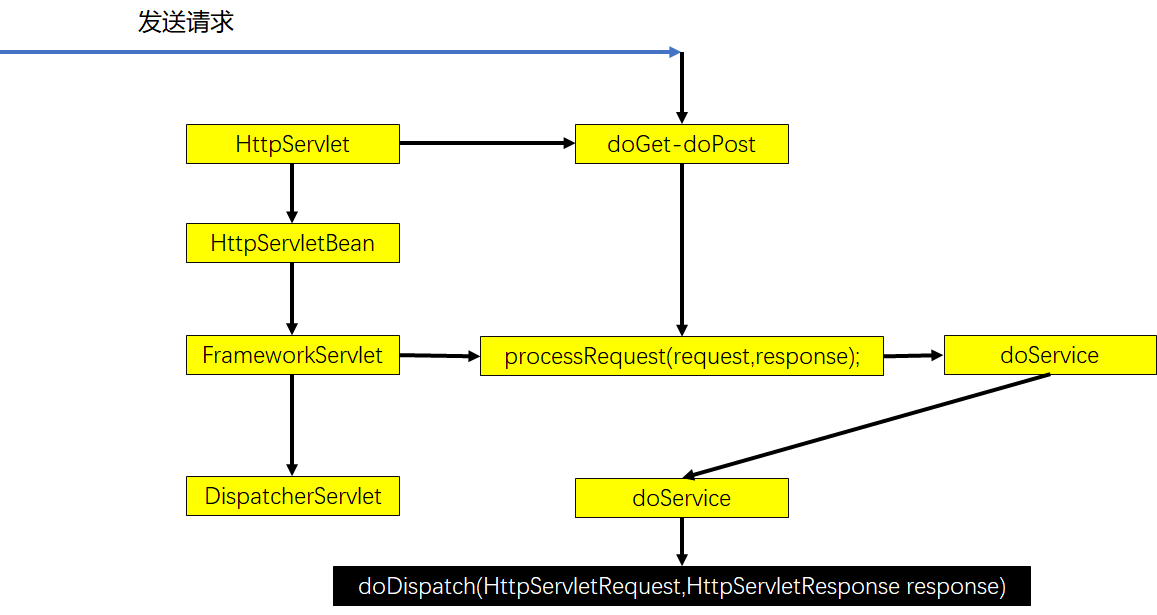
2、doDispatch()详细细节:
protected void doDispatch(HttpServletRequest request, HttpServletResponse response) throws Exception {
		HttpServletRequest processedRequest = request;
		HandlerExecutionChain mappedHandler = null;
		boolean multipartRequestParsed = false;

		WebAsyncManager asyncManager = WebAsyncUtils.getAsyncManager(request);

		try {
			ModelAndView mv = null;
			Exception dispatchException = null;

			try {
                //1、检查是否文件上传请求
				processedRequest = checkMultipart(request);
				multipartRequestParsed = (processedRequest != request);

				// Determine handler for the current request.
                //2、根据当前的请求地址找到哪个类能来处理;
				mappedHandler = getHandler(processedRequest);

                //3、如果没有找到哪个处理器(控制器)能处理这个请求就404,或者抛异常
				if (mappedHandler == null) {
					noHandlerFound(processedRequest, response);
					return;
				}

				// Determine handler adapter for the current request.
                //4、拿到能执行这个类的所有方法的适配器(反射工具RequestMappingHandlerAdapter);
				HandlerAdapter ha = getHandlerAdapter(mappedHandler.getHandler());

				// Process last-modified header, if supported by the handler.
				String method = request.getMethod();
				boolean isGet = "GET".equals(method);
				if (isGet || "HEAD".equals(method)) {
					long lastModified = ha.getLastModified(request, mappedHandler.getHandler());
					if (new ServletWebRequest(request, response).checkNotModified(lastModified) && isGet) {
						return;
					}
				}

				if (!mappedHandler.applyPreHandle(processedRequest, response)) {
					return;
				}

				// Actually invoke the handler.处理(控制)器的方法被调用
                //控制器(Controller),处理器(Handler)
                //5、适配器来执行目标方法;将目标方法执行完成后的返回值作为视图名,设置保存到ModelAndView中
                //目标方法无论怎么写,最终适配器执行完成以后都会将执行后的信息封装成ModelAndView
				mv = ha.handle(processedRequest, response, mappedHandler.getHandler());

				if (asyncManager.isConcurrentHandlingStarted()) {
					return;
				}

				applyDefaultViewName(processedRequest, mv); //如果没有视图名设置一个默认的视图名
				mappedHandler.applyPostHandle(processedRequest, response, mv);
			}
			catch (Exception ex) {
				dispatchException = ex;
			}
			catch (Throwable err) {
				// As of 4.3, we're processing Errors thrown from handler methods as well,
				// making them available for @ExceptionHandler methods and other scenarios.
				dispatchException = new NestedServletException("Handler dispatch failed", err);
			}
            //转发到目标页面
            //6、根据方法最终执行完成后封装的ModelAndView;转发到对应页面,而且ModelAndView中的数据可以从请求域中获取
			processDispatchResult(processedRequest, response, mappedHandler, mv, dispatchException);
		}
		catch (Exception ex) {
			triggerAfterCompletion(processedRequest, response, mappedHandler, ex);
		}
		catch (Throwable err) {
			triggerAfterCompletion(processedRequest, response, mappedHandler,
					new NestedServletException("Handler processing failed", err));
		}
		finally {
			if (asyncManager.isConcurrentHandlingStarted()) {
				// Instead of postHandle and afterCompletion
				if (mappedHandler != null) {
					mappedHandler.applyAfterConcurrentHandlingStarted(processedRequest, response);
				}
			}
			else {
				// Clean up any resources used by a multipart request.
				if (multipartRequestParsed) {
					cleanupMultipart(processedRequest);
				}
			}
		}
	}
所有请求过来DispatcherServlet收到请求
调用**doDispatch()**方法进行处理
- getHandler():根据当前请求地址找到能处理这个请求的目标处理器类(处理器)
- 根据当前请求在HandlerMapping中找到这个请求的映射信息,获取到目标处理器类
- ==getHandlerAdapter():根据当前处理器类获取到能执行这个处理器方法的适配器==
- 根据当前处理器类找到当前类的HanderAdapter(适配器)
- ==使用刚才获取到的适配器(RequestMappingHandlerAdapter)执行目标方法==
- ==目标方法执行后会返回一个ModelAndView对象==
- ==根据ModelAndView的信息转发到具体的页面,并可以在请求域中取出ModelAndView中的模型数据==
3、getHandler()细节:
1.怎么根据当前请求就能找到哪个类能来处理
- **getHandler()**会返回目标处理器类的执行链

- handerMap:ioc容器创建Controller对象时扫描每个处理器都能处理什么请求。
protected HandlerExecutionChain getHandler(HttpServletRequest request) throws Exception {
		if (this.handlerMappings != null) {
			for (HandlerMapping mapping : this.handlerMappings) {
				HandlerExecutionChain handler = mapping.getHandler(request);
				if (handler != null) {
					return handler;
				}
			}
		}
		return null;
	}
2.如何找到目标处理器类的适配器?
- 要拿适配器才去执行目标方法。
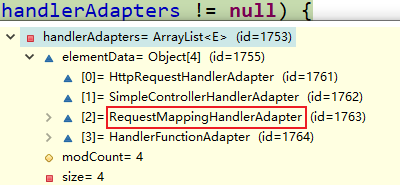
- RequestMappingHandlerAdapter:是HandlerAdapter的一个具体实现,主要用于将某个请求适配给
@RequestMapping类型的Handler处理。
protected HandlerAdapter getHandlerAdapter(Object handler) throws ServletException {
		if (this.handlerAdapters != null) {
			for (HandlerAdapter adapter : this.handlerAdapters) {
				if (adapter.supports(handler)) {
					return adapter;
				}
			}
		}
		throw new ServletException("No adapter for handler [" + handler +
				"]: The DispatcherServlet configuration needs to include a HandlerAdapter that supports this handler");
	}
DispatcherServlet中有几种引用类型的属性:
4、SpringMVC九大组件:
SpringMVC在工作的时候,关键位置都是由这些组件完成的:
公共点:九大组件全部都是接口:接口就是规范
1.SpringMVC的九大组件工作原理:
/** 文件上传解析器 */
@Nullable
private MultipartResolver multipartResolver;

/** 区域信息解析器,和国际化有关 */
@Nullable
private LocaleResolver localeResolver;

/** 主题解析器:强大的主题效果解析器 */
@Nullable
private ThemeResolver themeResolver;

/** Handler映射信息:HandlerMapping */
@Nullable
private List<HandlerMapping> handlerMappings;

/** Handler的适配器 */
@Nullable
private List<HandlerAdapter> handlerAdapters;

/** SpringMVC强大的异常解析功能:异常解析器 */
@Nullable
private List<HandlerExceptionResolver> handlerExceptionResolvers;

/** RequestToViewNameTranslator used by this servlet. */
@Nullable
private RequestToViewNameTranslator viewNameTranslator;

/** FlashMap+Manager:SpringMVC中允许重定向携带数据的功能 */
@Nullable
private FlashMapManager flashMapManager;

/** 视图解析器 */
@Nullable
private List<ViewResolver> viewResolvers;
2.DispatcherServlet中九大组件初始化的地方:
protected void initStrategies(ApplicationContext context) {
    initMultipartResolver(context);
    initLocaleResolver(context);
    initThemeResolver(context);
    initHandlerMappings(context);
    initHandlerAdapters(context);
    initHandlerExceptionResolvers(context);
    initRequestToViewNameTranslator(context);
    initViewResolvers(context);
    initFlashMapManager(context);
	}
可以在web.xml中修改DispatcherServlet某些属性的默认配置(不需要改):
<init-param>
    <param-name>detectAllHandlerMappings</param-name>
    <param-value>false</param-value>
</init-param>
3.初始化HandlerMapping:
private void initHandlerMappings(ApplicationContext context) {
		this.handlerMappings = null;

		if (this.detectAllHandlerMappings) {
			// Find all HandlerMappings in the ApplicationContext, including ancestor contexts.
			Map<String, HandlerMapping> matchingBeans =
					BeanFactoryUtils.beansOfTypeIncludingAncestors(context, HandlerMapping.class, true, false);
			if (!matchingBeans.isEmpty()) {
				this.handlerMappings = new ArrayList<>(matchingBeans.values());
				// We keep HandlerMappings in sorted order.
				AnnotationAwareOrderComparator.sort(this.handlerMappings);
			}
		}
		else {
			try {
				HandlerMapping hm = context.getBean(HANDLER_MAPPING_BEAN_NAME, HandlerMapping.class);
				this.handlerMappings = Collections.singletonList(hm);
			}
			catch (NoSuchBeanDefinitionException ex) {
				// Ignore, we'll add a default HandlerMapping later.
			}
		}

		// Ensure we have at least one HandlerMapping, by registering
		// a default HandlerMapping if no other mappings are found.
		if (this.handlerMappings == null) {
			this.handlerMappings = getDefaultStrategies(context, HandlerMapping.class);
			if (logger.isTraceEnabled()) {
				logger.trace("No HandlerMappings declared for servlet '" + getServletName() +
						"': using default strategies from DispatcherServlet.properties");
			}
		}
	}
4.组件的初始化:
有些组件在容器中是使用类型找的,有些组件是使用id找的;
去容器中找这个组件,如果没有找到就用默认的配置;
5.未完待续(版本不一致)
mv = ha.handle(processedRequest, response, mappedHandler.getHandler()); 执行目标方法的细节;
||
/
mav = invokeHandlerMethod(request, response, handlerMethod);
||
/
@Nullable
protected ModelAndView invokeHandlerMethod(HttpServletRequest request,
                                           HttpServletResponse response, HandlerMethod handlerMethod) throws Exception {

    ServletWebRequest webRequest = new ServletWebRequest(request, response);
    try {
        WebDataBinderFactory binderFactory = getDataBinderFactory(handlerMethod);
        ModelFactory modelFactory = getModelFactory(handlerMethod, binderFactory);

        ServletInvocableHandlerMethod invocableMethod = createInvocableHandlerMethod(handlerMethod);
        if (this.argumentResolvers != null) {
            invocableMethod.setHandlerMethodArgumentResolvers(this.argumentResolvers);
        }
        if (this.returnValueHandlers != null) {
            invocableMethod.setHandlerMethodReturnValueHandlers(this.returnValueHandlers);
        }
        invocableMethod.setDataBinderFactory(binderFactory);
        invocableMethod.setParameterNameDiscoverer(this.parameterNameDiscoverer);

        ModelAndViewContainer mavContainer = new ModelAndViewContainer();
        mavContainer.addAllAttributes(RequestContextUtils.getInputFlashMap(request));
        modelFactory.initModel(webRequest, mavContainer, invocableMethod);
        mavContainer.setIgnoreDefaultModelOnRedirect(this.ignoreDefaultModelOnRedirect);

        AsyncWebRequest asyncWebRequest = WebAsyncUtils.createAsyncWebRequest(request, response);
        asyncWebRequest.setTimeout(this.asyncRequestTimeout);

        WebAsyncManager asyncManager = WebAsyncUtils.getAsyncManager(request);
        asyncManager.setTaskExecutor(this.taskExecutor);
        asyncManager.setAsyncWebRequest(asyncWebRequest);
        asyncManager.registerCallableInterceptors(this.callableInterceptors);
        asyncManager.registerDeferredResultInterceptors(this.deferredResultInterceptors);

        if (asyncManager.hasConcurrentResult()) {
            Object result = asyncManager.getConcurrentResult();
            mavContainer = (ModelAndViewContainer) asyncManager.getConcurrentResultContext()[0];
            asyncManager.clearConcurrentResult();
            LogFormatUtils.traceDebug(logger, traceOn -> {
                String formatted = LogFormatUtils.formatValue(result, !traceOn);
                return "Resume with async result [" + formatted + "]";
            });
            invocableMethod = invocableMethod.wrapConcurrentResult(result);
        }

        invocableMethod.invokeAndHandle(webRequest, mavContainer);
        if (asyncManager.isConcurrentHandlingStarted()) {
            return null;
        }

        return getModelAndView(mavContainer, modelFactory, webRequest);
    }
    finally {
        webRequest.requestCompleted();
    }
}
com.lql.controller.HelloController#handle02(String, String, String)
SpringMVC确定POJO值的三步:
1、先看隐含模型中有没有这个key(标了ModelAttribute注解就是注解指定的value,没标就是参数类型的首字母小写)指定的值;如果有将这个值赋值给bindObject。
2、如果是SessionAttribute标注的属性,就从session中拿;
3、如果都不是就利用反射创建对象(null);
总结两件事:
1、运行流程简单版
2、确定方法每个参数的值
—–》过时
1)、标注解:
保存注解的信息,最终得到这个注解应该对应解析的值;
2)、没标注解:
-
看是否是原生API;
-
看是否是Model或者Map,xxx;
-
都不是,看是否是简单类型;paramName;
-
给attrName赋值;attrName(参数标了@ModelAttribute("")就是指定的,没标就是"")
==确定自定义类型参数==:
1)attrName使用参数的类型首字母小写;或者使用之前
@ModelAttribute("")的值2)先看隐含模型中有没有这个attrName作为key对应的值;如果有就从隐含模型中获取并赋值;
3)看是否是
@SessionAttributes(value="")标注的属性,如果是从session中拿,如果拿不到就会抛异常;4)不是**@SessionAttributes**标注的,利用反射创建一个对象;
-
拿到之前创建好的对象,使用数据绑定器(WebDataBinder)将请求中的每个数据绑定到这个对象中;
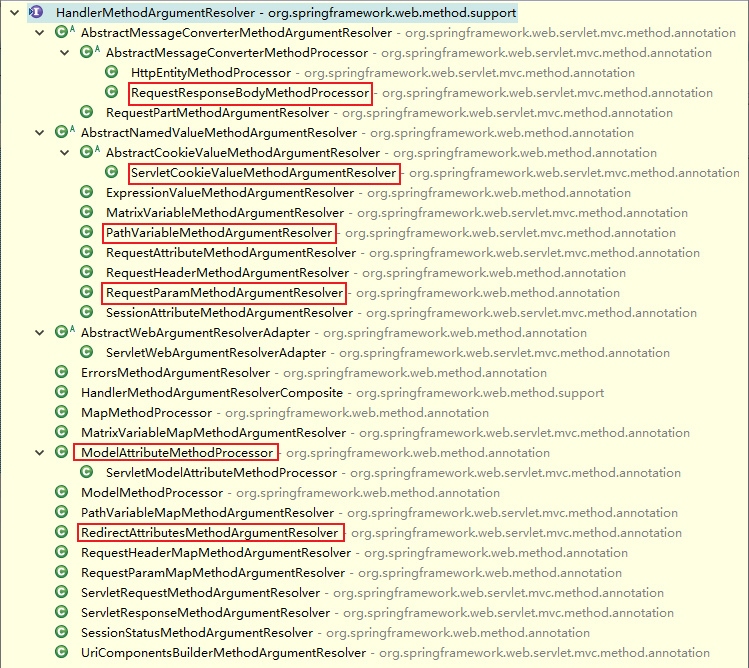
—–》现在
- 用解析器
6.@SessionAttributes(value="haha")
==最好不要使用==(为了避免可能引发的异常)
使用保证两点:
- 要么隐含模型中有**@SessionAttributes**标注的属性
- 如果隐含模型中有,session还说有就一定要有,否则抛异常
七、视图解析
1、方法执行后的返回值会作为页面地址参考,转发或者重定向到页面
2、视图解析器可能会进行页面地址的拼串
1、源码
1.ModelAndView
- 任何方法的返回值,最终都会被包装成ModelAndView对象
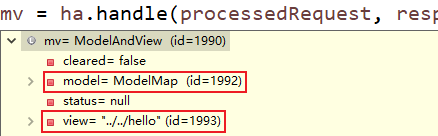
2.来到页面的方法
processDispatchResult(processedRequest, response, mappedHandler, mv, dispatchException);
- 视图渲染流程:将域中的数据在页面展示;页面就是用来渲染模型数据的。
3.渲染页面
- 调用
render(mv, request, response);渲染页面。
4.View与ViewResolver
- ViewResolver的作用是根据视图名(方法的返回值)得到View对象:

5.怎么能根据方法的返回值(视图名)得到View对象?
@Nullable
protected View resolveViewName(String viewName, @Nullable Map<String, Object> model,
                               Locale locale, HttpServletRequest request) throws Exception {

    if (this.viewResolvers != null) {
        //遍历所有的ViewResolver
        for (ViewResolver viewResolver : this.viewResolvers) {
            //viewResolver视图解析器,根据方法的返回值得到View对象
            View view = viewResolver.resolveViewName(viewName, locale);
            if (view != null) {
                return view;
            }
        }
    }
    return null;
}
6.resolveViewName实现:
@Override
@Nullable
public View resolveViewName(String viewName, Locale locale) throws Exception {
    if (!isCache()) {
        return createView(viewName, locale);
    }
    else {
        Object cacheKey = getCacheKey(viewName, locale);
        View view = this.viewAccessCache.get(cacheKey);
        if (view == null) {
            synchronized (this.viewCreationCache) {
                view = this.viewCreationCache.get(cacheKey);
                if (view == null) {
                    // Ask the subclass to create the View object.
                    //根据方法的返回值创建出视图view对象
                    view = createView(viewName, locale);
                    if (view == null && this.cacheUnresolved) {
                        view = UNRESOLVED_VIEW;
                    }
                    if (view != null && this.cacheFilter.filter(view, viewName, locale)) {
                        this.viewAccessCache.put(cacheKey, view);
                        this.viewCreationCache.put(cacheKey, view);
                    }
                }
            }
        }
        else {
            if (logger.isTraceEnabled()) {
                logger.trace(formatKey(cacheKey) + "served from cache");
            }
        }
        return (view != UNRESOLVED_VIEW ? view : null);
    }
}
7.创建view对象
@Override
protected View createView(String viewName, Locale locale) throws Exception {
    // If this resolver is not supposed to handle the given view,
    // return null to pass on to the next resolver in the chain.
    if (!canHandle(viewName, locale)) {
        return null;
    }

    // Check for special "redirect:" prefix.
    if (viewName.startsWith(REDIRECT_URL_PREFIX)) {
        String redirectUrl = viewName.substring(REDIRECT_URL_PREFIX.length());
        RedirectView view = new RedirectView(redirectUrl,
                                             isRedirectContextRelative(), isRedirectHttp10Compatible());
        String[] hosts = getRedirectHosts();
        if (hosts != null) {
            view.setHosts(hosts);
        }
        return applyLifecycleMethods(REDIRECT_URL_PREFIX, view);
    }

    // Check for special "forward:" prefix.
    if (viewName.startsWith(FORWARD_URL_PREFIX)) {
        String forwardUrl = viewName.substring(FORWARD_URL_PREFIX.length());
        InternalResourceView view = new InternalResourceView(forwardUrl);
        return applyLifecycleMethods(FORWARD_URL_PREFIX, view);
    }

    // Else fall back to superclass implementation: calling loadView.
    //如果没有前缀就使用父类默认创建一个View;
    return super.createView(viewName, locale);
}
项目中使用JSTL(导包或配置),SpringMVC会把视图由InternalView转换为JstlView。
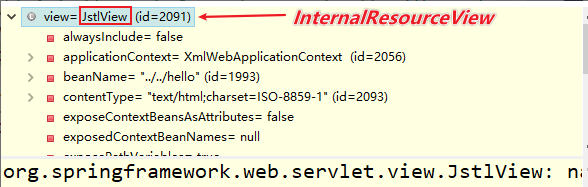
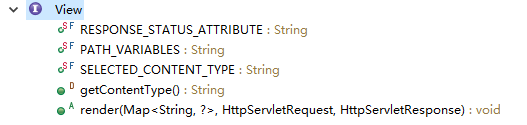
8.视图接口
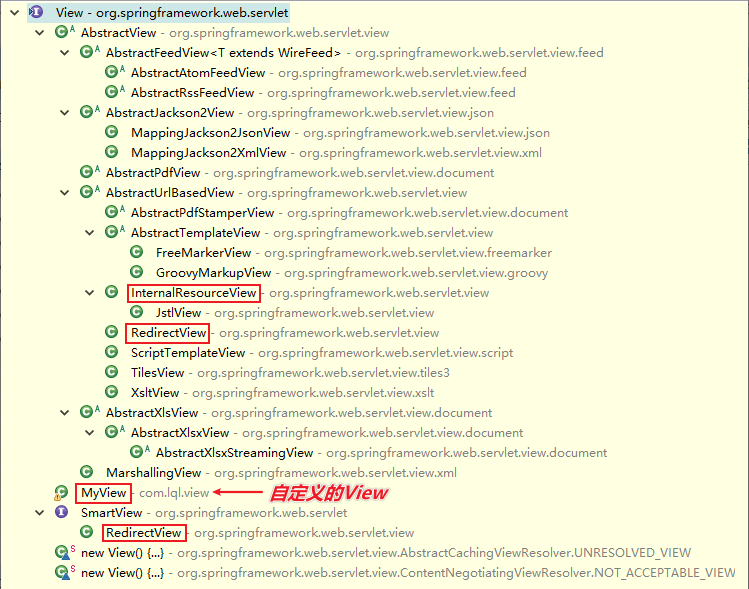
9.返回View对象
1)、视图解析器得到View对象的流程
- 所有配置的视图解析器都来尝试根据视图名(返回值)得到View对象;如果能得到就返回,得不到就换下一个视图解析器
2)、View对象的render方法
@Override
public void render(@Nullable Map<String, ?> model, HttpServletRequest request,
                   HttpServletResponse response) throws Exception {

    if (logger.isDebugEnabled()) {
        logger.debug("View " + formatViewName() +
                     ", model " + (model != null ? model : Collections.emptyMap()) +
                     (this.staticAttributes.isEmpty() ? "" : ", static attributes " + this.staticAttributes));
    }

    Map<String, Object> mergedModel = createMergedOutputModel(model, request, response);
    prepareResponse(request, response);
    //渲染要给页面输出的所有数据
    renderMergedOutputModel(mergedModel, getRequestToExpose(request), response);
}
3)、renderMergedOutputModel
- InternalResourceView有这个方法renderMergedOutputModel:
@Override
protected void renderMergedOutputModel(
    Map<String, Object> model, HttpServletRequest request, HttpServletResponse response) throws Exception {

    // Expose the model object as request attributes.
    //将模型中的数据放在请求域中
    exposeModelAsRequestAttributes(model, request);

    // Expose helpers as request attributes, if any.
    exposeHelpers(request);

    // Determine the path for the request dispatcher.
    String dispatcherPath = prepareForRendering(request, response);

    // Obtain a RequestDispatcher for the target resource (typically a JSP).
    RequestDispatcher rd = getRequestDispatcher(request, dispatcherPath);
    if (rd == null) {
        throw new ServletException("Could not get RequestDispatcher for [" + getUrl() +
                                   "]: Check that the corresponding file exists within your web application archive!");
    }

    // If already included or response already committed, perform include, else forward.
    if (useInclude(request, response)) {
        response.setContentType(getContentType());
        if (logger.isDebugEnabled()) {
            logger.debug("Including [" + getUrl() + "]");
        }
        rd.include(request, response);
    }

    else {
        // Note: The forwarded resource is supposed to determine the content type itself.
        if (logger.isDebugEnabled()) {
            logger.debug("Forwarding to [" + getUrl() + "]");
        }
        rd.forward(request, response);
    }
}
4)、将模型中的所有数据取出来全放在request域中
protected void exposeModelAsRequestAttributes(Map<String, Object> model,
			HttpServletRequest request) throws Exception {

		model.forEach((name, value) -> {
			if (value != null) {
				request.setAttribute(name, value);
			}
			else {
				request.removeAttribute(name);
			}
		});
	}
2、总结:
- 视图解析器只是为了得到视图对象;视图对象才能真正的==转发(将模型数据全部放在请求域中)或者重定向到页面==,视图对象才能真正的==渲染视图==
1.ViewResolver接口
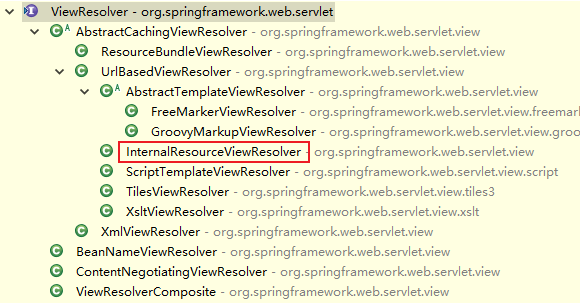
2.视图
- 视图的作用是渲染模型数据,将模型里的数据以某种形式呈现给用户,视图对象由视图解析器负责实例化;由于视图是无状态的,所以他们不会有线程安全的问题。
3、国际化
- 导包导入了jstl的时候会自动创建为一个jstlView,可以快速方便的支持国际化功能
1.javaWeb国际化步骤
-
得得到一个Locale对象
-
使用ResourceBundle绑定国际化资源文件
-
使用
ResourceBundle.getstring("key");获取到国际化配置文件中的值 -
web页面的国际化,fmt标签库来做:
<fmt:setLocale> <fmt:setBundle> <fmt:message>
2.Jstlview
-
让Spring管理国际化资源
<!-- 让SpringMVC管理国际化资源文件:配置一个资源文件管理器 --> <bean id="messageSource" class="org.springframework.context.support.ResourceBundleMessageSource"> <!-- basename-指定基础名 --> <property name="basename" value="i18n"></property> </bean> -
直接去页面使用
<fmt:message>
<h1>
<fmt:message key="welcomeinfo"/>
</h1>
<form action="">
	<fmt:message key="username"/>:<input/><br>
	<fmt:message key="password"/>:<input/><br>
	<input type="submit" value="<fmt:message key="loginBtn"/>"/>
</form>
3.注意
- 一定要过SpringMVC的视图解析流程,人家会创建一个jstlView帮你快速国际化
- 也不能写forward(转发),(会执行
InternalResourceView view = new InternalResourceView(forwardUrl);创建view对象)
4.扩展
- 视图解析器根据方法的返回值得到视图对象
- 多个视图解析器都会尝试能否得到视图对象
- 视图对象不同就可以具有不同功能
for (ViewResolver viewResolver : this.viewResolvers) { //viewResolver视图解析器,根据方法的返回值得到View对象 View view = viewResolver.resolveViewName(viewName, locale); if (view != null) { return view; } }
5.自定义视图和视图解析器
- 让我们的视图解析器工作
- 得到我们的视图对象
- 我们的视图对象自定义渲染逻辑
response.getWriter().write("哈哈<h1>即将展现精彩内容<h1>");
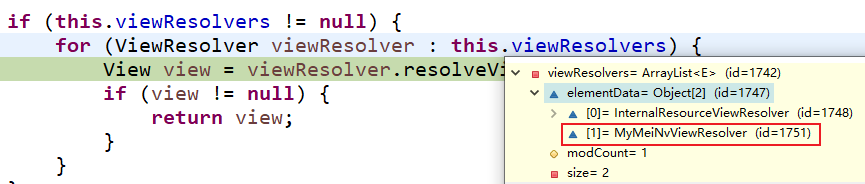
步骤
- 编写自定义的视图解析器和视图实现类
- 视图解析器必须放在ioc容器中
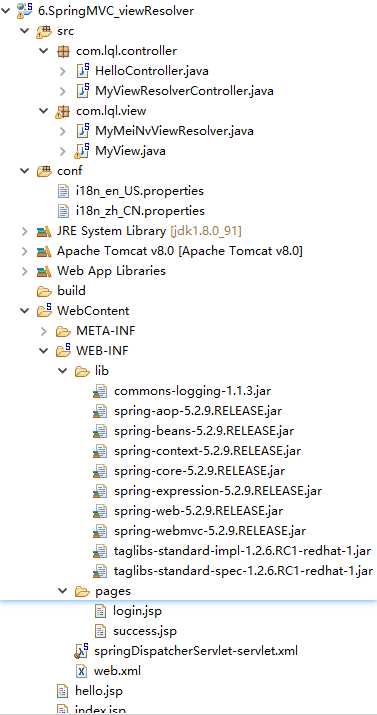
4、总体架构:
5、web.xml(同上)
6、springDispatcherServlet-servlet.xml
<?xml version="1.0" encoding="UTF-8"?>
<beans xmlns="http://www.springframework.org/schema/beans"
	xmlns:xsi="http://www.w3.org/2001/XMLSchema-instance"
	xmlns:context="http://www.springframework.org/schema/context"
	xmlns:mvc="http://www.springframework.org/schema/mvc"
	xsi:schemaLocation="http://www.springframework.org/schema/mvc http://www.springframework.org/schema/mvc/spring-mvc-4.3.xsd
		http://www.springframework.org/schema/beans http://www.springframework.org/schema/beans/spring-beans.xsd
		http://www.springframework.org/schema/context http://www.springframework.org/schema/context/spring-context-4.3.xsd">

	<context:component-scan base-package="com.lql"></context:component-scan>

	<!-- 可以导入JSTL包;fmt:message
	InternalResourceViewResolver:优先级是最低的-->
	<bean class="org.springframework.web.servlet.view.InternalResourceViewResolver">
		<property name="prefix" value="/WEB-INF/pages/"></property>
		<property name="suffix" value=".jsp"></property>
		<!-- <property name="viewClass" value="org.springframework.web.servlet.view.JstlView"></property> -->
	</bean>
	<!-- 自定义的视图解析器 value="1"数字越小优先级越高 -->
	<bean class="com.lql.view.MyMeiNvViewResolver">
		<property name="order" value="1"></property>
	</bean>

	<!-- 让SpringMVC管理国际化资源文件:配置一个资源文件管理器;id是必须叫messageSource -->
	<bean id="messageSource" class="org.springframework.context.support.ResourceBundleMessageSource">
	<!-- basename-指定基础名 -->
	<property name="basename" value="i18n"></property>
	</bean>

	<!-- 发送一个请求(toLoginPage):直接来到web-inf下的login页面;mvc名称空间下有一个请求映射标签 -->
	<!-- path="":指定哪个请求
		 view-name:指定映射给哪个视图
		 走了SpringMVC的整个流程,视图解析等等。。帮忙国际化。
		 其他的请求就不好使了?
	 -->
	<mvc:view-controller path="/toLoginPage" view-name="login"/>
	<!-- 开启mvc注解驱动模式:开启了mvc的开挂模式 -->
	<mvc:annotation-driven></mvc:annotation-driven>

</beans>
7、jsp
#############index.jsp#######################################

<%@ page language="java" contentType="text/html; charset=UTF-8"
    pageEncoding="UTF-8"%>
<!DOCTYPE html PUBLIC "-//W3C//DTD HTML 4.01 Transitional//EN" "http://www.w3.org/TR/html4/loose.dtd">
<html>
<head>
<meta http-equiv="Content-Type" content="text/html; charset=UTF-8">
<title>Insert title here</title>
</head>
<body>
<a href="hello">hello</a>
<a href="handle01">handle01-来到hello页面</a>
<a href="handle03">handle03-重定向到hello.jsp页面</a>

<a href="toLoginPage">去登录页面</a><br><br>

<a href="handleplus">下载美女资源--你就会看见各种高清-无码图</a>
</body>
</html>

#############login.jsp#######################################

<%@ page language="java" contentType="text/html; charset=UTF-8"
    pageEncoding="UTF-8"%>
<%@ taglib prefix="fmt" uri="http://java.sun.com/jsp/jstl/fmt"%>
<!DOCTYPE html PUBLIC "-//W3C//DTD HTML 4.01 Transitional//EN" "http://www.w3.org/TR/html4/loose.dtd">
<html>
<head>
<meta http-equiv="Content-Type" content="text/html; charset=UTF-8">
<title>Insert title here</title>
</head>
<body>
<h1>
<fmt:message key="welcomeinfo"/>
</h1>
<form action="">
	<fmt:message key="username"/>:<input/><br>
	<fmt:message key="password"/>:<input/><br>
	<input type="submit" value="<fmt:message key="loginBtn"/>"/>
</form>
</body>
</html>
8、conf(国际化properties)
###########i18n_en_US.properties#################

welcomeinfo=WELCOME TO CODEWORLD
username=USERNAME
password=PASSWORD
loginBtn=LOGIN

################i18n_en_US.properties################

welcomeinfo=\u6B22\u8FCE\u6765\u5230\u4EE3\u7801\u4E16\u754C
username=\u7528\u6237\u540D
password=\u5BC6\u7801
loginBtn=\u767B\u5F55
9、view(自定义视图)
package com.lql.view;
import java.util.Locale;

import org.springframework.core.Ordered;
import org.springframework.web.servlet.View;
import org.springframework.web.servlet.ViewResolver;

public class MyMeiNvViewResolver implements ViewResolver,Ordered{

	private Integer order = 0;

	@Override
	public View resolveViewName(String viewName, Locale locale) throws Exception {
		// TODO Auto-generated method stub
		//根据视图名返回视图对象
		//meinv:/gaoqing	meinv:/dama
		//forward:/login.jsp
		if(viewName.startsWith("meinv:")){
			return new MyView();
		}else{
			//如果不能处理返回null即可
			return null;
		}

	}


	@Override
	public int getOrder() {
		// TODO Auto-generated method stub
		return order;
	}

	//改变视图解析器的优先级
	public void setOrder(Integer order){
		this.order = order;
	}

}

**************************************************************

package com.lql.view;

import java.io.PrintWriter;
import java.util.List;
import java.util.Map;

import javax.servlet.http.HttpServletRequest;
import javax.servlet.http.HttpServletResponse;

import org.springframework.stereotype.Controller;
import org.springframework.web.servlet.View;

/**
 * 返回的数据的内容类型
 * @author 陆乾龙
 *
 */
@Controller
public class MyView implements View{

	@Override
	public void render(Map<String, ?> model, HttpServletRequest request, HttpServletResponse response)
			throws Exception {
		// TODO Auto-generated method stub
		System.out.println("之前保存的数据:"+model);
		response.setContentType("text/html");
		List<String> vn = (List<String>) model.get("video");

		response.getWriter().write("哈哈<h1>即将展现精彩内容<h1>");
		for(String string : vn){
			response.getWriter().write("<a>下载"+string+".avi</a><br/>");
		}
		int num = vn.toString().length()-7;
		//request.setAttribute("msg", num);

		response.getWriter().write(""
				+ "<script language='javascript'>"
				+ "var aEle = document.getElementsByTagName('a');"
				+ "var n=2;"
				+ "alert(n);"
				+ "for(let i=0;i<n;i++){"
				+ "aEle[i].onclick=function(){"
				+ "alert('想下载吗?交学费');"
				+ "}}"
				+ "</script>");
	}
}
10、Controller类
package com.lql.controller;

import org.springframework.stereotype.Controller;
import org.springframework.web.bind.annotation.RequestMapping;

@Controller
public class HelloController {

	@RequestMapping("/hello")
	public String hello(){
		//		/WEB-INF/pages/hello.jsp	/hello.jsp
		//相对路径
		return "../../hello";
	}
	/**
	 *  forward:转发到一个页面
	 *  /hello.jsp:转发当前项目下的hello;
	 *
	 *  一定加上/,如果不加/就是相对路径,容易出问题;
	 *  forward:/hello.jsp
	 *  forward:前缀的转发,不会由我们配置的视图解析器拼串
	 * @return
	 */
	@RequestMapping("/handle01")
	public String handle01(){
		System.out.println("handle01");
		return "forward:/hello.jsp";
	}

	@RequestMapping("/handle02")
	public String handle02(){
		System.out.println("handle02");
		return "forward:/handle01";
	}

	/**
	 * 重定向到hello.jsp页面
	 * 有前缀的转发和重定向操作,配置的视图解析器就不会进行拼串;
	 *
	 * 转发	forward:转发的路径
	 * 重定向	redirect:重定向的路径
	 * 		/hello.jsp:代表就是从当前项目下开始:SpringMVC会为路径自动的拼接上项目名
	 * 		原生的Servlet重定向/路径需要加上项目名才能成功
	 * 		response.sendRedirect("/hello.jsp")
	 * @return
	 */
	@RequestMapping("/handle03")
	public String handle03(){
		System.out.println("handle03....");
		return "redirect:hello.jsp";
	}

	@RequestMapping("/handle04")
	public String handle04(){
		System.out.println("handle04....");
		return "redirect:handle03";
	}

	/*@RequestMapping("/toLoginPage")
	public String toLogin(){
		return "login";
	}*/

}

***************************************************************

package com.lql.controller;

import java.util.ArrayList;
import java.util.List;

import org.springframework.stereotype.Controller;
import org.springframework.ui.Model;
import org.springframework.web.bind.annotation.RequestMapping;

/**
 * 自定义视图解析器和视图对象
 * @author 陆乾龙
 *
 */
@Controller
public class MyViewResolverController {

	@RequestMapping("/handleplus")
	public String handleplus(Model model){
		//meinv:/gaoqing	meinv:/dama
		//forward:/login.jsp
		List<String> vname = new ArrayList<String>();
		List<String> imgname = new ArrayList<String>();
		vname.add("佟老师");
		vname.add("飞哥");

		imgname.add("萌萌");

		model.addAttribute("video", vname);
		model.addAttribute("imgs", imgname);
		return "meinv:/gaoqing";
	}

}
八、SpringMVC-RestfulCRUD
1、需求
利用SpringMVC做一个CRUD(增删改查)符合Rest风格的;
C:Creat:创建
R:Retrieve:查询
U:Update:更新
D:Delete:删除
==使用Map,List代替数据库保存数据==
1.员工列表
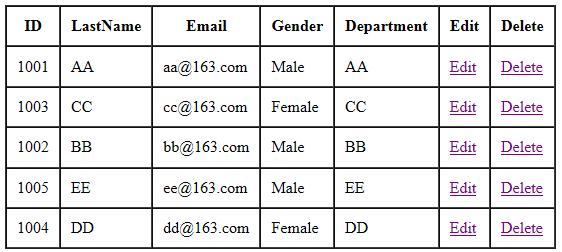
2.员工添加
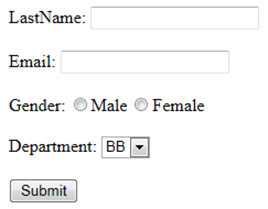
3.员工修改
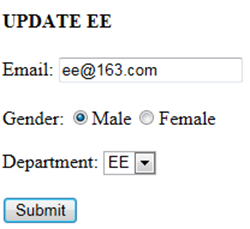
4.员工删除-点击完成删除来到列表页面
增删改查的URL地址 /资源名/资源标识
| /资源名/资源标识 | 请求 | 解释 |
|---|---|---|
| /emp/1 | GET | 查询id为1的员工 |
| /emp/1 | PUT | 更新id为1的员工 |
| /emp/1 | DELETE | 删除id为1的员工 |
| /emp | POST | 新增员工 |
| /emps | GET | 查询所有员工 |
2、逻辑
-
员工列表展示:访问index.jsp–直接发送/emps–控制器查询所有员工–放在请求域中–转发到list页面展示
-
员工添加:
- 在list页面点击“员工添加”—-(查询出所有部门信息要展示在页面)—–来到添加页面(add.jsp)—-输入员工数据—-点击保存(/emp)—-处理器收到员工保存请求(保存员工)—-保存完成以后还是来到列表页面
- 通过 SpringMVC 的表单标签可以实现将模型数据中的属性和 HTML 表单元素相绑定,以实现表单数据更便捷编辑和表单值的回显
====用了表单标签的页面可能会报错(请求域中没有一个command**类型的对象)

解决(具体看后面源码):
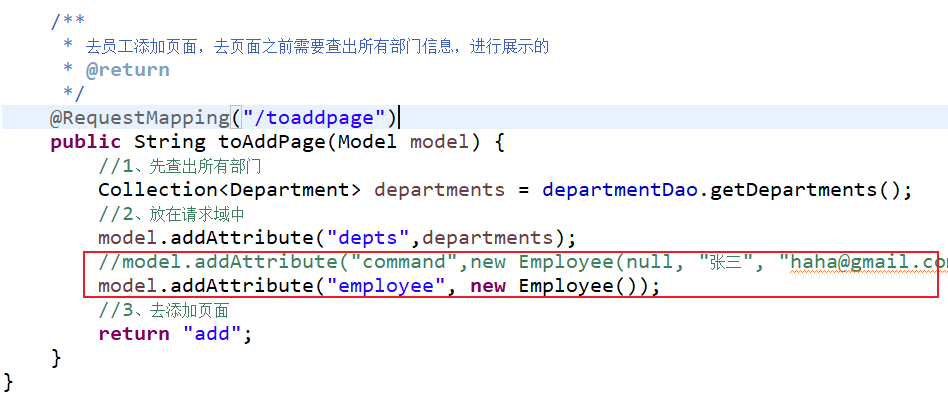
3、总体架构:
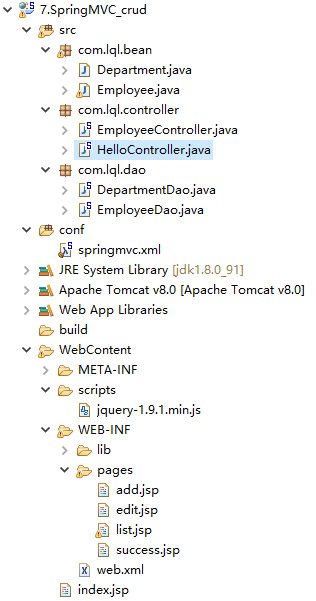
4、web.xml
<?xml version="1.0" encoding="UTF-8"?>
<web-app xmlns:xsi="http://www.w3.org/2001/XMLSchema-instance" xmlns="http://xmlns.jcp.org/xml/ns/javaee" xsi:schemaLocation="http://xmlns.jcp.org/xml/ns/javaee http://xmlns.jcp.org/xml/ns/javaee/web-app_3_1.xsd" id="WebApp_ID" version="3.1">
  <display-name>7.SpringMVC_crud</display-name>
  <welcome-file-list>
    <welcome-file>index.html</welcome-file>
    <welcome-file>index.htm</welcome-file>
    <welcome-file>index.jsp</welcome-file>
    <welcome-file>default.html</welcome-file>
    <welcome-file>default.htm</welcome-file>
    <welcome-file>default.jsp</welcome-file>
  </welcome-file-list>

  <!-- The front controller of this Spring Web application, responsible for handling all application requests -->
	<servlet>
		<servlet-name>springDispatcherServlet</servlet-name>
		<servlet-class>org.springframework.web.servlet.DispatcherServlet</servlet-class>
		<init-param>
			<param-name>contextConfigLocation</param-name>
			<param-value>classpath:springmvc.xml</param-value>
		</init-param>
		<load-on-startup>1</load-on-startup>
	</servlet>

	<!-- Map all requests to the DispatcherServlet for handling -->
	<servlet-mapping>
		<servlet-name>springDispatcherServlet</servlet-name>
		<url-pattern>/</url-pattern>
	</servlet-mapping>

	<!-- 字符编码Filter -->
	<filter>
		<filter-name>CharacterEncodingFilter</filter-name>
		<filter-class>org.springframework.web.filter.CharacterEncodingFilter</filter-class>
		<init-param>
			<param-name>encoding</param-name>
			<param-value>UTF-8</param-value>
		</init-param>
		<init-param>
			<param-name>forceRequestEncoding</param-name>
			<param-value>true</param-value>
		</init-param>
		<init-param>
			<param-name>forceResponseEncoding</param-name>
			<param-value>true</param-value>
		</init-param>
	</filter>
	<filter-mapping>
		<filter-name>CharacterEncodingFilter</filter-name>
		<url-pattern>/*</url-pattern>
	</filter-mapping>

	<!-- 支持Rest风格转换的Filter -->
	<filter>
		<filter-name>HiddenHttpMethodFilter</filter-name>
		<filter-class>org.springframework.web.filter.HiddenHttpMethodFilter</filter-class>
	</filter>
	<filter-mapping>
		<filter-name>HiddenHttpMethodFilter</filter-name>
		<url-pattern>/*</url-pattern>
	</filter-mapping>
</web-app>
5、springmvc.xml
<?xml version="1.0" encoding="UTF-8"?>
<beans xmlns="http://www.springframework.org/schema/beans"
	xmlns:xsi="http://www.w3.org/2001/XMLSchema-instance"
	xmlns:context="http://www.springframework.org/schema/context"
	xmlns:mvc="http://www.springframework.org/schema/mvc"
	xsi:schemaLocation="http://www.springframework.org/schema/mvc http://www.springframework.org/schema/mvc/spring-mvc-4.3.xsd
		http://www.springframework.org/schema/beans http://www.springframework.org/schema/beans/spring-beans.xsd
		http://www.springframework.org/schema/context http://www.springframework.org/schema/context/spring-context-4.3.xsd">

	<context:component-scan base-package="com.lql"></context:component-scan>

	<bean class="org.springframework.web.servlet.view.InternalResourceViewResolver">
		<property name="prefix" value="/WEB-INF/pages/"></property>
		<property name="suffix" value=".jsp"></property>
	</bean>

	<!-- 默认前端控制器是拦截所有资源(除过jsp),js文件就404了;要js文件的请求是交给tomcat处理的
	http://localhost:8080/7.SpringMVC_crud/scripts/jquery-1.9.1.min.js -->
	<!-- 告诉SpringMVC,自己映射的请求就自己处理,不能处理的请求直接交给tomcat -->
	<!-- 静态资源能访问,动态映射的请求就不行 -->
	<mvc:default-servlet-handler/>
	<!-- SprigMVC可以保证动态请求和静态请求都能访问 -->
	<mvc:annotation-driven></mvc:annotation-driven>
</beans>
6、jsp页面
****************index.jsp*************************************
<%@ page language="java" contentType="text/html; charset=UTF-8"
pageEncoding="UTF-8"%>
<!-- 访问项目就要展示员工列表页面 -->
<jsp:forward page="/emps"></jsp:forward>
****************list.jsp*************************************
<%@ page language="java" contentType="text/html; charset=UTF-8"
pageEncoding="UTF-8"%>
<%@taglib prefix="c" uri="http://java.sun.com/jsp/jstl/core"%>
<!DOCTYPE html PUBLIC "-//W3C//DTD HTML 4.01 Transitional//EN" "http://www.w3.org/TR/html4/loose.dtd">
<html>
<%
pageContext.setAttribute("ctp", request.getContextPath());
%>
<head>
<meta http-equiv="Content-Type" content="text/html; charset=UTF-8">
<title>员工列表页面</title>
</head>
<body>
<h1>员工列表</h1>
<script type="text/javascript" src="${ctp }/scripts/jquery-1.9.1.min.js"></script>
<table border="1" cellpadding="5" cellspacing="0">
<tr>
<th>ID</th>
<th>LastName</th>
<th>Email</th>
<th>Gender</th>
<th>Department</th>
<th>EDIT</th>
<th>DELETE</th>
</tr>
<c:forEach items="${emps }" var="emp">
<tr>
<td>${emp.id}</td>
<td>${emp.lastName}</td>
<td>${emp.email}</td>
<td>${emp.gender==0?"女":"男"}</td>
<td>${emp.department.departmentName}</td>
<td>
<a href="${ctp }/emp/${emp.id}">edit</a>
</td>
<td>
<a href="${ctp }/emp/${emp.id}" class="delBtn">delete</a>
</td>
</tr>
</c:forEach>
<a href="${ctp }/toaddpage">添加员工</a>
</table>
<form action="${ctp }/emp/${emp.id}" method="post" id="deleteForm">
<input type="hidden" name="_method" value="DELETE"/>
</form>
<script type="text/javascript">
$(function(){
$(".delBtn").click(function(){
//0、确认删除?
if(confirm("确认要删除吗?")){
//1、改变表单的action指向
$("#deleteForm").attr("action",this.href);
//2、提交表单
$("#deleteForm").submit();
return false;}else{
return false;
}
});
});
</script>
</body>
</html>
****************add.jsp*************************************
<%@ page language="java" contentType="text/html; charset=UTF-8"
pageEncoding="UTF-8"%>
<%@taglib prefix="c" uri="http://java.sun.com/jsp/jstl/core" %>
<%@taglib prefix="form" uri="http://www.springframework.org/tags/form" %>
<!DOCTYPE html PUBLIC "-//W3C//DTD HTML 4.01 Transitional//EN" "http://www.w3.org/TR/html4/loose.dtd">
<html>
<head>
<meta http-equiv="Content-Type" content="text/html; charset=UTF-8">
<title>Insert title here</title>
</head>
<body>
<h1>员工添加</h1>
<!-- 表单标签:
通过 SpringMVC 的表单标签可以实现将模型数据中的属性和 HTML 表单元素相绑定,
以实现表单数据更便捷编辑和表单值的回显
1)、SpringMVC认为,表单数据中的每一项最终都是要回显的;
path指定的是一个属性,这个属性是从隐含模型(请求域中取出的某个对象中的属性)
path指定的每一个属性,请求域中必须有一个对象拥有这个属性;
这个对象就是请求域中的command;
modelAttribute="":
1)、以前我们表单标签会从请求域中获取一个command对象;把这个对象中的每一个属性对应的显示出来
2)、可以告诉SpringMVC不要去取command的值了,我放了一个modelAttribute指定的值,
取对象用的key就用我modelAttribute指定的;
-->
<%
pageContext.setAttribute("ctp", request.getContextPath());
%>
<form:form action="${ctp }/emp" modelAttribute="employee" method="POST">
<!-- path就是原来html-input的name项;需要写
path:
1)、当作原生的name项
2)、自动回显隐含模型中某个对象对应的这个属性的值
-->
lastName:<form:input path="lastName"/><br>
eamil:<form:input path="email"/><br>
gender:<br>
男:<form:radiobutton path="gender" value="1"/><br>
女:<form:radiobutton path="gender" value="0"/><br>
dept:
<!-- items="":指定要遍历的集合,自动遍历;遍历出的每一个元素是一个department对象
itemLabel="属性名":指定遍历出的这个对象的哪个属性是作为option标签体的值
itemValue="属性名":指定刚才遍历出来的这个对象的哪个属性是作为要提交的value值
-->
<form:select path="department.id"
items="${depts}"
itemLabel="departmentName"
itemValue="id"></form:select><br>
<input type="submit" value="保存"/>
</form:form>
<!-- (Employee) -->
<%-- <form action="">
lastName:<input type="text" name="lastName"/><br>
email:<input type="text" name="email"/><br>
gender:<br>
男:<input type="radio" name="gender" value="1"/><br>
女:<input type="radio" name="gender" value="0"/><br>
dept:
<select name="department.id">
<c:forEach items="${depts }" var="deptItem">
<!-- 标签中的是在页面 的提示选项信息,value才是真正提交的值-->
<option value="${deptItem.id}">${deptItem.departmentName}</option>
</c:forEach>
</select>
<input type="submit" value="提交"/>
</form> --%>
</body>
</html>
****************edit.jsp*************************************
<%@ page language="java" contentType="text/html; charset=UTF-8"
pageEncoding="UTF-8"%>
<%@taglib prefix="form" uri="http://www.springframework.org/tags/form" %>
<!DOCTYPE html PUBLIC "-//W3C//DTD HTML 4.01 Transitional//EN" "http://www.w3.org/TR/html4/loose.dtd">
<html>
<head>
<meta http-equiv="Content-Type" content="text/html; charset=UTF-8">
<title>Insert title here</title>
<%
pageContext.setAttribute("ctp", request.getContextPath());
%>
</head>
<body>
<h1>员工修改页面</h1>
<!-- modelAttribute:这个表单的所有内容显示绑定的是绑定的是请求域中employee的值 -->
<form:form action="${ctp }/emp/${employee.id }"
modelAttribute="employee" method="post">
<input type="hidden" name="_method" value="put"/>
<input type="hidden" name="id" value="${employee.id }"/>
email:<form:input path="email"/><br>
gender:
男:<form:radiobutton path="gender" value="1"/>
女:<form:radiobutton path="gender" value="0"/><br>
dept:<form:select path="department.id" items="${depts }"
itemLabel="departmentName" itemValue="id"></form:select>
<input type="submit" value="修改" />
</form:form>
</body>
</html>
7、bean
package com.lql.bean;

public class Department {

	private Integer id;
	private String departmentName;

	public Department() {
	}

	public Department(int i, String string) {
		this.id = i;
		this.departmentName = string;
	}

	public Integer getId() {
		return id;
	}

	public void setId(Integer id) {
		this.id = id;
	}

	public String getDepartmentName() {
		return departmentName;
	}

	public void setDepartmentName(String departmentName) {
		this.departmentName = departmentName;
	}

	@Override
	public String toString() {
		return "Department [id=" + id + ", departmentName=" + departmentName + "]";
	}

}


**************************************************************

package com.lql.bean;

import java.util.Date;

public class Employee {

	private Integer id;
	private String lastName;

	private String email;
	//1 male, 0 female
	private Integer gender;

	private Department department;

	public Integer getId() {
		return id;
	}

	public void setId(Integer id) {
		this.id = id;
	}

	public String getLastName() {
		return lastName;
	}

	public void setLastName(String lastName) {
		this.lastName = lastName;
	}

	public String getEmail() {
		return email;
	}

	public void setEmail(String email) {
		this.email = email;
	}

	public Integer getGender() {
		return gender;
	}

	public void setGender(Integer gender) {
		this.gender = gender;
	}

	public Department getDepartment() {
		return department;
	}

	public void setDepartment(Department department) {
		this.department = department;
	}

	public Employee(Integer id, String lastName, String email, Integer gender,
			Department department) {
		super();
		this.id = id;
		this.lastName = lastName;
		this.email = email;
		this.gender = gender;
		this.department = department;
	}

	public Employee() {
	}

	@Override
	public String toString() {
		return "Employee [id=" + id + ", lastName=" + lastName + ", email="
				+ email + ", gender=" + gender + ", department=" + department
				+ "]";
	}


}
8、dao
package com.lql.dao;

import java.util.Collection;
import java.util.HashMap;
import java.util.Map;

import org.springframework.stereotype.Repository;

import com.lql.bean.Department;

/**
 * 操作部门的dao
 * @author 陆乾龙
 *
 */
@Repository
public class DepartmentDao {

	private static Map<Integer, Department> departments = null;

	static{
		departments = new HashMap<Integer, Department>();

		departments.put(101, new Department(101, "D-AA"));
		departments.put(102, new Department(102, "D-BB"));
		departments.put(103, new Department(103, "D-CC"));
		departments.put(104, new Department(104, "D-DD"));
		departments.put(105, new Department(105, "D-EE"));
	}
	/**
	 * 返回所有的部门
	 * @return
	 */
	public Collection<Department> getDepartments(){
		return departments.values();
	}

	/**
	 * 按照部门id查询部门
	 * @param id
	 * @return
	 */
	public Department getDepartment(Integer id){
		return departments.get(id);
	}

}


**************************************************************

package com.lql.dao;

import java.util.Collection;
import java.util.HashMap;
import java.util.Map;

import org.springframework.beans.factory.annotation.Autowired;
import org.springframework.stereotype.Repository;

import com.lql.bean.Department;
import com.lql.bean.Employee;

/**
 * EmployeeDao:操作员工
 * @author 陆乾龙
 *
 */
@Repository
public class EmployeeDao {

	private static Map<Integer, Employee> employees = null;

	@Autowired
	private DepartmentDao departmentDao;

	static{
		employees = new HashMap<Integer, Employee>();

		employees.put(1001, new Employee(1001, "E-AA", "aa@163.com", 1, new Department(101, "D-AA")));
		employees.put(1002, new Employee(1002, "E-BB", "bb@163.com", 1, new Department(102, "D-BB")));
		employees.put(1003, new Employee(1003, "E-CC", "cc@163.com", 0, new Department(103, "D-CC")));
		employees.put(1004, new Employee(1004, "E-DD", "dd@163.com", 0, new Department(104, "D-DD")));
		employees.put(1005, new Employee(1005, "E-EE", "ee@163.com", 1, new Department(105, "D-EE")));
	}

	//初始id
	private static Integer initId = 1006;

	/**
	 * 员工保存/更新二合一方法;
	 * @param employee
	 */
	public void save(Employee employee){
		if(employee.getId() == null){
			employee.setId(initId++);
		}

		//根据部门id单独查出部门信息设置到员工对象中,页面提交时只需要提交部门的id
		employee.setDepartment(departmentDao.getDepartment(employee.getDepartment().getId()));
		employees.put(employee.getId(), employee);
	}

	/**
	 * 查询所有员工
	 * @return
	 */
	public Collection<Employee> getAll(){
		return employees.values();
	}

	/**
	 * 按照id查询某个员工
	 * @param id
	 * @return
	 */
	public Employee get(Integer id){
		return employees.get(id);
	}

	/**
	 * 删除某个员工
	 * @param id
	 */
	public void delete(Integer id){
		employees.remove(id);
	}
}
9、Controller
package com.lql.controller;

import java.util.Collection;

import org.springframework.beans.factory.annotation.Autowired;
import org.springframework.stereotype.Controller;
import org.springframework.ui.Model;
import org.springframework.web.bind.annotation.ModelAttribute;
import org.springframework.web.bind.annotation.PathVariable;
import org.springframework.web.bind.annotation.RequestMapping;
import org.springframework.web.bind.annotation.RequestMethod;
import org.springframework.web.bind.annotation.RequestParam;

import com.lql.bean.Department;
import com.lql.bean.Employee;
import com.lql.dao.DepartmentDao;
import com.lql.dao.EmployeeDao;


@Controller
public class EmployeeController {

	@Autowired
	EmployeeDao employeeDao;

	@Autowired
	DepartmentDao departmentDao;


	/**
	 * 查询所有员工
	 */
	@RequestMapping("/emps")
	public String getEmps(Model model){
		Collection<Employee> all = employeeDao.getAll();
		model.addAttribute("emps", all);
		return "list";
	}

	@RequestMapping(value="/emp/{id}",method=RequestMethod.DELETE)
	public String deleteEmp(@PathVariable("id")Integer id) {
		employeeDao.delete(id);
		return "redirect:/emps";
	}

	/**
	 * 查询员工,来到修改页面回显
	 * @param id
	 * @param model
	 * @return
	 */

	@RequestMapping(value="/emp/{id}",method=RequestMethod.GET)
	public String getEmp(@PathVariable("id")Integer id,Model model) {
		//1、查出员工信息
		Employee employee = employeeDao.get(id);
		//2、放在请求域中
		model.addAttribute("employee",employee);
		//3、继续查出部门信息放在隐含模型中
		Collection<Department> departments = departmentDao.getDepartments();
		model.addAttribute("depts", departments);
		return "edit";
	}
	//@ModelAttribute("employee")
	@RequestMapping(value="/emp/{id}",method=RequestMethod.PUT)
	public String updateEmp(Employee employee/*,@PathVariable("id")Integer id*/){
		System.out.println("要修改的员工:"+employee);
		// xxxx更新修改二合一
		//employeeDao.save(employee);
		return "redirect:/emps";
	}


	@ModelAttribute
	public void myModelAttribute(
			@RequestParam(value = "id",required = false)Integer id,Model model){
		if(id != null){
			Employee employee = employeeDao.get(id);
			model.addAttribute("employee", employee);
		}
		System.out.println("hahaha");
	}

	/**
	 * 保存员工
	 * @param employee
	 * @return
	 */
	@RequestMapping(value="/emp",method=RequestMethod.POST)
	public String addEmp(Employee employee) {
		System.out.println("要添加的员工:"+employee);
		employeeDao.save(employee);
		//返回列表页面;重定向到查询所有员工的请求
		return "redirect:/emps";
	}

	/**
	 * 去员工添加页面,去页面之前需要查出所有部门信息,进行展示的
	 * @return
	 */
	@RequestMapping("/toaddpage")
	public String toAddPage(Model model) {
		//1、先查出所有部门
		Collection<Department> departments = departmentDao.getDepartments();
		//2、放在请求域中
		model.addAttribute("depts",departments);
		//model.addAttribute("command",new Employee(null, "张三", "haha@gmail.com", 0, departmentDao.getDepartment(102)));
		model.addAttribute("employee", new Employee());
		//3、去添加页面
		return "add";
	}
}
九、数据转换 & 数据格式化 & 数据校验
-
SpringMVC封装自定义类型对象,javaBean要和页面提交的数据进行一一绑定
-
页面提交的所有数据都是字符串
-
Integer age,Date birth,
-
employName=zhangsan&age=18&gender=1
-
String age=request.getParameter("age");
-
-
数据绑定期间牵扯到以下操作:
- 数据类型转化
- String–Integer,String–Boolean,xxx
- 数据格式化
- birth=2020-12-02 –>Date 2020/12/02 2020.12.02
- 数据校验
- 我们提交的数据必须是合法的
- 前端校验:js+正则表达式(浏览器能禁用js,防君子不防小人)
- 后端校验:重要数据也是必须的
- 校验成功—->数据合法
- 校验失败
- 我们提交的数据必须是合法的
1、新的源码
ModelAttributeMethodProcessor
@Override
@Nullable
public final Object resolveArgument(MethodParameter parameter, @Nullable ModelAndViewContainer mavContainer,
                                    NativeWebRequest webRequest, @Nullable WebDataBinderFactory binderFactory) throws Exception {

    Assert.state(mavContainer != null, "ModelAttributeMethodProcessor requires ModelAndViewContainer");
    Assert.state(binderFactory != null, "ModelAttributeMethodProcessor requires WebDataBinderFactory");

    String name = ModelFactory.getNameForParameter(parameter);
    ModelAttribute ann = parameter.getParameterAnnotation(ModelAttribute.class);
    if (ann != null) {
        mavContainer.setBinding(name, ann.binding());
    }

    Object attribute = null;
    BindingResult bindingResult = null;

    if (mavContainer.containsAttribute(name)) {
        attribute = mavContainer.getModel().get(name);
    }
    else {
        // Create attribute instance
        try {
            attribute = createAttribute(name, parameter, binderFactory, webRequest);
        }
        catch (BindException ex) {
            if (isBindExceptionRequired(parameter)) {
                // No BindingResult parameter -> fail with BindException
                throw ex;
            }
            // Otherwise, expose null/empty value and associated BindingResult
            if (parameter.getParameterType() == Optional.class) {
                attribute = Optional.empty();
            }
            bindingResult = ex.getBindingResult();
        }
    }

    if (bindingResult == null) {
        // Bean property binding and validation;
        // skipped in case of binding failure on construction.
        WebDataBinder binder = binderFactory.createBinder(webRequest, attribute, name);
        if (binder.getTarget() != null) {
            if (!mavContainer.isBindingDisabled(name)) {
                //将页面提交过来的数据封装到javaBean的属性中
                bindRequestParameters(binder, webRequest);
            }
            validateIfApplicable(binder, parameter);
            if (binder.getBindingResult().hasErrors() && isBindExceptionRequired(binder, parameter)) {
                throw new BindException(binder.getBindingResult());
            }
        }
        // Value type adaptation, also covering java.util.Optional
        if (!parameter.getParameterType().isInstance(attribute)) {
            attribute = binder.convertIfNecessary(binder.getTarget(), parameter.getParameterType(), parameter);
        }
        bindingResult = binder.getBindingResult();
    }
2、WebDataBinder(数据绑定器)
- 负责数据绑定工作
- 数据绑定期间产生的类型转换、格式化、数据校验等问题
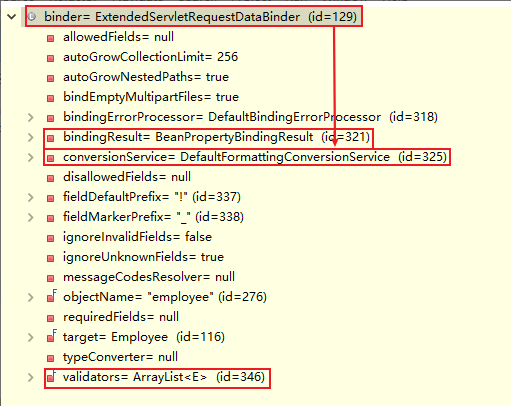
1.ConversionService组件
- 负责数据类型的转换以及格式化功能
- ConversionService(接口)中有非常多的converter(转换器)
- 不同类型的转换和格式化用它自己的==converter==进行工作

ConversionService converters =
	@org.springframework.format.annotation.DateTimeFormat java.lang.Long -> java.lang.String: org.springframework.format.datetime.DateTimeFormatAnnotationFormatterFactory@2d79adce,@org.springframework.format.annotation.NumberFormat java.lang.Long -> java.lang.String: org.springframework.format.number.NumberFormatAnnotationFormatterFactory@4aa56e0e
	@org.springframework.format.annotation.DateTimeFormat java.time.LocalDate -> java.lang.String: org.springframework.format.datetime.standard.Jsr310DateTimeFormatAnnotationFormatterFactory@1f5a6f4a,java.time.LocalDate -> java.lang.String : org.springframework.format.datetime.standard.TemporalAccessorPrinter@4fab9160
	@org.springframework.format.annotation.DateTimeFormat java.time.LocalDateTime -> java.lang.String: org.springframework.format.datetime.standard.Jsr310DateTimeFormatAnnotationFormatterFactory@1f5a6f4a,java.time.LocalDateTime -> java.lang.String : org.springframework.format.datetime.standard.TemporalAccessorPrinter@538ef1eb
	@org.springframework.format.annotation.DateTimeFormat java.time.LocalTime -> java.lang.String: org.springframework.format.datetime.standard.Jsr310DateTimeFormatAnnotationFormatterFactory@1f5a6f4a,java.time.LocalTime -> java.lang.String : org.springframework.format.datetime.standard.TemporalAccessorPrinter@c5146f2
	@org.springframework.format.annotation.DateTimeFormat java.time.OffsetDateTime -> java.lang.String: org.springframework.format.datetime.standard.Jsr310DateTimeFormatAnnotationFormatterFactory@1f5a6f4a,java.time.OffsetDateTime -> java.lang.String : org.springframework.format.datetime.standard.TemporalAccessorPrinter@528ad79
	@org.springframework.format.annotation.DateTimeFormat java.time.OffsetTime -> java.lang.String: org.springframework.format.datetime.standard.Jsr310DateTimeFormatAnnotationFormatterFactory@1f5a6f4a,java.time.OffsetTime -> java.lang.String : org.springframework.format.datetime.standard.TemporalAccessorPrinter@647f303
	@org.springframework.format.annotation.DateTimeFormat java.time.ZonedDateTime -> java.lang.String: org.springframework.format.datetime.standard.Jsr310DateTimeFormatAnnotationFormatterFactory@1f5a6f4a,java.time.ZonedDateTime -> java.lang.String : org.springframework.format.datetime.standard.TemporalAccessorPrinter@bda4d4c
	@org.springframework.format.annotation.DateTimeFormat java.util.Calendar -> java.lang.String: org.springframework.format.datetime.DateTimeFormatAnnotationFormatterFactory@2d79adce
	@org.springframework.format.annotation.DateTimeFormat java.util.Date -> java.lang.String: org.springframework.format.datetime.DateTimeFormatAnnotationFormatterFactory@2d79adce
	@org.springframework.format.annotation.NumberFormat java.lang.Byte -> java.lang.String: org.springframework.format.number.NumberFormatAnnotationFormatterFactory@4aa56e0e
	@org.springframework.format.annotation.NumberFormat java.lang.Double -> java.lang.String: org.springframework.format.number.NumberFormatAnnotationFormatterFactory@4aa56e0e
	@org.springframework.format.annotation.NumberFormat java.lang.Float -> java.lang.String: org.springframework.format.number.NumberFormatAnnotationFormatterFactory@4aa56e0e
	@org.springframework.format.annotation.NumberFormat java.lang.Integer -> java.lang.String: org.springframework.format.number.NumberFormatAnnotationFormatterFactory@4aa56e0e
	@org.springframework.format.annotation.NumberFormat java.lang.Short -> java.lang.String: org.springframework.format.number.NumberFormatAnnotationFormatterFactory@4aa56e0e
	@org.springframework.format.annotation.NumberFormat java.math.BigDecimal -> java.lang.String: org.springframework.format.number.NumberFormatAnnotationFormatterFactory@4aa56e0e
	@org.springframework.format.annotation.NumberFormat java.math.BigInteger -> java.lang.String: org.springframework.format.number.NumberFormatAnnotationFormatterFactory@4aa56e0e
	java.lang.Boolean -> java.lang.String : org.springframework.core.convert.support.ObjectToStringConverter@2007b2cb
	java.lang.Character -> java.lang.Number : org.springframework.core.convert.support.CharacterToNumberFactory@77af216b
	java.lang.Character -> java.lang.String : org.springframework.core.convert.support.ObjectToStringConverter@275d923b
	java.lang.Enum -> java.lang.Integer : org.springframework.core.convert.support.EnumToIntegerConverter@20024e53
	java.lang.Enum -> java.lang.String : org.springframework.core.convert.support.EnumToStringConverter@572a9f05
	java.lang.Integer -> java.lang.Enum : org.springframework.core.convert.support.IntegerToEnumConverterFactory@3d8e32c3
	java.lang.Long -> java.time.Instant : org.springframework.format.datetime.standard.DateTimeConverters$LongToInstantConverter@6a88519c
	java.lang.Long -> java.util.Calendar : org.springframework.format.datetime.DateFormatterRegistrar$LongToCalendarConverter@184331e8,java.lang.Long -> java.util.Calendar : org.springframework.format.datetime.DateFormatterRegistrar$LongToCalendarConverter@5726b340
	java.lang.Long -> java.util.Date : org.springframework.format.datetime.DateFormatterRegistrar$LongToDateConverter@20fac40c,java.lang.Long -> java.util.Date : org.springframework.format.datetime.DateFormatterRegistrar$LongToDateConverter@35ed78d5
	java.lang.Number -> java.lang.Character : org.springframework.core.convert.support.NumberToCharacterConverter@5235697d
	java.lang.Number -> java.lang.Number : org.springframework.core.convert.support.NumberToNumberConverterFactory@42238f9e
	java.lang.Number -> java.lang.String : org.springframework.core.convert.support.ObjectToStringConverter@359205bd
	java.lang.String -> @org.springframework.format.annotation.DateTimeFormat java.lang.Long: org.springframework.format.datetime.DateTimeFormatAnnotationFormatterFactory@2d79adce,java.lang.String -> @org.springframework.format.annotation.NumberFormat java.lang.Long: org.springframework.format.number.NumberFormatAnnotationFormatterFactory@4aa56e0e
	java.lang.String -> @org.springframework.format.annotation.DateTimeFormat java.time.LocalDate: org.springframework.format.datetime.standard.Jsr310DateTimeFormatAnnotationFormatterFactory@1f5a6f4a,java.lang.String -> java.time.LocalDate: org.springframework.format.datetime.standard.TemporalAccessorParser@67872db8
	java.lang.String -> @org.springframework.format.annotation.DateTimeFormat java.time.LocalDateTime: org.springframework.format.datetime.standard.Jsr310DateTimeFormatAnnotationFormatterFactory@1f5a6f4a,java.lang.String -> java.time.LocalDateTime: org.springframework.format.datetime.standard.TemporalAccessorParser@d3aeccf
	java.lang.String -> @org.springframework.format.annotation.DateTimeFormat java.time.LocalTime: org.springframework.format.datetime.standard.Jsr310DateTimeFormatAnnotationFormatterFactory@1f5a6f4a,java.lang.String -> java.time.LocalTime: org.springframework.format.datetime.standard.TemporalAccessorParser@40bd580d
	java.lang.String -> @org.springframework.format.annotation.DateTimeFormat java.time.OffsetDateTime: org.springframework.format.datetime.standard.Jsr310DateTimeFormatAnnotationFormatterFactory@1f5a6f4a,java.lang.String -> java.time.OffsetDateTime: org.springframework.format.datetime.standard.TemporalAccessorParser@5f2e7587
	java.lang.String -> @org.springframework.format.annotation.DateTimeFormat java.time.OffsetTime: org.springframework.format.datetime.standard.Jsr310DateTimeFormatAnnotationFormatterFactory@1f5a6f4a,java.lang.String -> java.time.OffsetTime: org.springframework.format.datetime.standard.TemporalAccessorParser@4f8b2790
	java.lang.String -> @org.springframework.format.annotation.DateTimeFormat java.time.ZonedDateTime: org.springframework.format.datetime.standard.Jsr310DateTimeFormatAnnotationFormatterFactory@1f5a6f4a,java.lang.String -> java.time.ZonedDateTime: org.springframework.format.datetime.standard.TemporalAccessorParser@218d010a
	java.lang.String -> @org.springframework.format.annotation.DateTimeFormat java.util.Calendar: org.springframework.format.datetime.DateTimeFormatAnnotationFormatterFactory@2d79adce
	java.lang.String -> @org.springframework.format.annotation.DateTimeFormat java.util.Date: org.springframework.format.datetime.DateTimeFormatAnnotationFormatterFactory@2d79adce
	java.lang.String -> @org.springframework.format.annotation.NumberFormat java.lang.Byte: org.springframework.format.number.NumberFormatAnnotationFormatterFactory@4aa56e0e
	java.lang.String -> @org.springframework.format.annotation.NumberFormat java.lang.Double: org.springframework.format.number.NumberFormatAnnotationFormatterFactory@4aa56e0e
	java.lang.String -> @org.springframework.format.annotation.NumberFormat java.lang.Float: org.springframework.format.number.NumberFormatAnnotationFormatterFactory@4aa56e0e
	java.lang.String -> @org.springframework.format.annotation.NumberFormat java.lang.Integer: org.springframework.format.number.NumberFormatAnnotationFormatterFactory@4aa56e0e
	java.lang.String -> @org.springframework.format.annotation.NumberFormat java.lang.Short: org.springframework.format.number.NumberFormatAnnotationFormatterFactory@4aa56e0e
	java.lang.String -> @org.springframework.format.annotation.NumberFormat java.math.BigDecimal: org.springframework.format.number.NumberFormatAnnotationFormatterFactory@4aa56e0e
	java.lang.String -> @org.springframework.format.annotation.NumberFormat java.math.BigInteger: org.springframework.format.number.NumberFormatAnnotationFormatterFactory@4aa56e0e
	java.lang.String -> java.lang.Boolean : org.springframework.core.convert.support.StringToBooleanConverter@6b0029da
	java.lang.String -> java.lang.Character : org.springframework.core.convert.support.StringToCharacterConverter@79dcade1
	java.lang.String -> java.lang.Enum : org.springframework.core.convert.support.StringToEnumConverterFactory@59004937
	java.lang.String -> java.lang.Number : org.springframework.core.convert.support.StringToNumberConverterFactory@2d4b1acf
	java.lang.String -> java.nio.charset.Charset : org.springframework.core.convert.support.StringToCharsetConverter@3415b...
2.validators
- 负责校验工作
3.bindResult
- 负责保存以及解析数据绑定期间数据校验产生的错误

3、数据绑定流程
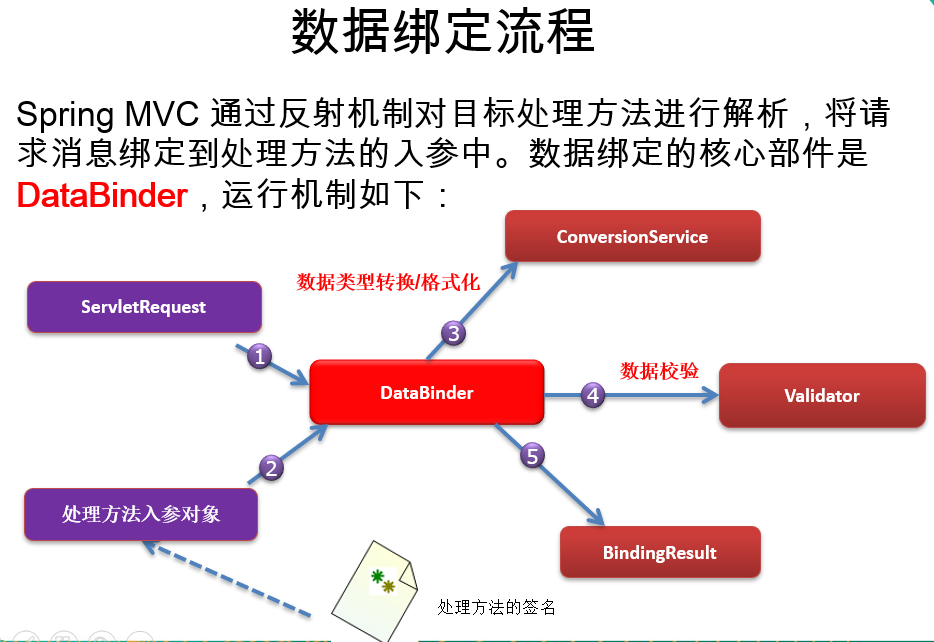
4、自定义类型转换
1.步骤
-
实现Converter接口,写一个自定义类型的转换器
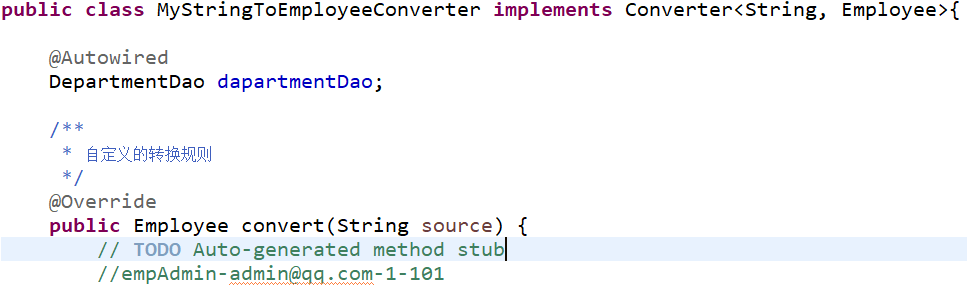
-
你的Converter得放进ConversionService中(Converter是ConversionService中的组件)
-
将WebDataBinder中的ConversionService设置成我们这个加了自定义类型转换器的ConversionService
-
配置出ConversionService
<!-- 告诉SpringMVC别用默认的ConversionService, 而用我自定义的ConversionService,可能有我们自定义的Converter --> <bean id="conversionService" class="org.springframework.context.support.ConversionServiceFactoryBean"> <!-- converters转换器中添加我们自定义的类型转换器 --> <property name="converters"> <set> <bean class="com.lql.component.MyStringToEmployeeConverter"></bean> </set> </property> </bean> -
让SpringMVC用我们的ConversionService
<!-- conversion-service="conversionService":使用我们自己配置的类型转换组件 -->
<mvc:annotation-driven conversion-service="conversionService"></mvc:annotation-driven>
2.总结三步(换一种说法)
- 实现Converter接口,做一个自定义类型的转换器
- 将这个Converter配置在ConversionService中
- 告诉SpringMVC使用这个ConversionService
- 源码上WebDataBinder上的ConversionService组件替换了
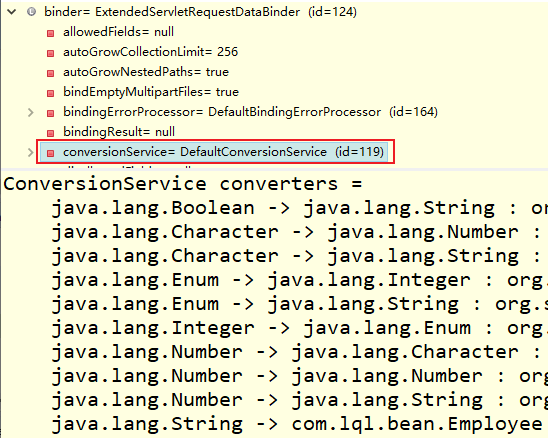
ConversionService converters =
	java.lang.Boolean -> java.lang.String : org.springframework.core.convert.support.ObjectToStringConverter@26baea68
	java.lang.Character -> java.lang.Number : org.springframework.core.convert.support.CharacterToNumberFactory@7ddf5356
	java.lang.Character -> java.lang.String : org.springframework.core.convert.support.ObjectToStringConverter@5b786b72
	java.lang.Enum -> java.lang.Integer : org.springframework.core.convert.support.EnumToIntegerConverter@7a709d66
	java.lang.Enum -> java.lang.String : org.springframework.core.convert.support.EnumToStringConverter@3cf7cd5b
	java.lang.Integer -> java.lang.Enum : org.springframework.core.convert.support.IntegerToEnumConverterFactory@b68cfc9
	java.lang.Number -> java.lang.Character : org.springframework.core.convert.support.NumberToCharacterConverter@245728b7
	java.lang.Number -> java.lang.Number : org.springframework.core.convert.support.NumberToNumberConverterFactory@28ca2efb
	java.lang.Number -> java.lang.String : org.springframework.core.convert.support.ObjectToStringConverter@616716d5
********************************************************************************
	java.lang.String -> com.lql.bean.Employee : com.lql.component.MyStringToEmployeeConverter@30e6e7dd
********************************************************************************
	java.lang.String -> java.lang.Boolean : org.springframework.core.convert.support.StringToBooleanConverter@3e012521
	java.lang.String -> java.lang.Character : org.springframework.core.convert.support.StringToCharacterConverter@223c3438
	java.lang.String -> java.lang.Enum : org.springframework.core.convert.support.StringToEnumConverterFactory@3bb56c98
	java.lang.String -> java.lang.Number : org.springframework.core.convert.support.StringToNumberConverterFactory@77910832
	java.lang.String -> java.nio.charset.Charset : org.springframework.core.convert.support.StringToCharsetConverter@25f5e65f
	java.lang.String -> java.util.Currency : org.springframework.core.convert.support.StringToCurrencyConverter@3ebc894b
	java.lang.String -> java.util.Locale : org.springframework.core.convert.support.StringToLocaleConverter@6a31ef1c
	java.lang.String -> java.util.Properties : org.springframework.core.convert.support.StringToPropertiesConverter@2f9477b8
	java.lang.String -> java.util.TimeZone : org.springframework.core.convert.support.StringToTimeZoneConverter@d0ce4bb
	java.lang.String -> java.util.UUID : org.springframework.core.convert.support.StringToUUIDConverter@28d46e31
	java.nio.charset.Charset -> java.lang.String : org.springframework.core.convert.support.ObjectToStringConverter@5b90c42a
	java.time.ZoneId -> java.util.TimeZone : org.springframework.core.convert.support.ZoneIdToTimeZoneConverter@708c3b21
	java.time.ZonedDateTime -> java.util.Calendar : org.springframework.core.convert.support.ZonedDateTimeToCalendarConverter@4e57a21
	java.util.Currency -> java.lang.String : org.springframework.core.convert.support.ObjectToStringConverter@2559aa52
	java.util.Locale -> java.lang.String : org.springframework.core.convert.support.ObjectToStringConverter@682e7a14
	java.util.Properties -> java.lang.String : org.springframework.core.convert.support.PropertiesToStringConverter@72f857f4
	java.util.UUID -> java.lang.String : org.springframework.core.convert.support.ObjectToStringConverter@40375a43
	org.springframework.core.convert.support.ArrayToArrayConverter@77cb2990
	org.springframework.core.convert.support.ArrayToCollectionConverter@4c92dc4a
	org.springframework.core.convert.support.ArrayToObjectConverter@7b53dd9
	org.springframework.core.convert.support.ArrayToStringConverter@62019d
	org.springframework.core.convert.support.ByteBufferConverter@f20cfaa
	org.springframework.core.convert.support.ByteBufferConverter@f20cfaa
	org.springframework.core.convert.support.ByteBufferConverter@f20cfaa
	org.springframework.core.convert.support.ByteBufferConverter@f20cfaa
	org.springframework.core.convert.support.CollectionToArrayConverter@7ce565db
	org.springframework.core.convert.support.CollectionToCollectionConverter@d549068
	org.springframework.core.convert.support.CollectionToObjectConverter@6acd0c71
	org.springframework.core.convert.support.CollectionToStringConverter@3379e562
	org.springframework.core.convert.support.FallbackObjectToStringConverter@7636d645
	org.springframework.core.convert.support.IdToEntityConverter@db1b888,org.springframework.core.convert.support.ObjectToObjectConverter@6772acb9
	org.springframework.core.convert.support.MapToMapConverter@57fe7d04
	org.springframework.core.convert.support.ObjectToArrayConverter@23076676
	org.springframework.core.convert.support.ObjectToCollectionConverter@72e1f388
	org.springframework.core.convert.support.ObjectToOptionalConverter@592d8ed0
	org.springframework.core.convert.support.ObjectToOptionalConverter@592d8ed0
	org.springframework.core.convert.support.ObjectToOptionalConverter@592d8ed0
	org.springframework.core.convert.support.StreamConverter@e4f4a43
	org.springframework.core.convert.support.StreamConverter@e4f4a43
	org.springframework.core.convert.support.StreamConverter@e4f4a43
	org.springframework.core.convert.support.StreamConverter@e4f4a43
	org.springframework.core.convert.support.StringToArrayConverter@2e4b2fa8
	org.springframework.core.convert.support.StringToCollectionConverter@44b8baca
5、<mvc:annotation-driven/>
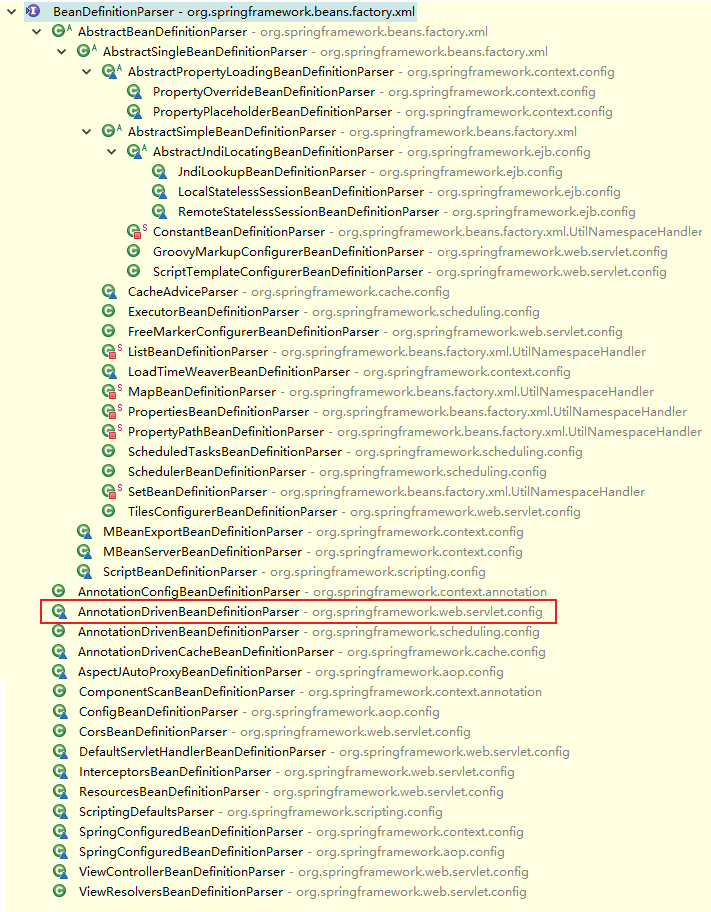
1.SpringMVC解析<mvc:annotation-driven/>标签
- 添加了好多东西:
class AnnotationDrivenBeanDefinitionParser implements BeanDefinitionParser {

	public static final String HANDLER_MAPPING_BEAN_NAME = RequestMappingHandlerMapping.class.getName();

	public static final String HANDLER_ADAPTER_BEAN_NAME = RequestMappingHandlerAdapter.class.getName();

	public static final String CONTENT_NEGOTIATION_MANAGER_BEAN_NAME = "mvcContentNegotiationManager";


	private static final boolean javaxValidationPresent;

	private static boolean romePresent;

	private static final boolean jaxb2Present;

	private static final boolean jackson2Present;

	private static final boolean jackson2XmlPresent;

	private static final boolean jackson2SmilePresent;

	private static final boolean jackson2CborPresent;

	private static final boolean gsonPresent;

	static {
		ClassLoader classLoader = AnnotationDrivenBeanDefinitionParser.class.getClassLoader();
		javaxValidationPresent = ClassUtils.isPresent("javax.validation.Validator", classLoader);
		romePresent = ClassUtils.isPresent("com.rometools.rome.feed.WireFeed", classLoader);
		jaxb2Present = ClassUtils.isPresent("javax.xml.bind.Binder", classLoader);
		jackson2Present = ClassUtils.isPresent("com.fasterxml.jackson.databind.ObjectMapper", classLoader) &&
						ClassUtils.isPresent("com.fasterxml.jackson.core.JsonGenerator", classLoader);
		jackson2XmlPresent = ClassUtils.isPresent("com.fasterxml.jackson.dataformat.xml.XmlMapper", classLoader);
		jackson2SmilePresent = ClassUtils.isPresent("com.fasterxml.jackson.dataformat.smile.SmileFactory", classLoader);
		jackson2CborPresent = ClassUtils.isPresent("com.fasterxml.jackson.dataformat.cbor.CBORFactory", classLoader);
		gsonPresent = ClassUtils.isPresent("com.google.gson.Gson", classLoader);
	}


	@Override
	@Nullable
	public BeanDefinition parse(Element element, ParserContext context) {
		Object source = context.extractSource(element);
		XmlReaderContext readerContext = context.getReaderContext();

		CompositeComponentDefinition compDefinition = new CompositeComponentDefinition(element.getTagName(), source);
		context.pushContainingComponent(compDefinition);

		RuntimeBeanReference contentNegotiationManager = getContentNegotiationManager(element, source, context);

		RootBeanDefinition handlerMappingDef = new RootBeanDefinition(RequestMappingHandlerMapping.class);
		handlerMappingDef.setSource(source);
		handlerMappingDef.setRole(BeanDefinition.ROLE_INFRASTRUCTURE);
		handlerMappingDef.getPropertyValues().add("order", 0);
		handlerMappingDef.getPropertyValues().add("contentNegotiationManager", contentNegotiationManager);

		if (element.hasAttribute("enable-matrix-variables")) {
			Boolean enableMatrixVariables = Boolean.valueOf(element.getAttribute("enable-matrix-variables"));
			handlerMappingDef.getPropertyValues().add("removeSemicolonContent", !enableMatrixVariables);
		}

		configurePathMatchingProperties(handlerMappingDef, element, context);
		readerContext.getRegistry().registerBeanDefinition(HANDLER_MAPPING_BEAN_NAME, handlerMappingDef);

		RuntimeBeanReference corsRef = MvcNamespaceUtils.registerCorsConfigurations(null, context, source);
		handlerMappingDef.getPropertyValues().add("corsConfigurations", corsRef);

		RuntimeBeanReference conversionService = getConversionService(element, source, context);
		RuntimeBeanReference validator = getValidator(element, source, context);
		RuntimeBeanReference messageCodesResolver = getMessageCodesResolver(element);

		RootBeanDefinition bindingDef = new RootBeanDefinition(ConfigurableWebBindingInitializer.class);
		bindingDef.setSource(source);
		bindingDef.setRole(BeanDefinition.ROLE_INFRASTRUCTURE);
		bindingDef.getPropertyValues().add("conversionService", conversionService);
		bindingDef.getPropertyValues().add("validator", validator);
		bindingDef.getPropertyValues().add("messageCodesResolver", messageCodesResolver);

		ManagedList<?> messageConverters = getMessageConverters(element, source, context);
		ManagedList<?> argumentResolvers = getArgumentResolvers(element, context);
		ManagedList<?> returnValueHandlers = getReturnValueHandlers(element, context);
		String asyncTimeout = getAsyncTimeout(element);
		RuntimeBeanReference asyncExecutor = getAsyncExecutor(element);
		ManagedList<?> callableInterceptors = getInterceptors(element, source, context, "callable-interceptors");
		ManagedList<?> deferredResultInterceptors = getInterceptors(element, source, context, "deferred-result-interceptors");

		RootBeanDefinition handlerAdapterDef = new RootBeanDefinition(RequestMappingHandlerAdapter.class);
		handlerAdapterDef.setSource(source);
		handlerAdapterDef.setRole(BeanDefinition.ROLE_INFRASTRUCTURE);
		handlerAdapterDef.getPropertyValues().add("contentNegotiationManager", contentNegotiationManager);
		handlerAdapterDef.getPropertyValues().add("webBindingInitializer", bindingDef);
		handlerAdapterDef.getPropertyValues().add("messageConverters", messageConverters);
		addRequestBodyAdvice(handlerAdapterDef);
		addResponseBodyAdvice(handlerAdapterDef);

		if (element.hasAttribute("ignore-default-model-on-redirect")) {
			Boolean ignoreDefaultModel = Boolean.valueOf(element.getAttribute("ignore-default-model-on-redirect"));
			handlerAdapterDef.getPropertyValues().add("ignoreDefaultModelOnRedirect", ignoreDefaultModel);
		}
		if (argumentResolvers != null) {
			handlerAdapterDef.getPropertyValues().add("customArgumentResolvers", argumentResolvers);
		}
		if (returnValueHandlers != null) {
			handlerAdapterDef.getPropertyValues().add("customReturnValueHandlers", returnValueHandlers);
		}
		if (asyncTimeout != null) {
			handlerAdapterDef.getPropertyValues().add("asyncRequestTimeout", asyncTimeout);
		}
		if (asyncExecutor != null) {
			handlerAdapterDef.getPropertyValues().add("taskExecutor", asyncExecutor);
		}

		handlerAdapterDef.getPropertyValues().add("callableInterceptors", callableInterceptors);
		handlerAdapterDef.getPropertyValues().add("deferredResultInterceptors", deferredResultInterceptors);
		readerContext.getRegistry().registerBeanDefinition(HANDLER_ADAPTER_BEAN_NAME, handlerAdapterDef);

		RootBeanDefinition uriContributorDef =
				new RootBeanDefinition(CompositeUriComponentsContributorFactoryBean.class);
		uriContributorDef.setSource(source);
		uriContributorDef.getPropertyValues().addPropertyValue("handlerAdapter", handlerAdapterDef);
		uriContributorDef.getPropertyValues().addPropertyValue("conversionService", conversionService);
		String uriContributorName = MvcUriComponentsBuilder.MVC_URI_COMPONENTS_CONTRIBUTOR_BEAN_NAME;
		readerContext.getRegistry().registerBeanDefinition(uriContributorName, uriContributorDef);

		RootBeanDefinition csInterceptorDef = new RootBeanDefinition(ConversionServiceExposingInterceptor.class);
		csInterceptorDef.setSource(source);
		csInterceptorDef.getConstructorArgumentValues().addIndexedArgumentValue(0, conversionService);
		RootBeanDefinition mappedInterceptorDef = new RootBeanDefinition(MappedInterceptor.class);
		mappedInterceptorDef.setSource(source);
		mappedInterceptorDef.setRole(BeanDefinition.ROLE_INFRASTRUCTURE);
		mappedInterceptorDef.getConstructorArgumentValues().addIndexedArgumentValue(0, (Object) null);
		mappedInterceptorDef.getConstructorArgumentValues().addIndexedArgumentValue(1, csInterceptorDef);
		String mappedInterceptorName = readerContext.registerWithGeneratedName(mappedInterceptorDef);

		RootBeanDefinition methodExceptionResolver = new RootBeanDefinition(ExceptionHandlerExceptionResolver.class);
		methodExceptionResolver.setSource(source);
		methodExceptionResolver.setRole(BeanDefinition.ROLE_INFRASTRUCTURE);
		methodExceptionResolver.getPropertyValues().add("contentNegotiationManager", contentNegotiationManager);
		methodExceptionResolver.getPropertyValues().add("messageConverters", messageConverters);
		methodExceptionResolver.getPropertyValues().add("order", 0);
		addResponseBodyAdvice(methodExceptionResolver);
		if (argumentResolvers != null) {
			methodExceptionResolver.getPropertyValues().add("customArgumentResolvers", argumentResolvers);
		}
		if (returnValueHandlers != null) {
			methodExceptionResolver.getPropertyValues().add("customReturnValueHandlers", returnValueHandlers);
		}
		String methodExResolverName = readerContext.registerWithGeneratedName(methodExceptionResolver);

		RootBeanDefinition statusExceptionResolver = new RootBeanDefinition(ResponseStatusExceptionResolver.class);
		statusExceptionResolver.setSource(source);
		statusExceptionResolver.setRole(BeanDefinition.ROLE_INFRASTRUCTURE);
		statusExceptionResolver.getPropertyValues().add("order", 1);
		String statusExResolverName = readerContext.registerWithGeneratedName(statusExceptionResolver);

		RootBeanDefinition defaultExceptionResolver = new RootBeanDefinition(DefaultHandlerExceptionResolver.class);
		defaultExceptionResolver.setSource(source);
		defaultExceptionResolver.setRole(BeanDefinition.ROLE_INFRASTRUCTURE);
		defaultExceptionResolver.getPropertyValues().add("order", 2);
		String defaultExResolverName = readerContext.registerWithGeneratedName(defaultExceptionResolver);

		context.registerComponent(new BeanComponentDefinition(handlerMappingDef, HANDLER_MAPPING_BEAN_NAME));
		context.registerComponent(new BeanComponentDefinition(handlerAdapterDef, HANDLER_ADAPTER_BEAN_NAME));
		context.registerComponent(new BeanComponentDefinition(uriContributorDef, uriContributorName));
		context.registerComponent(new BeanComponentDefinition(mappedInterceptorDef, mappedInterceptorName));
		context.registerComponent(new BeanComponentDefinition(methodExceptionResolver, methodExResolverName));
		context.registerComponent(new BeanComponentDefinition(statusExceptionResolver, statusExResolverName));
		context.registerComponent(new BeanComponentDefinition(defaultExceptionResolver, defaultExResolverName));

		// Ensure BeanNameUrlHandlerMapping (SPR-8289) and default HandlerAdapters are not "turned off"
		MvcNamespaceUtils.registerDefaultComponents(context, source);

		context.popAndRegisterContainingComponent();

		return null;
	}
2.<mvc:default-servlet-handler/>和 mvc:annotation-driven
-
均不配置
- 动态资源(@RequestMapping映射的资源)能访问,静态资源(.html、.js、.img)不行
- HandlerMapping

- RequestMappingHandlerMapping中的mappingLookup中保存了每一个资源的映射信息,而没有保存静态资源映射的请求。==故动态资源能访问,静态不能==。
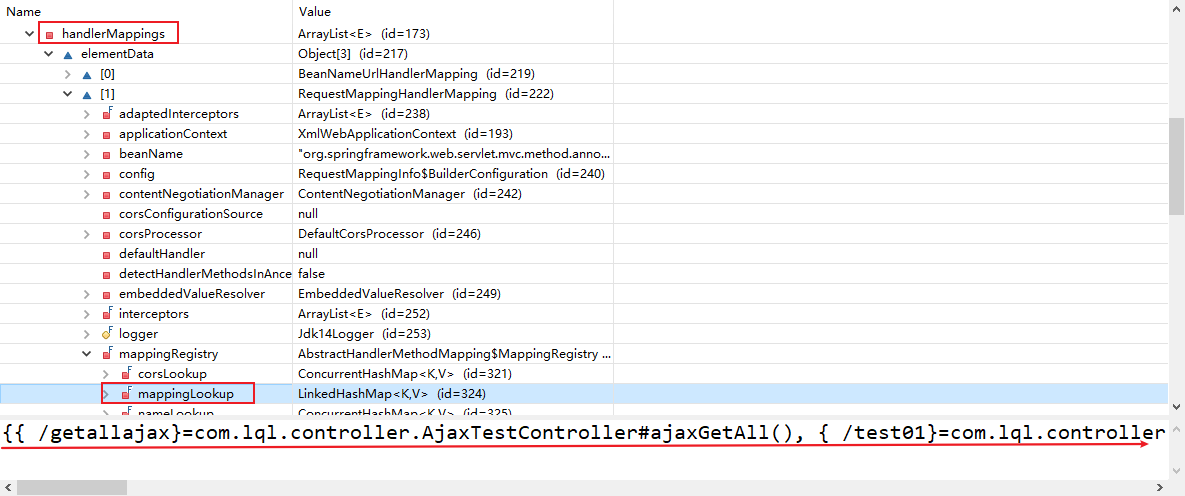
- HandlerAdapter(方法执行的适配器)
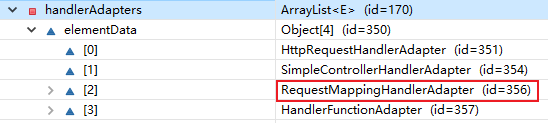
-
RequestMappingHandlerAdapter帮我们执行目标方法
-
配前者不配后者
- 静态资源🆗,动态资源完蛋
- HandlerMapping

- SimpleUrlHandlerMapping替换了RequestMappingHandlerMapping,而前者能把所有请求映射给tomcat,==故静态资源能访问,而动态不能。==
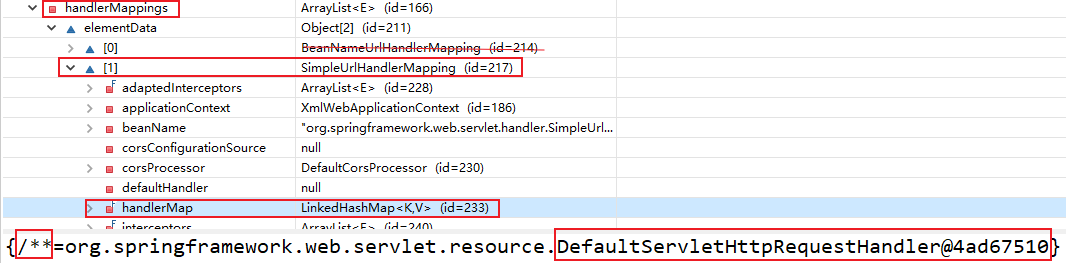
- HandlerAdapter(方法执行的适配器)

- RequestMappingHandlerAdapter都没了,方法都不能执行
-
配后者不配前者
- 动态资源🆗,静态资源完蛋
-
均配置
- 动、静态资源都能访问
- HandlerMapping

6、格式化
1.需求
- 日期格式:2020-12-07
- 页面提交的数据格式如果不正确,就是404
2.解决
- 对日期类型的属性使用 @DateTimeFormat 注解

-
==注意:如果要使用自定义类型转换==(不用自定义类型转换也是可以的)
- ConversionServiceFactoryBean创建的ConversionService组件是没有格式化器存在的
- 而实现ConversionService接口的 FormattingConversionService既具有类型转换的功能,又具有格式化的功能
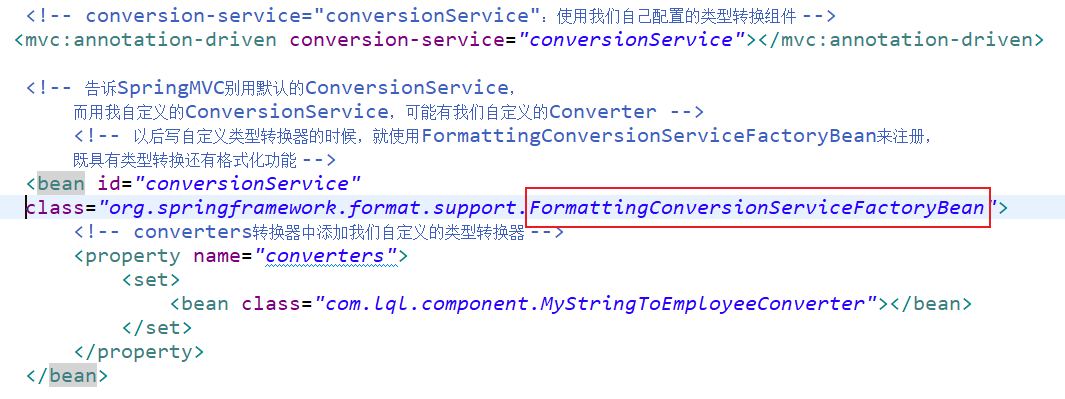
7、数据校验
-
只做前端校验是不安全的
-
在重要数据一定要加上后端验证
可以写程序将我们每一个数据取出进行校验,如果失败直接来到添加页面,提示其重新填写- SpringMVC:可以JSR303来做数据校验
- JDBC:规范—》实现(各个厂商的驱动包)
- JSR303:规范—-》Hibernate Validator(第三方校验框架)
1.JSR 303
-
JSR 303 是 Java 为 Bean 数据合法性校验提供的标准框架,它已经包含在 JavaEE 6.0 中
-
JSR 303 通过在 Bean 属性上标注类似于 @NotNull、@Max 等标准的注解指定校验规则,并通过标准的验证接口对 Bean 进行验证
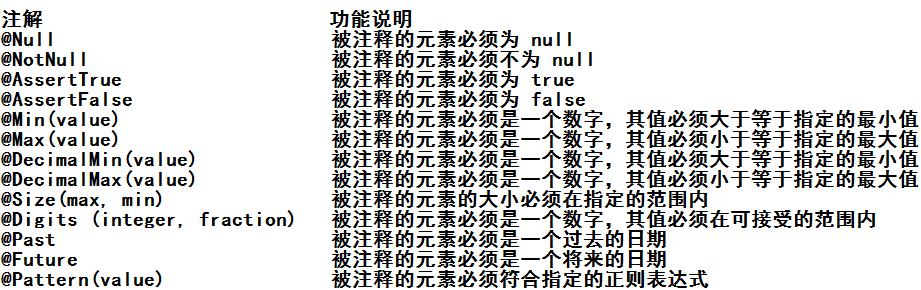
2.如何快速的进行后端校验
-
导入校验框架的jar包
- 有几个带el的jar包不导入,tomcat中有(tomcat7.0以上el表达式比较强大);如果tomcat的版本是7.0以下将带el的几个jar包放在tomcat的lib文件夹下
hibernate-validator-5.0.0.CR2.jar hibernate-validator-annotation-processor-5.0.0.CR2.jar
classmate-0.8.0.jar jboss-logging-3.1.1.GA.jar validation-api-1.1.0.CR1.jar
-
只需要给javaBean的属性添加上校验注解
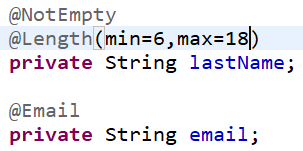
-
在SpringMVC封装对象的时候,告诉SpringMVC这个javaBean需要校验
public String addEmp(@Valid Employee employee) { -
如何知道校验结果
- 给需要校验的javaBean后面紧跟一个BindingResult。这个BindingResult就是封装前一个bean的校验结果

-
根据不同的校验结果决定怎么办
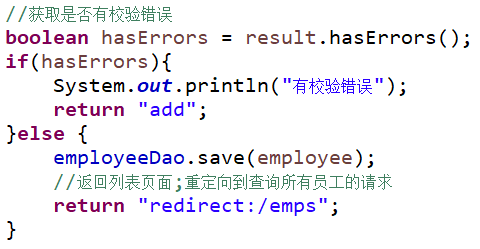
-
来到页面使用
<form:errors path=""/>取出错误信息
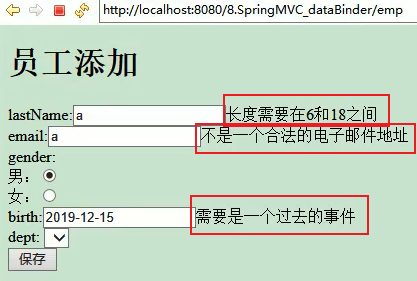
3.原生的表单怎么办?
-
将错误放在请求域中
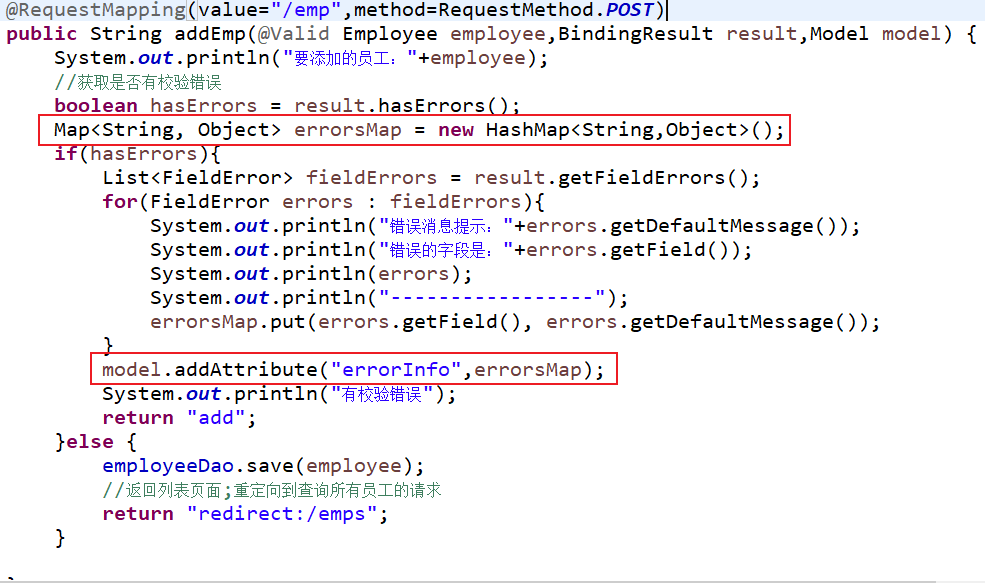
-
用el表达式获取错误信息

4.国际化定制自己的错误消息显示
1、编写国际化的文件
- errors_zh_CN.properties
- errors_en_US.properties


- ==注意==
- 格式:key=lastname betweenn 6 and 18
- key有规定
- 校验错误信息
Field error in object 'employee' on field 'birth': rejected value [aaA]; codes [typeMismatch.employee.birth,typeMismatch.birth,typeMismatch.java.util.Date,typeMismatch]; arguments [org.springframework.context.support.DefaultMessageSourceResolvable: codes [employee.birth,birth]; arguments []; default message [birth]]; default message [Failed to convert property value of type 'java.lang.String' to required type 'java.util.Date' for property 'birth'; nested exception is org.springframework.core.convert.ConversionFailedException: Failed to convert from type [java.lang.String] to type [@org.springframework.format.annotation.DateTimeFormat @javax.validation.constraints.Past java.util.Date] for value 'aaA'; nested exception is java.lang.IllegalArgumentException: Parse attempt failed for value [aaA]]
Field error in object 'employee' on field 'email': rejected value [a]; codes [Email.employee.email,Email.email,Email.java.lang.String,Email]; arguments [org.springframework.context.support.DefaultMessageSourceResolvable: codes [employee.email,email]; arguments []; default message [email],[Ljavax.validation.constraints.Pattern$Flag;@36575bc1,.*]; default message [not a well-formed email address]
每一个字段发生错误以后,都会有自己的错误代码;国际化文件中错误消息的key必须对应一个错误代码:
==codes==
[
Email.employee.email, 校验规则.隐含模型中这个对象的key.对象的属性
Email.email, 校验规则.属性名
Email.java.lang.String, 校验规则.属性类型
];
| codes | 解释 |
|---|---|
| Email.employee.email | 隐含模型中employee对象的email字段发生了**@Email**校验错误 |
| Email.email | 所有的email属性只要发生了**@Email**错误 |
| Email.java.lang.String | 只要是String类型发生了**@Email**错误 |
| 只要发生了**@Email**校验错误 |
2、让SpringMVC管理国际化资源文件
<!-- 管理国际化资源文件 -->
<bean class="org.springframework.context.support.ResourceBundleMessageSource">
	<property name="basename" value="errors"></property>
</bean>
3、来到页面取值
- 用
<form:errors path=""/>(见上面快速后端校验)
4、高级国际化
- 动态传入消息参数
Length.java.lang.String=length incorrect {0} {1} {2}
-
{0}:永远都是当前属性名;
-
{1}、{2}:匹配注解参数
5.简单错误消息显示(不能国际化)
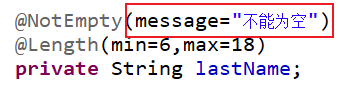
8、ajax
1.SpringMVC快速的完成ajax功能
1、要求
- 返回数据是json就🆗
- 页面发
$.ajax();请求
- 页面发
2、原生javaWeb
- 导入GSON
- 返回的数据用GSON转成json
- 写出去
3、SpringMVC-ajax
-
导包
jackson-annotations-2.1.5.jar jackson-core-2.1.5.jar jackson-databind-2.1.5.jar
-
写配置
-
测试
==文件上传下载等见源码==
9、总体架构:
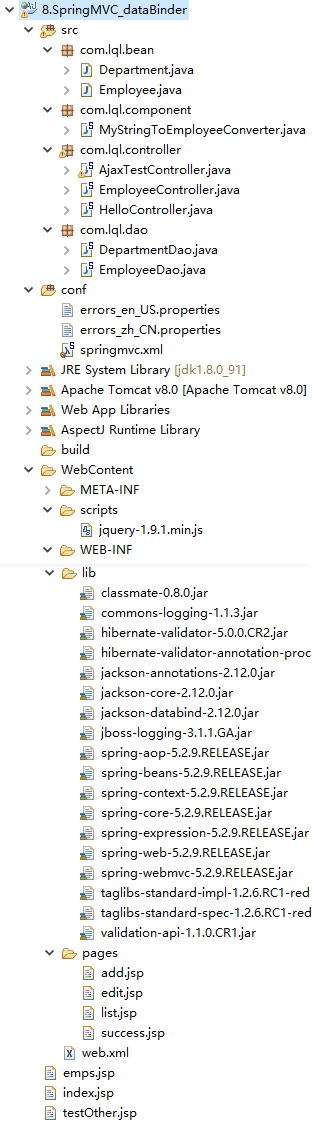
10、web.xml
<?xml version="1.0" encoding="UTF-8"?>
<web-app xmlns:xsi="http://www.w3.org/2001/XMLSchema-instance" xmlns="http://xmlns.jcp.org/xml/ns/javaee" xsi:schemaLocation="http://xmlns.jcp.org/xml/ns/javaee http://xmlns.jcp.org/xml/ns/javaee/web-app_3_1.xsd" id="WebApp_ID" version="3.1">
  <display-name>7.SpringMVC_crud</display-name>
  <welcome-file-list>
    <welcome-file>index.html</welcome-file>
    <welcome-file>index.htm</welcome-file>
    <welcome-file>index.jsp</welcome-file>
    <welcome-file>default.html</welcome-file>
    <welcome-file>default.htm</welcome-file>
    <welcome-file>default.jsp</welcome-file>
  </welcome-file-list>

  <!-- The front controller of this Spring Web application, responsible for handling all application requests -->
	<servlet>
		<servlet-name>springDispatcherServlet</servlet-name>
		<servlet-class>org.springframework.web.servlet.DispatcherServlet</servlet-class>
		<init-param>
			<param-name>contextConfigLocation</param-name>
			<param-value>classpath:springmvc.xml</param-value>
		</init-param>
		<load-on-startup>1</load-on-startup>
	</servlet>

	<!-- Map all requests to the DispatcherServlet for handling -->
	<servlet-mapping>
		<servlet-name>springDispatcherServlet</servlet-name>
		<url-pattern>/</url-pattern>
	</servlet-mapping>

	<!-- 字符编码Filter -->
	<filter>
		<filter-name>CharacterEncodingFilter</filter-name>
		<filter-class>org.springframework.web.filter.CharacterEncodingFilter</filter-class>
		<init-param>
			<param-name>encoding</param-name>
			<param-value>UTF-8</param-value>
		</init-param>
		<init-param>
			<param-name>forceRequestEncoding</param-name>
			<param-value>true</param-value>
		</init-param>
		<init-param>
			<param-name>forceResponseEncoding</param-name>
			<param-value>true</param-value>
		</init-param>
	</filter>
	<filter-mapping>
		<filter-name>CharacterEncodingFilter</filter-name>
		<url-pattern>/*</url-pattern>
	</filter-mapping>

	<!-- 支持Rest风格转换的Filter -->
	<filter>
		<filter-name>HiddenHttpMethodFilter</filter-name>
		<filter-class>org.springframework.web.filter.HiddenHttpMethodFilter</filter-class>
	</filter>
	<filter-mapping>
		<filter-name>HiddenHttpMethodFilter</filter-name>
		<url-pattern>/*</url-pattern>
	</filter-mapping>

</web-app>
11、springmvc.xml
<?xml version="1.0" encoding="UTF-8"?>
<beans xmlns="http://www.springframework.org/schema/beans"
	xmlns:xsi="http://www.w3.org/2001/XMLSchema-instance"
	xmlns:context="http://www.springframework.org/schema/context"
	xmlns:mvc="http://www.springframework.org/schema/mvc"
	xsi:schemaLocation="http://www.springframework.org/schema/mvc http://www.springframework.org/schema/mvc/spring-mvc-4.3.xsd
		http://www.springframework.org/schema/beans http://www.springframework.org/schema/beans/spring-beans.xsd
		http://www.springframework.org/schema/context http://www.springframework.org/schema/context/spring-context-4.3.xsd">

	<context:component-scan base-package="com.lql"></context:component-scan>

	<bean class="org.springframework.web.servlet.view.InternalResourceViewResolver">
		<property name="prefix" value="/WEB-INF/pages/"></property>
		<property name="suffix" value=".jsp"></property>
	</bean>

	<!-- 默认前端控制器是拦截所有资源(除过jsp),js文件就404了;要js文件的请求是交给tomcat处理的
	http://localhost:8080/7.SpringMVC_crud/scripts/jquery-1.9.1.min.js -->
	<!-- 告诉SpringMVC,自己映射的请求就自己处理,不能处理的请求直接交给tomcat -->
	<!-- 静态资源能访问,动态映射的请求就不行 -->
    <mvc:default-servlet-handler/>
	<!-- SprigMVC可以保证动态请求和静态请求都能访问 -->

	<!-- conversion-service="conversionService":使用我们自己配置的类型转换组件 -->
   <mvc:annotation-driven conversion-service="conversionService"></mvc:annotation-driven>

	<!-- 告诉SpringMVC别用默认的ConversionService,
		而用我自定义的ConversionService,可能有我们自定义的Converter -->
		<!-- 以后写自定义类型转换器的时候,就使用FormattingConversionServiceFactoryBean来注册,
		既具有类型转换还有格式化功能 -->
	<bean id="conversionService"
	class="org.springframework.format.support.FormattingConversionServiceFactoryBean">
		<!-- converters转换器中添加我们自定义的类型转换器 -->
		<property name="converters">
			<set>
				<bean class="com.lql.component.MyStringToEmployeeConverter"></bean>
			</set>
		</property>
	</bean>

	<!-- 管理国际化资源文件 -->
	 <bean id="messageSource" class="org.springframework.context.support.ResourceBundleMessageSource">
		<property name="basename" value="errors"></property>
	</bean>
</beans>
12、jsp页面
****************index.jsp****************************
<%@ page language="java" contentType="text/html; charset=UTF-8"
pageEncoding="UTF-8"%>
<!-- 访问项目就要展示员工列表页面 -->
<jsp:forward page="/emps"></jsp:forward>
****************emps.jsp****************************
<%@page import="java.util.Date"%>
<%@ page language="java" contentType="text/html; charset=UTF-8"
pageEncoding="UTF-8"%>
<!DOCTYPE html PUBLIC "-//W3C//DTD HTML 4.01 Transitional//EN" "http://www.w3.org/TR/html4/loose.dtd">
<html>
<head>
<meta http-equiv="Content-Type" content="text/html; charset=UTF-8">
<title>Insert title here</title>
<%
pageContext.setAttribute("ctp", request.getContextPath());
%>
<script type="text/javascript" src="scripts/jquery-1.9.1.min.js"></script>
</head>
<body>
<%=new Date() %>
<a href="${ctp}/getallajax">ajax获取所有员工</a><br>
<div>
</div>
<script type="text/javascript">
$("a:first").click(function(){
//1、发送ajax获取所有员工
$.ajax({
url:"${ctp}/getallajax",
type:"GET",
success:function(data){
//console.log(data);
$.each(data,function(){
var empInfo = this.lastName+"--->"+this.birth+"--->"+this.gender;
$("div").append(empInfo+"<br>");
});
}
});
return false;
});
</script>
</body>
</html>
****************testOther.jsp************************
<%@ page language="java" contentType="text/html; charset=UTF-8"
pageEncoding="UTF-8"%>
<!DOCTYPE html PUBLIC "-//W3C//DTD HTML 4.01 Transitional//EN" "http://www.w3.org/TR/html4/loose.dtd">
<html>
<head>
<meta http-equiv="Content-Type" content="text/html; charset=UTF-8">
<title>Insert title here</title>
<%
pageContext.setAttribute("ctp", request.getContextPath());
%>
</head>
<script type="text/javascript" src="scripts/jquery-1.9.1.min.js"></script>
<body>
<form action="${ctp}/test02" method="post"
enctype="multipart/form-data">
<input name="username" value="tomcat" /> <input name="password"
value="123456" /> <input type="file" name="file" /> <input
type="submit" />
</form>
<a href="${ctp}/testRequestBody">ajax发送json数据</a>
</body>
<script type="text/javascript">
$("a:first").click(function() {
//点击发送ajax请求,请求带的数据是json
var emp = {
lastName : "张三",
email : "aaa@aa.com",
gender : 0
};
//alert(typeof emp);
//js对象
var empStr = JSON.stringify(emp);
//alert(typeof empStr);
$.ajax({
url : "${ctp}/testRequestBody",
type : "POST",
data : empStr,
contentType : "application/json",
success : function(data) {
alert(data);
}
});
return false;
});
</script>
</html>
****************list.jsp****************************
<%@ page language="java" contentType="text/html; charset=UTF-8"
pageEncoding="UTF-8"%>
<%@taglib prefix="c" uri="http://java.sun.com/jsp/jstl/core"%>
<!DOCTYPE html PUBLIC "-//W3C//DTD HTML 4.01 Transitional//EN" "http://www.w3.org/TR/html4/loose.dtd">
<html>
<%
pageContext.setAttribute("ctp", request.getContextPath());
%>
<head>
<meta http-equiv="Content-Type" content="text/html; charset=UTF-8">
<title>员工列表页面</title>
</head>
<body>
<h1>员工列表</h1>
<script type="text/javascript" src="${ctp }/scripts/jquery-1.9.1.min.js"></script>
<table border="1" cellpadding="5" cellspacing="0">
<tr>
<th>ID</th>
<th>LastName</th>
<th>Email</th>
<th>Gender</th>
<th>Birth</th>
<th>Salary</th>
<th>Department</th>
<th>EDIT</th>
<th>DELETE</th>
</tr>
<c:forEach items="${emps }" var="emp">
<tr>
<td>${emp.id}</td>
<td>${emp.lastName}</td>
<td>${emp.email}</td>
<td>${emp.gender==0?"女":"男"}</td>
<td>${emp.birth}</td>
<td>${emp.salary}</td>
<td>${emp.department.departmentName}</td>
<td>
<a href="${ctp }/emp/${emp.id}">edit</a>
</td>
<td>
<a href="${ctp }/emp/${emp.id}" class="delBtn">delete</a>
</td>
</tr>
</c:forEach>
</table>
<a href="${ctp }/toaddpage">添加员工</a>
<form action="${ctp }/quickadd">
<!-- 将员工的所有信息都写上,自动封装对象 -->
<input name="empinfo" value="empAdmin-admin@qq.com-1-101"/>
<input type="submit" value="快速添加"/>
</form>
<form action="${ctp }/emp/${emp.id}" method="post" id="deleteForm">
<input type="hidden" name="_method" value="DELETE"/>
</form>
<script type="text/javascript">
$(function(){
$(".delBtn").click(function(){
//0、确认删除?
if(confirm("确认要删除吗?")){
//1、改变表单的action指向
$("#deleteForm").attr("action",this.href);
//2、提交表单
$("#deleteForm").submit();
return false;}else{
return false;
}
});
});
</script>
</body>
</html>
****************add.jsp****************************
<%@ page language="java" contentType="text/html; charset=UTF-8"
pageEncoding="UTF-8"%>
<%@taglib prefix="c" uri="http://java.sun.com/jsp/jstl/core" %>
<%@taglib prefix="form" uri="http://www.springframework.org/tags/form" %>
<!DOCTYPE html PUBLIC "-//W3C//DTD HTML 4.01 Transitional//EN" "http://www.w3.org/TR/html4/loose.dtd">
<html>
<head>
<meta http-equiv="Content-Type" content="text/html; charset=UTF-8">
<title>Insert title here</title>
</head>
<body>
<h1>员工添加</h1>
<!-- 表单标签:
通过 SpringMVC 的表单标签可以实现将模型数据中的属性和 HTML 表单元素相绑定,
以实现表单数据更便捷编辑和表单值的回显
1)、SpringMVC认为,表单数据中的每一项最终都是要回显的;
path指定的是一个属性,这个属性是从隐含模型(请求域中取出的某个对象中的属性)
path指定的每一个属性,请求域中必须有一个对象拥有这个属性;
这个对象就是请求域中的command;
modelAttribute="":
1)、以前我们表单标签会从请求域中获取一个command对象;把这个对象中的每一个属性对应的显示出来
2)、可以告诉SpringMVC不要去取command的值了,我放了一个modelAttribute指定的值,
取对象用的key就用我modelAttribute指定的;
-->
<%
pageContext.setAttribute("ctp", request.getContextPath());
%>
<form:form action="${ctp }/emp" modelAttribute="employee" method="POST">
<!-- path就是原来html-input的name项;需要写
path:
1)、当作原生的name项
2)、自动回显隐含模型中某个对象对应的这个属性的值
-->
lastName:<form:input path="lastName"/>
<form:errors path="lastName"/>-->${errorInfo.lastName}
<br>
eamil:<form:input path="email"/>
<form:errors path="email"/>-->${errorInfo.email}
<br>
gender:<br>
男:<form:radiobutton path="gender" value="1"/><br>
女:<form:radiobutton path="gender" value="0"/><br>
birth:<form:input path="birth"/>
<form:errors path="birth"/>-->${errorInfo.birth}
<br/>
salary:<form:input path="salary"/><br/>
dept:
<!-- items="":指定要遍历的集合,自动遍历;遍历出的每一个元素是一个department对象
itemLabel="属性名":指定遍历出的这个对象的哪个属性是作为option标签体的值
itemValue="属性名":指定刚才遍历出来的这个对象的哪个属性是作为要提交的value值
-->
<form:select path="department.id"
items="${depts}"
itemLabel="departmentName"
itemValue="id"></form:select><br>
<input type="submit" value="保存"/>
</form:form>
<!-- (Employee) -->
<%-- <form action="">
lastName:<input type="text" name="lastName"/><br>
email:<input type="text" name="email"/><br>
gender:<br>
男:<input type="radio" name="gender" value="1"/><br>
女:<input type="radio" name="gender" value="0"/><br>
dept:
<select name="department.id">
<c:forEach items="${depts }" var="deptItem">
<!-- 标签中的是在页面 的提示选项信息,value才是真正提交的值-->
<option value="${deptItem.id}">${deptItem.departmentName}</option>
</c:forEach>
</select>
<input type="submit" value="提交"/>
</form> --%>
</body>
</html>
****************edit.jsp****************************
<%@ page language="java" contentType="text/html; charset=UTF-8"
pageEncoding="UTF-8"%>
<%@taglib prefix="form" uri="http://www.springframework.org/tags/form" %>
<!DOCTYPE html PUBLIC "-//W3C//DTD HTML 4.01 Transitional//EN" "http://www.w3.org/TR/html4/loose.dtd">
<html>
<head>
<meta http-equiv="Content-Type" content="text/html; charset=UTF-8">
<title>Insert title here</title>
<%
pageContext.setAttribute("ctp", request.getContextPath());
%>
</head>
<body>
<h1>员工修改页面</h1>
<!-- modelAttribute:这个表单的所有内容显示绑定的是绑定的是请求域中employee的值 -->
<form:form action="${ctp }/emp/${employee.id }"
modelAttribute="employee" method="post">
<input type="hidden" name="_method" value="put"/>
<input type="hidden" name="id" value="${employee.id }"/>
email:<form:input path="email"/><br>
gender:
男:<form:radiobutton path="gender" value="1"/>
女:<form:radiobutton path="gender" value="0"/><br>
dept:<form:select path="department.id" items="${depts }"
itemLabel="departmentName" itemValue="id"></form:select>
<input type="submit" value="修改" />
</form:form>
</body>
</html>
13、bean
package com.lql.bean;

import java.util.Date;

import javax.validation.constraints.Past;

import org.hibernate.validator.constraints.Email;
import org.hibernate.validator.constraints.Length;
import org.hibernate.validator.constraints.NotEmpty;
import org.springframework.format.annotation.DateTimeFormat;
import org.springframework.format.annotation.NumberFormat;

import com.fasterxml.jackson.annotation.JsonFormat;
import com.fasterxml.jackson.annotation.JsonIgnore;

public class Employee {

	private Integer id;

	@NotEmpty(message="不能为空")
	@Length(min=6,max=18)
	private String lastName;

	@Email
	private String email;
	//1 male, 0 female
	private Integer gender;

	//规定页面提交的日期格式
	//@Past:必须是一个过去的时间
	//@Future:必须是一个未来的时间
	@DateTimeFormat(pattern="yyyy-MM-dd")
	@Past
	@JsonFormat(pattern="yyyy-MM-dd")
	private Date birth = new Date();

	//假设页面为了显示方便提交的工资是¥10,000.98
	@NumberFormat(pattern="#,###.##")
	private Double salary;

	@JsonIgnore
	private Department department;


	public Double getSalary() {
		return salary;
	}

	public void setSalary(Double salary) {
		this.salary = salary;
	}

	public Date getBirth() {
		return birth;
	}

	public void setBirth(Date birth) {
		this.birth = birth;
	}

	public Integer getId() {
		return id;
	}

	public void setId(Integer id) {
		this.id = id;
	}

	public String getLastName() {
		return lastName;
	}

	public void setLastName(String lastName) {
		this.lastName = lastName;
	}

	public String getEmail() {
		return email;
	}

	public void setEmail(String email) {
		this.email = email;
	}

	public Integer getGender() {
		return gender;
	}

	public void setGender(Integer gender) {
		this.gender = gender;
	}

	public Department getDepartment() {
		return department;
	}

	public void setDepartment(Department department) {
		this.department = department;
	}

	public Employee(Integer id, String lastName, String email, Integer gender,
			Department department) {
		super();
		this.id = id;
		this.lastName = lastName;
		this.email = email;
		this.gender = gender;
		this.department = department;
	}

	public Employee() {
	}

	@Override
	public String toString() {
		return "Employee [id=" + id + ", lastName=" + lastName + ", email=" + email + ", gender=" + gender + ", birth="
				+ birth + ", salary=" + salary + ", department=" + department + "]";
	}

}
14、component
package com.lql.component;

import org.springframework.beans.factory.annotation.Autowired;
import org.springframework.core.convert.converter.Converter;

import com.lql.bean.Employee;
import com.lql.dao.DepartmentDao;

/**
 * 两个泛型
 *
 * S:Source
 * T:Target
 * 将S转为T
 * @author 陆乾龙
 *
 */
public class MyStringToEmployeeConverter implements Converter<String, Employee>{

	@Autowired
	DepartmentDao dapartmentDao;

	/**
	 * 自定义的转换规则
	 */
	@Override
	public Employee convert(String source) {
		// TODO Auto-generated method stub
		//empAdmin-admin@qq.com-1-101
		System.out.println("页面提交的将要转换的字符串"+source);
		Employee employee = new Employee();
		if(source.contains("-")){
			String[] split = source.split("-");
			employee.setLastName(split[0]);
			employee.setEmail(split[1]);
			employee.setGender(Integer.parseInt(split[2]));
			employee.setDepartment(dapartmentDao.getDepartment(Integer.parseInt(split[3])));
		}
		return employee;
	}

}
15、Controller
package com.lql.controller;

import java.util.Collection;
import java.util.HashMap;
import java.util.List;
import java.util.Map;

import javax.validation.Valid;

import org.springframework.beans.factory.annotation.Autowired;
import org.springframework.stereotype.Controller;
import org.springframework.ui.Model;
import org.springframework.validation.BindingResult;
import org.springframework.validation.FieldError;
import org.springframework.web.bind.annotation.ModelAttribute;
import org.springframework.web.bind.annotation.PathVariable;
import org.springframework.web.bind.annotation.RequestMapping;
import org.springframework.web.bind.annotation.RequestMethod;
import org.springframework.web.bind.annotation.RequestParam;

import com.lql.bean.Department;
import com.lql.bean.Employee;
import com.lql.dao.DepartmentDao;
import com.lql.dao.EmployeeDao;


@Controller
public class EmployeeController {

	@Autowired
	EmployeeDao employeeDao;

	@Autowired
	DepartmentDao departmentDao;

	/**
	 * 发送的请求是什么?
	 *
	 * quickadd?empinfo=empAdmin-admin@qq.com-1-101
	 *
	 * @RequestParam("empinfo")Employee employee:
	 * 		=》Employee employee = request.getParameter("empinfo");
	 *
	 * 可以通过写一个自定义类型转换器让其工作;
	 * @param employee
	 * @return
	 */
	@RequestMapping("/quickadd")
	public String quickAdd(@RequestParam("empinfo")Employee employee){
		System.out.println("封装:"+employee);
		employeeDao.save(employee);
		return "redirect:/emps";
	}

	/**
	 * 查询所有员工
	 */
	@RequestMapping("/emps")
	public String getEmps(Model model){
		Collection<Employee> all = employeeDao.getAll();
		model.addAttribute("emps", all);
		return "list";
	}

	@RequestMapping(value="/emp/{id}",method=RequestMethod.DELETE)
	public String deleteEmp(@PathVariable("id")Integer id) {
		employeeDao.delete(id);
		return "redirect:/emps";
	}

	/**
	 * 查询员工,来到修改页面回显
	 * @param id
	 * @param model
	 * @return
	 */

	@RequestMapping(value="/emp/{id}",method=RequestMethod.GET)
	public String getEmp(@PathVariable("id")Integer id,Model model) {
		//1、查出员工信息
		Employee employee = employeeDao.get(id);
		//2、放在请求域中
		model.addAttribute("employee",employee);
		//3、继续查出部门信息放在隐含模型中
		Collection<Department> departments = departmentDao.getDepartments();
		model.addAttribute("depts", departments);
		return "edit";
	}
	//@ModelAttribute("employee")
	@RequestMapping(value="/emp/{id}",method=RequestMethod.PUT)
	public String updateEmp(Employee employee/*,@PathVariable("id")Integer id*/){
		System.out.println("要修改的员工:"+employee);
		// xxxx更新修改二合一
		//employeeDao.save(employee);
		return "redirect:/emps";
	}


	@ModelAttribute
	public void myModelAttribute(
			@RequestParam(value = "id",required = false)Integer id,Model model){
		if(id != null){
			Employee employee = employeeDao.get(id);
			model.addAttribute("employee", employee);
		}
		System.out.println("hahaha");
		//1、先查出所有部门
		Collection<Department> departments = departmentDao.getDepartments();
		//2、放在请求域中
		model.addAttribute("depts",departments);
	}

	/**
	 * 保存员工
	 * @param employee
	 * @return
	 */
	@RequestMapping(value="/emp",method=RequestMethod.POST)
	public String addEmp(@Valid Employee employee,BindingResult result,Model model) {
		System.out.println("要添加的员工:"+employee);
		//获取是否有校验错误
		boolean hasErrors = result.hasErrors();
		Map<String, Object> errorsMap = new HashMap<String,Object>();
		if(hasErrors){
			List<FieldError> fieldErrors = result.getFieldErrors();
			for(FieldError errors : fieldErrors){
				System.out.println("错误消息提示:"+errors.getDefaultMessage());
				System.out.println("错误的字段是:"+errors.getField());
				System.out.println(errors);
				System.out.println("-----------------");
				errorsMap.put(errors.getField(), errors.getDefaultMessage());
			}
			model.addAttribute("errorInfo",errorsMap);
			System.out.println("有校验错误");
			return "add";
		}else {
			employeeDao.save(employee);
			//返回列表页面;重定向到查询所有员工的请求
			return "redirect:/emps";
		}

	}

	/**
	 * 去员工添加页面,去页面之前需要查出所有部门信息,进行展示的
	 * @return
	 */
	@RequestMapping("/toaddpage")
	public String toAddPage(Model model) {
		/*//1、先查出所有部门
		Collection<Department> departments = departmentDao.getDepartments();
		//2、放在请求域中
		model.addAttribute("depts",departments);*/
		//model.addAttribute("command",new Employee(null, "张三", "haha@gmail.com", 0, departmentDao.getDepartment(102)));
		model.addAttribute("employee", new Employee());
		//3、去添加页面
		return "add";
	}
}


=====================================================
package com.lql.controller;

import java.io.FileInputStream;
import java.util.Collection;

import javax.servlet.ServletContext;
import javax.servlet.ServletRequest;
import javax.servlet.http.HttpServletRequest;

import org.springframework.beans.factory.annotation.Autowired;
import org.springframework.http.HttpEntity;
import org.springframework.http.HttpHeaders;
import org.springframework.http.HttpStatus;
import org.springframework.http.ResponseEntity;
import org.springframework.stereotype.Controller;
import org.springframework.util.MultiValueMap;
import org.springframework.web.bind.annotation.RequestBody;
import org.springframework.web.bind.annotation.RequestMapping;
import org.springframework.web.bind.annotation.ResponseBody;

import com.lql.bean.Employee;
import com.lql.dao.EmployeeDao;

@Controller
public class AjaxTestController {


	@Autowired
	EmployeeDao employeeDao;

	/**
	 * SpringMVC文件下载
	 * @param request
	 * @return
	 * @throws Exception
	 */
	@RequestMapping("/download")
	public ResponseEntity<byte[]> download(HttpServletRequest request) throws Exception{
		//1、得到要下载的文件的流;
		//找到要下载的文件的真实路径
		ServletContext servletContext = request.getServletContext();
		String realPath = servletContext.getRealPath("/scripts/jquery-1.9.1.min.js");
		FileInputStream fileInputStream = new FileInputStream(realPath);
		byte[] tmp = new byte[fileInputStream.available()];
		fileInputStream.read(tmp);
		fileInputStream.close();

		//2、将要下载的文件流返回
		HttpHeaders httpHeaders = new HttpHeaders();
		httpHeaders.set("Content-Disposition", "attachment;filename="+"jquery-1.9.1.min.js");


		return new ResponseEntity<>(tmp, httpHeaders, HttpStatus.OK);
	}

	/**
	 * @ResponseBody:
	 * 将返回数据放在响应体中
	 *
	 * ResponseEntity<String>:响应体中内容的类型
	 * @return
	 */
	//@ResponseBody
	@RequestMapping("/haha")
	public ResponseEntity<String> hahah(){
		System.out.println("hahaha....");
		HttpStatus statusCode;
		MultiValueMap<String, String> headers = new HttpHeaders();
		String body = "<h1>success</h1>";

		headers.add("Set-Cookie", "username=hahahaha");

		return new ResponseEntity<String>(body, headers, HttpStatus.OK);
	}

	/**
	 * 如果参数位置写HttpEntity<String> str;
	 * 比@RequestBody更强,可以拿到请求头;
	 * 	@RequestHeader("")
	 *
	 * @param str
	 * @return
	 */
	@RequestMapping("/test02")
	public String test02(HttpEntity<String> str){
		System.out.println(str);
		return "success";
	}

	/**
	 *
	 */
	@RequestMapping("/test01")
	public String test01(@RequestBody String str){
		System.out.println("请求体:"+str);
		return "success";
	}

	/**
	 * @RequestBody:请求体,获取一个请求的请求体
	 * @RequestParam:
	 *
	 * @Responsebody:可以把对象转为json数据,返回给浏览器
	 *
	 * @RequsetBody:接收json数据,封装为对象
	 * @return
	 */
	@RequestMapping("/testRequestBody")
	public String testRequestBody(@RequestBody(required=false) Employee employee){
		System.out.println("请求体:"+employee);
		return "success";
	}

	/**
	 * @ResponseBody:
	 * 将返回的数据放在响应体中;
	 * 如果是对象,jackson自动将对象转为json格式
	 * @return
	 */
	@ResponseBody
	@RequestMapping("/getallajax")
	public Collection<Employee> ajaxGetAll(){
		Collection<Employee> all = employeeDao.getAll();
		return all;
	}
}
16、文件上传
1.index.jsp
<%@ page language="java" contentType="text/html; charset=UTF-8"
    pageEncoding="UTF-8"%>
<!DOCTYPE html PUBLIC "-//W3C//DTD HTML 4.01 Transitional//EN" "http://www.w3.org/TR/html4/loose.dtd">
<html>
<head>
<meta http-equiv="Content-Type" content="text/html; charset=UTF-8">
<title>Insert title here</title>
<%
pageContext.setAttribute("ctp", request.getContextPath());
%>
</head>
<body>
<!--
1)、文件上传:
	1、文件上传表单准备:enctype="multipart/form-data"
	2、导入fileupload:
		commons-fileupload-1.4.jar
		commons-io-2.8.0.jar
	3、javaWeb:
		object = new FileItemDiskFactory();
		ServletFileUpload upload = new ServletFileUpload(object);

		upload<FileItem> items = upload.parseRequest(upload);
		for(FileItem item:items){
			if(item.isField()){
				//普通项
			}else{
				//文件项
				IOUtils.copy();//文件保存
			}
		}
	3、只需要在SpringMVC配置文件中,编写一个配置,配置文件上传解析器(MultipartResolver);
	4、文件上传请求处理
		在处理器方法上写一个
			@RequestParam("headerimg")MultipartFile file,封装当前文件的信息,可以直接保存
 -->
 ${msg }
 <form action="${ctp}/upload" method="post" enctype="multipart/form-data">
 	用户头像:<input type="file" name="headerimg"/><br>
 	用户头像:<input type="file" name="headerimg"/><br>
 	用户头像:<input type="file" name="headerimg"/><br>
 	用户头像:<input type="file" name="headerimg"/><br>
 	用户名:<input type="text" name="username"/><br>
 	<input type="submit"/> </form><br><br><br>


<a href="${ctp}/hello">hello</a>
</body>
</html>
2.springmvc.xml
<?xml version="1.0" encoding="UTF-8"?>
<beans xmlns="http://www.springframework.org/schema/beans"
	xmlns:xsi="http://www.w3.org/2001/XMLSchema-instance"
	xmlns:context="http://www.springframework.org/schema/context"
	xmlns:mvc="http://www.springframework.org/schema/mvc"
	xsi:schemaLocation="http://www.springframework.org/schema/mvc http://www.springframework.org/schema/mvc/spring-mvc-4.3.xsd
		http://www.springframework.org/schema/beans http://www.springframework.org/schema/beans/spring-beans.xsd
		http://www.springframework.org/schema/context http://www.springframework.org/schema/context/spring-context-4.3.xsd">

	<context:component-scan base-package="com.lql"></context:component-scan>

	<bean class="org.springframework.web.servlet.view.InternalResourceViewResolver">
		<property name="prefix" value="/WEB-INF/pages/"></property>
		<property name="suffix" value=".jsp"></property>
	</bean>

	<mvc:default-servlet-handler/>
	<mvc:annotation-driven></mvc:annotation-driven>

	<!-- 配置文件上传解析器;id必须是multipartResolver -->
	<bean id="multipartResolver" class="org.springframework.web.multipart.commons.CommonsMultipartResolver">
		<property name="maxUploadSize" value="#{1024*1024*20}"></property>
		<!-- 设置默认的编码 -->
		<property name="defaultEncoding" value="utf-8"></property>
	</bean>

</beans>
3.UploadController
package com.lql;

import java.io.File;
import java.io.IOException;

import org.springframework.stereotype.Controller;
import org.springframework.ui.Model;
import org.springframework.web.bind.annotation.RequestMapping;
import org.springframework.web.bind.annotation.RequestParam;
import org.springframework.web.multipart.MultipartFile;

@Controller
public class UploadController {

	/**
	 * 测试多文件上传
	 * @param username
	 * @param file
	 * @param model
	 * @return
	 */
	@RequestMapping("/upload")
	public String upload(@RequestParam(value="username",required=false)String username,
			@RequestParam("headerimg")MultipartFile[] file,
			Model model){

		System.out.println("上传的文件的信息");
		for(MultipartFile multipartFile : file){
			if(!multipartFile.isEmpty()){
				//文件保存
				try {
					multipartFile.transferTo(new File("E:\\upload\\"+multipartFile.getOriginalFilename()));
					model.addAttribute("msg","文件上传成功了!");
				} catch (Exception e) {
					model.addAttribute("msg","文件上传失败了!"+e.getMessage());
					}

		}

	}return "forward:/index.jsp";
	}

	/*@RequestMapping("/upload")
	public String upload(@RequestParam(value="username",required=false)String username,
			@RequestParam("headerimg")MultipartFile file,
			Model model){

		System.out.println("上传的文件的信息");
		System.out.println("文件项name:"+file.getName());
		System.out.println("文件的名字:"+file.getOriginalFilename());

		//文件保存
		try {
			file.transferTo(new File("E:\\upload\\"+file.getOriginalFilename()));
			model.addAttribute("msg","文件上传成功了!");
		} catch (Exception e) {
			model.addAttribute("msg","文件上传失败了!"+e.getMessage());
		}
		return "forward:/index.jsp";
	}*/
}
十、拦截器
1、介绍
- SpringMVC提供了拦截器机制,允许运行目标方法之前进行一些拦截工作,或者目标方法运行之后进行一些其他处理
- Filter(javaWeb)
- HandlerInterceptor(SpringMVC)

| 方法 | 时机 |
|---|---|
| preHandle | 在目标方法之前调用,返回Boolean【return true:(chain.doFilter())放行;return false:不放行】 |
| postHandle | 在目标方法运行之后调用(目标方法调用之后) |
| afterCompletion | 在请求整个完成之后(来到目标页面之后)(chain.doFilter()放行)(资源响应之后) |
2、设置拦截器
-
实现HandlerInterceptor接口(手动实现接口方法)
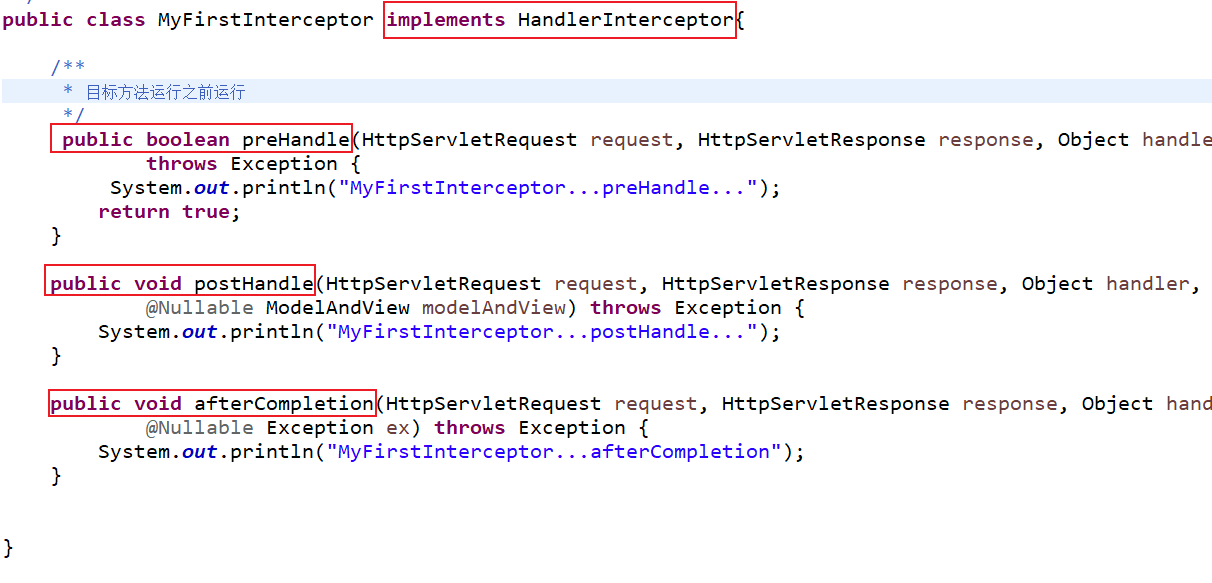
-
配置拦截器
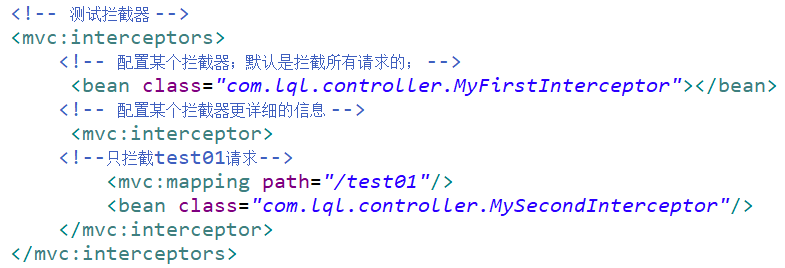
3、拦截器的运行流程
1.单个拦截器
- 正常运行流程:
拦截器的preHandle—-》目标方法—-》拦截器postHandle—-》页面—-》拦截器的afterCompletion
- 运行结果
MyFirstInterceptor...preHandle...
test01....
MyFirstInterceptor...postHandle...
success.jsp....
MyFirstInterceptor...afterCompletion
- 其他流程:
- 只要preHandle不放行就没有以后的流程
- 只要放行了,afterCompletion都会执行
2.多个拦截器:
- 正常流程:
MyFirstInterceptor...preHandle...
MySecondInterceptor...preHandle...
test01....
MySecondInterceptor...postHandle...
MyFirstInterceptor...postHandle...
success.jsp....
MySecondInterceptor...afterCompletion
MyFirstInterceptor...afterCompletion
- 异常流程(不放行)
- 哪一块不放行从此以后都没有
- ==已经放行了的拦截器afterCompletion总会执行==
- 例如:MySecondInterceptor不放行
MyFirstInterceptor...preHandle...
MySecondInterceptor...preHandle...
MyFirstInterceptor...afterCompletion
3.执行次序
| 拦截器 | 执行流程 |
|---|---|
| preHandle | 顺序执行 |
| postHandle | 逆序执行 |
| afterCompletion | 逆序执行 |
4、源码
try {
    ModelAndView mv = null;
    Exception dispatchException = null;

    try {
        processedRequest = checkMultipart(request);
        multipartRequestParsed = (processedRequest != request);

        // Determine handler for the current request.拿到方法的执行链,包含拦截器
        mappedHandler = getHandler(processedRequest);
        if (mappedHandler == null) {
            noHandlerFound(processedRequest, response);
            return;
        }

        // Determine handler adapter for the current request.
        HandlerAdapter ha = getHandlerAdapter(mappedHandler.getHandler());

        // Process last-modified header, if supported by the handler.
        String method = request.getMethod();
        boolean isGet = "GET".equals(method);
        if (isGet || "HEAD".equals(method)) {
            long lastModified = ha.getLastModified(request, mappedHandler.getHandler());
            if (new ServletWebRequest(request, response).checkNotModified(lastModified) && isGet) {
                return;
            }
        }

        //拦截器preHandle执行位置;有一个拦截器返回false目标方法都不会执行;直接跳到afterCompletion
        if (!mappedHandler.applyPreHandle(processedRequest, response)) {
            return;
        }

        // Actually invoke the handler.适配器执行目标方法
        mv = ha.handle(processedRequest, response, mappedHandler.getHandler());

        if (asyncManager.isConcurrentHandlingStarted()) {
            return;
        }

        applyDefaultViewName(processedRequest, mv);
        //目标方法只要正常,就会走到postHandle;任何期间有异常
        mappedHandler.applyPostHandle(processedRequest, response, mv);
    }
    catch (Exception ex) {
        dispatchException = ex;
    }
    catch (Throwable err) {
        // As of 4.3, we're processing Errors thrown from handler methods as well,
        // making them available for @ExceptionHandler methods and other scenarios.
        dispatchException = new NestedServletException("Handler dispatch failed", err);
    }
    //页面渲染;如果完蛋也是直接跳到afterCompletion;
    processDispatchResult(processedRequest, response, mappedHandler, mv, dispatchException);
}
catch (Exception ex) {
    triggerAfterCompletion(processedRequest, response, mappedHandler, ex);
}
catch (Throwable err) {
    triggerAfterCompletion(processedRequest, response, mappedHandler,
                           new NestedServletException("Handler processing failed", err));
}
finally {
    if (asyncManager.isConcurrentHandlingStarted()) {
        // Instead of postHandle and afterCompletion
        if (mappedHandler != null) {
            mappedHandler.applyAfterConcurrentHandlingStarted(processedRequest, response);
        }
    }
    else {
        // Clean up any resources used by a multipart request.
        if (multipartRequestParsed) {
            cleanupMultipart(processedRequest);
        }
    }
}
}
1.preHandler
boolean applyPreHandle(HttpServletRequest request, HttpServletResponse response) throws Exception {
		HandlerInterceptor[] interceptors = getInterceptors();
		if (!ObjectUtils.isEmpty(interceptors)) {
			for (int i = 0; i < interceptors.length; i++) {
				HandlerInterceptor interceptor = interceptors[i];
                //preHandle - true - false
				if (!interceptor.preHandle(request, response, this.handler)) {
					//执行完afterCompletion();
                    triggerAfterCompletion(request, response, null);
					return false;
				}
                //记录一下索引
				this.interceptorIndex = i;
			}
		}
		return true;
	}
2.postHandle
void applyPostHandle(HttpServletRequest request, HttpServletResponse response, @Nullable ModelAndView mv)
			throws Exception {

		HandlerInterceptor[] interceptors = getInterceptors();
		if (!ObjectUtils.isEmpty(interceptors)) {
            //逆序执行每个拦截器的postHandle
			for (int i = interceptors.length - 1; i >= 0; i--) {
				HandlerInterceptor interceptor = interceptors[i];
				interceptor.postHandle(request, response, this.handler, mv);
			}
		}
	}
3.页面渲染逻辑
private void processDispatchResult(HttpServletRequest request, HttpServletResponse response,
			@Nullable HandlerExecutionChain mappedHandler, @Nullable ModelAndView mv,
			@Nullable Exception exception) throws Exception {

		boolean errorView = false;

		if (exception != null) {
			if (exception instanceof ModelAndViewDefiningException) {
				logger.debug("ModelAndViewDefiningException encountered", exception);
				mv = ((ModelAndViewDefiningException) exception).getModelAndView();
			}
			else {
				Object handler = (mappedHandler != null ? mappedHandler.getHandler() : null);
				mv = processHandlerException(request, response, handler, exception);
				errorView = (mv != null);
			}
		}

		// Did the handler return a view to render?
		if (mv != null && !mv.wasCleared()) {
            //页面渲染
			render(mv, request, response);
			if (errorView) {
				WebUtils.clearErrorRequestAttributes(request);
			}
		}
		else {
			if (logger.isTraceEnabled()) {
				logger.trace("No view rendering, null ModelAndView returned.");
			}
		}

		if (WebAsyncUtils.getAsyncManager(request).isConcurrentHandlingStarted()) {
			// Concurrent handling started during a forward
			return;
		}

		if (mappedHandler != null) {
			// Exception (if any) is already handled..
            //页面正常执行afterCompletion;即使没走到这,afterCompletion总会执行
			mappedHandler.triggerAfterCompletion(request, response, null);
		}
	}
4.afterCompletion
void triggerAfterCompletion(HttpServletRequest request, HttpServletResponse response, @Nullable Exception ex)
			throws Exception {

		HandlerInterceptor[] interceptors = getInterceptors();
		if (!ObjectUtils.isEmpty(interceptors)) {
            //有记录最后一个放行拦截器的索引(interceptorIndex),从他开始把之前所有的拦截器的afterCompletion都执行
			for (int i = this.interceptorIndex; i >= 0; i--) {
				HandlerInterceptor interceptor = interceptors[i];
				try {
					interceptor.afterCompletion(request, response, this.handler, ex);
				}
				catch (Throwable ex2) {
					logger.error("HandlerInterceptor.afterCompletion threw exception", ex2);
				}
			}
		}
	}
5、流程总结图
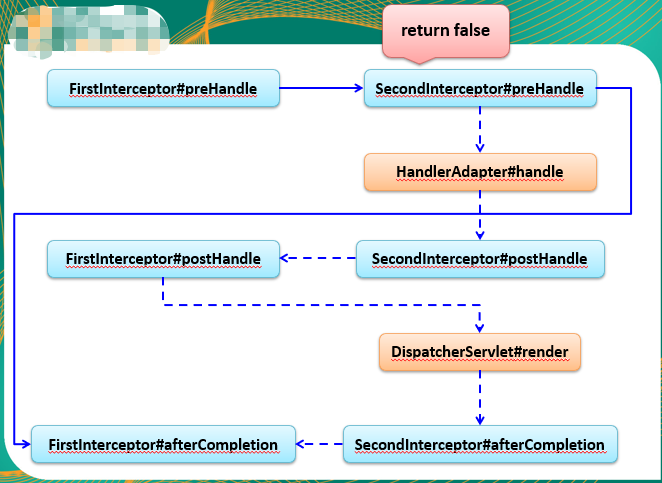
6、Filter和拦截器使用时机
-
如果某些功能需要其他组件配合完成,我们就用拦截器
-
其它情况可以写filter
十一、国际化
1、简单国际化
1.写好国际化资源文件
-
login_en_US.properties
welcominfo=welcome to lql.com username=USERNAME password=PASSWORD loginBtn=LOGIN -
login_zh_CN.properties
welcominfo=\u6B22\u8FCE\u6765\u5230\u4EE3\u7801\u4E16\u754C
username=\u7528\u6237\u540D
password=\u5BC6\u7801
loginBtn=\u767B\u5F55
2.让Spring的ResourceBundleMessageSource管理国际化资源文件
<bean id="messageSource" class="org.springframework.context.support.ResourceBundleMessageSource">
		<property name="basename" value="loginpro/login"></property>
</bean>
3.直接去页面取值
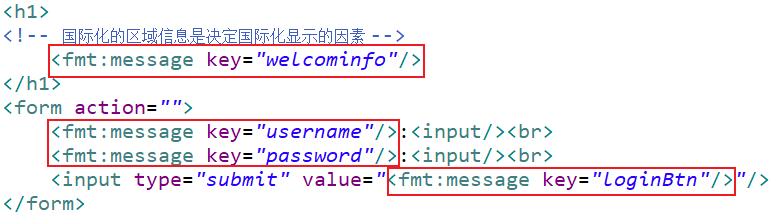
2、页面显示现象
- 是按照浏览器带来语言信息决定
3、javaWeb获取浏览器区域信息
Locale locale = Request.getLocale();
4、SpringMVC区域信息
- 由区域信息解析器得到
private LocaleResolver localeResolver;
- 默认会用一个
AcceptHeaderLocaleResolver- 所有用到区域信息的地方,都是用
AcceptHeaderLocaleResolver获取的
- 所有用到区域信息的地方,都是用
Locale locale =
				(this.localeResolver != null ? this.localeResolver.resolveLocale(request) : request.getLocale());
@Override
public Locale resolveLocale(HttpServletRequest request) {
    Locale defaultLocale = getDefaultLocale();
    if (defaultLocale != null && request.getHeader("Accept-Language") == null) {
        return defaultLocale;
    }
    Locale requestLocale = request.getLocale();
    List<Locale> supportedLocales = getSupportedLocales();
    if (supportedLocales.isEmpty() || supportedLocales.contains(requestLocale)) {
        return requestLocale;
    }
    Locale supportedLocale = findSupportedLocale(request, supportedLocales);
    if (supportedLocale != null) {
        return supportedLocale;
    }
    return (defaultLocale != null ? defaultLocale : requestLocale);
}
5、区域信息解析器
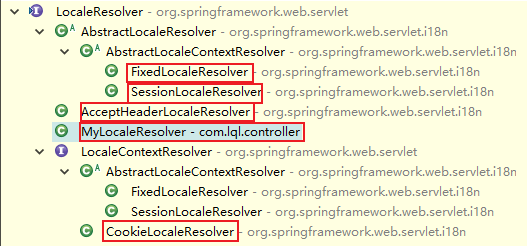
1.AcceptHeaderLocaleResolver
- 使用请求头中的信息
@Override
public Locale resolveLocale(HttpServletRequest request) {
    Locale defaultLocale = getDefaultLocale();
    if (defaultLocale != null && request.getHeader("Accept-Language") == null) {
        return defaultLocale;
    }
    Locale requestLocale = request.getLocale();
    List<Locale> supportedLocales = getSupportedLocales();
    if (supportedLocales.isEmpty() || supportedLocales.contains(requestLocale)) {
        return requestLocale;
    }
    Locale supportedLocale = findSupportedLocale(request, supportedLocales);
    if (supportedLocale != null) {
        return supportedLocale;
    }
    return (defaultLocale != null ? defaultLocale : requestLocale);
}


@Override
public void setLocale(HttpServletRequest request, @Nullable HttpServletResponse response, @Nullable Locale locale) {
    throw new UnsupportedOperationException(
        "Cannot change HTTP accept header - use a different locale resolution strategy");
}
2.FixedLocaleResolver
- 使用系统默认的区域信息
@Override
public Locale resolveLocale(HttpServletRequest request) {
    Locale locale = getDefaultLocale();
    if (locale == null) {
        locale = Locale.getDefault();
    }
    return locale;
}

@Override
public LocaleContext resolveLocaleContext(HttpServletRequest request) {
    return new TimeZoneAwareLocaleContext() {
        @Override
        @Nullable
        public Locale getLocale() {
            return getDefaultLocale();
        }
        @Override
        public TimeZone getTimeZone() {
            return getDefaultTimeZone();
        }
    };
}

@Override
public void setLocaleContext( HttpServletRequest request, @Nullable HttpServletResponse response,
                             @Nullable LocaleContext localeContext) {

    throw new UnsupportedOperationException("Cannot change fixed locale - use a different locale resolution strategy");
}
3.SessionLocaleResolver
-
区域信息是从session中获取
-
可以根据请求参数创建一个locale对象,把他放在session中
@Override
public Locale resolveLocale(HttpServletRequest request) {
    Locale locale = (Locale) WebUtils.getSessionAttribute(request, this.localeAttributeName);
    if (locale == null) {
        locale = determineDefaultLocale(request);
    }
    return locale;
}
4.CookieLocaleResolver
- 从cookie中获取区域信息(麻烦)
@Override
public Locale resolveLocale(HttpServletRequest request) {
    parseLocaleCookieIfNecessary(request);
    return (Locale) request.getAttribute(LOCALE_REQUEST_ATTRIBUTE_NAME);
}
6、点击链接切换国际化
- 国际化信息是要能改变的

1.自定义区域信息解析器(推荐)
-
实现LocaleResolver
package com.lql.controller;

import java.util.Locale;

import javax.servlet.http.HttpServletRequest;
import javax.servlet.http.HttpServletResponse;

import org.springframework.web.servlet.LocaleResolver;

public class MyLocaleResolver implements LocaleResolver{

 /**
  * 解析返回locale
  */
 @Override
 public Locale resolveLocale(HttpServletRequest req) {
     // TODO Auto-generated method stub
     //zh_CN
     Locale l = null;
     String localeStr = req.getParameter("locale");
     //如果带了local参数就用指定的区域信息,如果没带就用请求头的
     if(localeStr != null && !"".equals(localeStr)){
         l = new Locale(localeStr.split("_")[0],localeStr.split("_")[1]);
     }else {
         l = req.getLocale();
     }
     return l;
 }

 /**
  * 修改locale
  */
 @Override
 public void setLocale(HttpServletRequest arg0, HttpServletResponse arg1, Locale arg2) {
     // TODO Auto-generated method stub
     throw new UnsupportedOperationException(
             "Cannot change HTTP accept header - use a different locale resolution strategy");
 }

}
-
配置springmvc.xml
<!-- 自定义区域信息解析器 -->
<bean id="localeResolver" class="com.lql.controller.MyLocaleResolver"></bean>
2.区域信息从session中拿
-
Controller
package com.lql.controller;

import java.util.Locale;

import javax.servlet.http.HttpSession;

import org.springframework.beans.factory.annotation.Autowired;
import org.springframework.context.MessageSource;
import org.springframework.stereotype.Controller;
import org.springframework.ui.Model;
import org.springframework.web.bind.annotation.RequestMapping;
import org.springframework.web.bind.annotation.RequestParam;
import org.springframework.web.servlet.i18n.SessionLocaleResolver;

@Controller
public class I18nTestController {

 @Autowired
 private MessageSource messageSource;

 @RequestMapping("/tologinpage")
 public String tologinPage(@RequestParam(value="locale",defaultValue="zh_CN")String localeStr,Locale locale,Model model,HttpSession session){
     System.out.println(locale);

     String message = messageSource.getMessage("welcominfo", null, locale);
     System.out.println(message);
     //model.addAttribute("msg",message);

     /*//zh_CN
     Locale l = null;
     //如果带了local参数就用指定的区域信息,如果没带就用请求头的
     if(localeStr != null && !"".equals(localeStr)){
         l = new Locale(localeStr.split("_")[0],localeStr.split("_")[1]);
     }else {
         l = locale;
     }
     session.setAttribute(SessionLocaleResolver.class.getName() + ".LOCALE", l);*/

     return "login";
 }

 @RequestMapping("/test01")
 public String test01(){
     return "login";
 }
}
-
配置springmvc.xml
<!-- 区域信息从session中拿 -->
<bean id="localeResolver" class="org.springframework.web.servlet.i18n.SessionLocaleResolver"></bean>
<mvc:interceptors>
    <bean class="org.springframework.web.servlet.i18n.LocaleChangeInterceptor"></bean>
</mvc:interceptors>
十二、异常处理
1、源码
1.HandlerExceptionResolver
- 默认就是这几个:
org.springframework.web.servlet.HandlerExceptionResolver=org.springframework.web.servlet.mvc.method.annotation.ExceptionHandlerExceptionResolver,\
	org.springframework.web.servlet.mvc.annotation.ResponseStatusExceptionResolver,\
	org.springframework.web.servlet.mvc.support.DefaultHandlerExceptionResolver
2.异常处理
- 如果异常解析器都不能处理就直接抛出去(给tomcat)
private void processDispatchResult(HttpServletRequest request, HttpServletResponse response,
			@Nullable HandlerExecutionChain mappedHandler, @Nullable ModelAndView mv,
			@Nullable Exception exception) throws Exception {

		boolean errorView = false;

		if (exception != null) {	//如果有异常
			if (exception instanceof ModelAndViewDefiningException) {
				logger.debug("ModelAndViewDefiningException encountered", exception);
				mv = ((ModelAndViewDefiningException) exception).getModelAndView();
			}
			else {	//处理异常
				Object handler = (mappedHandler != null ? mappedHandler.getHandler() : null);
				mv = processHandlerException(request, response, handler, exception);
				errorView = (mv != null);
			}
		}

		// Did the handler return a view to render?
		if (mv != null && !mv.wasCleared()) {
            //来到页面
			render(mv, request, response);
			if (errorView) {
				WebUtils.clearErrorRequestAttributes(request);
			}
		}
		else {
			if (logger.isTraceEnabled()) {
				logger.trace("No view rendering, null ModelAndView returned.");
			}
		}

		if (WebAsyncUtils.getAsyncManager(request).isConcurrentHandlingStarted()) {
			// Concurrent handling started during a forward
			return;
		}

		if (mappedHandler != null) {
			// Exception (if any) is already handled..
			mappedHandler.triggerAfterCompletion(request, response, null);
		}
	}
3.异常解析
- 所有异常解析器尝试解析
- 解析完成进行后续
- 解析失败下一个解析器
@Nullable
protected ModelAndView processHandlerException(HttpServletRequest request, HttpServletResponse response,
                                               @Nullable Object handler, Exception ex) throws Exception {

    // Success and error responses may use different content types
    request.removeAttribute(HandlerMapping.PRODUCIBLE_MEDIA_TYPES_ATTRIBUTE);

    // Check registered HandlerExceptionResolvers...
    ModelAndView exMv = null;
    if (this.handlerExceptionResolvers != null) {
        for (HandlerExceptionResolver resolver : this.handlerExceptionResolvers) {
            exMv = resolver.resolveException(request, response, handler, ex);
            if (exMv != null) {
                break;
            }
        }
    }
    if (exMv != null) {
        if (exMv.isEmpty()) {
            request.setAttribute(EXCEPTION_ATTRIBUTE, ex);
            return null;
        }
        // We might still need view name translation for a plain error model...
        if (!exMv.hasView()) {
            String defaultViewName = getDefaultViewName(request);
            if (defaultViewName != null) {
                exMv.setViewName(defaultViewName);
            }
        }
        if (logger.isTraceEnabled()) {
            logger.trace("Using resolved error view: " + exMv, ex);
        }
        else if (logger.isDebugEnabled()) {
            logger.debug("Using resolved error view: " + exMv);
        }
        WebUtils.exposeErrorRequestAttributes(request, ex, getServletName());
        return exMv;
    }

    throw ex;
}
2、异常解析器用法
ExceptionHandlerExceptionResolver:@ExceptionHandler
- Controller类
ResponseStatusExceptionResolver:@ResponseStatus
- 给自定义异常上标注
- 运行结果
DefaultHandlerExceptionResolver
- 判断是否SpringMVC自己的异常
如:HttpRequestMethodNotSupportedException
如果没人处理,报错
- 源码(遍历异常解析器)
- 默认的异常
@Override
@Nullable
protected ModelAndView doResolveException(
   HttpServletRequest request, HttpServletResponse response, @Nullable Object handler, Exception ex) {

   try {
       if (ex instanceof HttpRequestMethodNotSupportedException) {
           return handleHttpRequestMethodNotSupported(
               (HttpRequestMethodNotSupportedException) ex, request, response, handler);
       }
       else if (ex instanceof HttpMediaTypeNotSupportedException) {
           return handleHttpMediaTypeNotSupported(
               (HttpMediaTypeNotSupportedException) ex, request, response, handler);
       }
       else if (ex instanceof HttpMediaTypeNotAcceptableException) {
           return handleHttpMediaTypeNotAcceptable(
               (HttpMediaTypeNotAcceptableException) ex, request, response, handler);
       }
       else if (ex instanceof MissingPathVariableException) {
           return handleMissingPathVariable(
               (MissingPathVariableException) ex, request, response, handler);
       }
       else if (ex instanceof MissingServletRequestParameterException) {
           return handleMissingServletRequestParameter(
               (MissingServletRequestParameterException) ex, request, response, handler);
       }
       else if (ex instanceof ServletRequestBindingException) {
           return handleServletRequestBindingException(
               (ServletRequestBindingException) ex, request, response, handler);
       }
       else if (ex instanceof ConversionNotSupportedException) {
           return handleConversionNotSupported(
               (ConversionNotSupportedException) ex, request, response, handler);
       }
       else if (ex instanceof TypeMismatchException) {
           return handleTypeMismatch(
               (TypeMismatchException) ex, request, response, handler);
       }
       else if (ex instanceof HttpMessageNotReadableException) {
           return handleHttpMessageNotReadable(
               (HttpMessageNotReadableException) ex, request, response, handler);
       }
       else if (ex instanceof HttpMessageNotWritableException) {
           return handleHttpMessageNotWritable(
               (HttpMessageNotWritableException) ex, request, response, handler);
       }
       else if (ex instanceof MethodArgumentNotValidException) {
           return handleMethodArgumentNotValidException(
               (MethodArgumentNotValidException) ex, request, response, handler);
       }
       else if (ex instanceof MissingServletRequestPartException) {
           return handleMissingServletRequestPartException(
               (MissingServletRequestPartException) ex, request, response, handler);
       }
       else if (ex instanceof BindException) {
           return handleBindException((BindException) ex, request, response, handler);
       }
       else if (ex instanceof NoHandlerFoundException) {
           return handleNoHandlerFoundException(
               (NoHandlerFoundException) ex, request, response, handler);
       }
       else if (ex instanceof AsyncRequestTimeoutException) {
           return handleAsyncRequestTimeoutException(
               (AsyncRequestTimeoutException) ex, request, response, handler);
       }
   }
   catch (Exception handlerEx) {
       if (logger.isWarnEnabled()) {
           logger.warn("Failure while trying to resolve exception [" + ex.getClass().getName() + "]", handlerEx);
       }
   }
   return null;
}
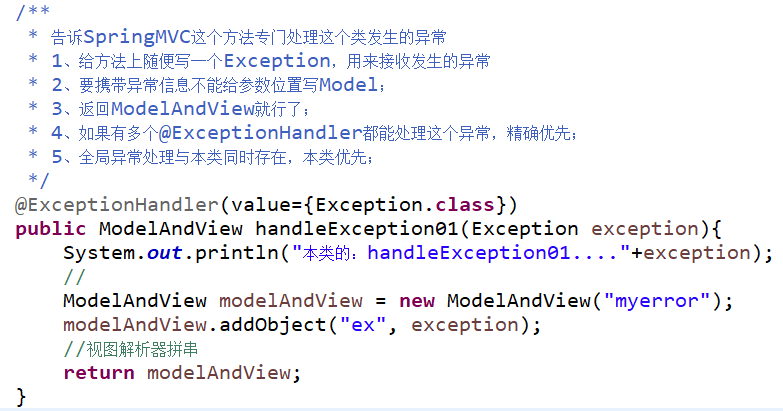
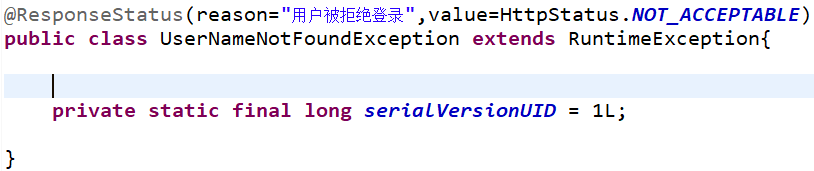
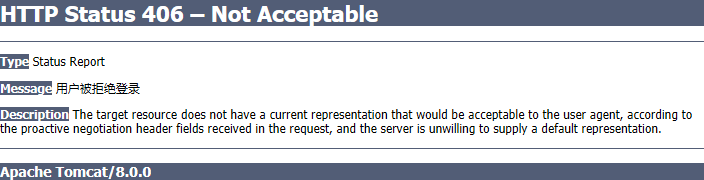
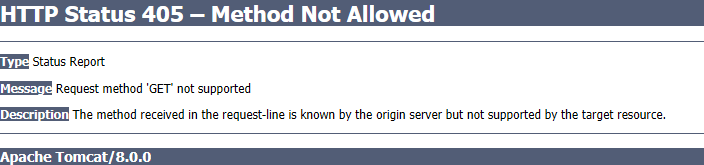
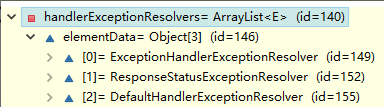
3、集中处理异常(推荐)
-
@ControllerAdvice专门处理异常的类
package com.lql.controller;

import org.springframework.web.bind.annotation.ControllerAdvice;
import org.springframework.web.bind.annotation.ExceptionHandler;
import org.springframework.web.servlet.ModelAndView;

/**
 * 集中处理所有异常
 * @author 陆乾龙
 *
 * 1、集中处理所有异常的类加入到ioc容器中
 * 2、@ControllerAdvice专门处理异常的类
 */
@ControllerAdvice
public class MyFocusExceptionController {

  @ExceptionHandler(value={ArithmeticException.class})
  public ModelAndView handleException01(Exception exception){
      System.out.println("全局的handleException01...."+exception);
      //
      ModelAndView modelAndView = new ModelAndView("myerror");
      modelAndView.addObject("ex", exception);
      //视图解析器拼串
      return modelAndView;
  }

  /*@ExceptionHandler(value={Exception.class})
  public ModelAndView handleException02(Exception exception){
      System.out.println("全局的handleException02...."+exception);
      //
      ModelAndView modelAndView = new ModelAndView("myerror");
      modelAndView.addObject("ex", exception);
      //视图解析器拼串
      return modelAndView;
  }*/
}
4、SimpleMappingExceptionResolver
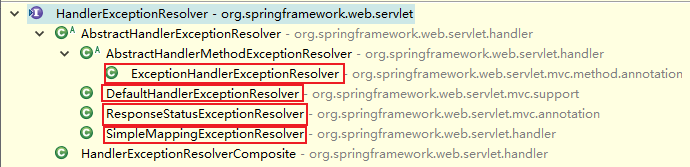
-
通过配置的方式进行异常处理
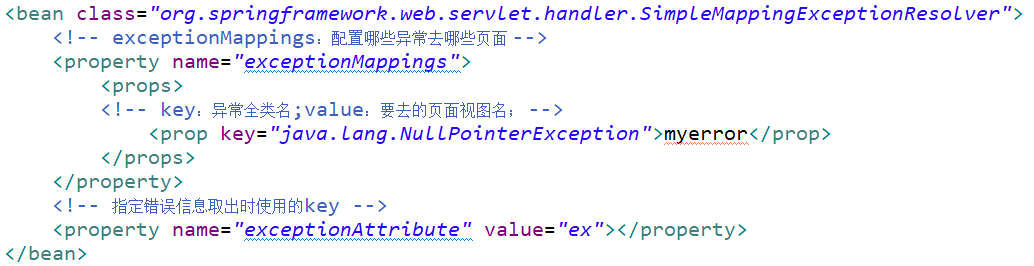
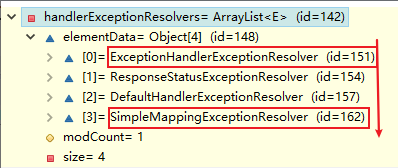
十三、SpringMVC的运行流程
- ==所有请求,前端控制器(DispatcherServlet)收到请求,调用doDispatch进行处理==
- ==根据HandlerMapping中保存的请求映射信息找到处理当前请求的处理器执行链(包含拦截器)==
- ==根据当前处理器找到它的HandlerAdapter(适配器)==
- ==拦截器的preHandle先执行==
- ==适配器执行目标方法,并返回ModelAndView==
- ModelAttribute注解标注的方法提前运行
- 确定目标方法用的参数(执行目标方法的时候)
- 有注解
- 没注解
- 看是否Model、Map以及其他的
- 如果是自定义类型
- 看隐含模型中有没有
- 有:从隐含模型中拿
- 没有:看是否SessionAttribute标注的属性
- 是:从Session中拿(拿不到会抛异常)
- 看隐含模型中有没有
- 都不是,就利用反射创建对象
- ==拦截器的postHandle执行==
- ==处理结果(页面渲染流程)==
- ==如果有异常,使用异常解析器处理异常(处理完后还会返回ModelAndView)==
- ==调用render进行页面渲染==
- 视图解析器根据视图名得到视图对象
- 视图对象调用render方法
- ==执行拦截器的afterCompletion==
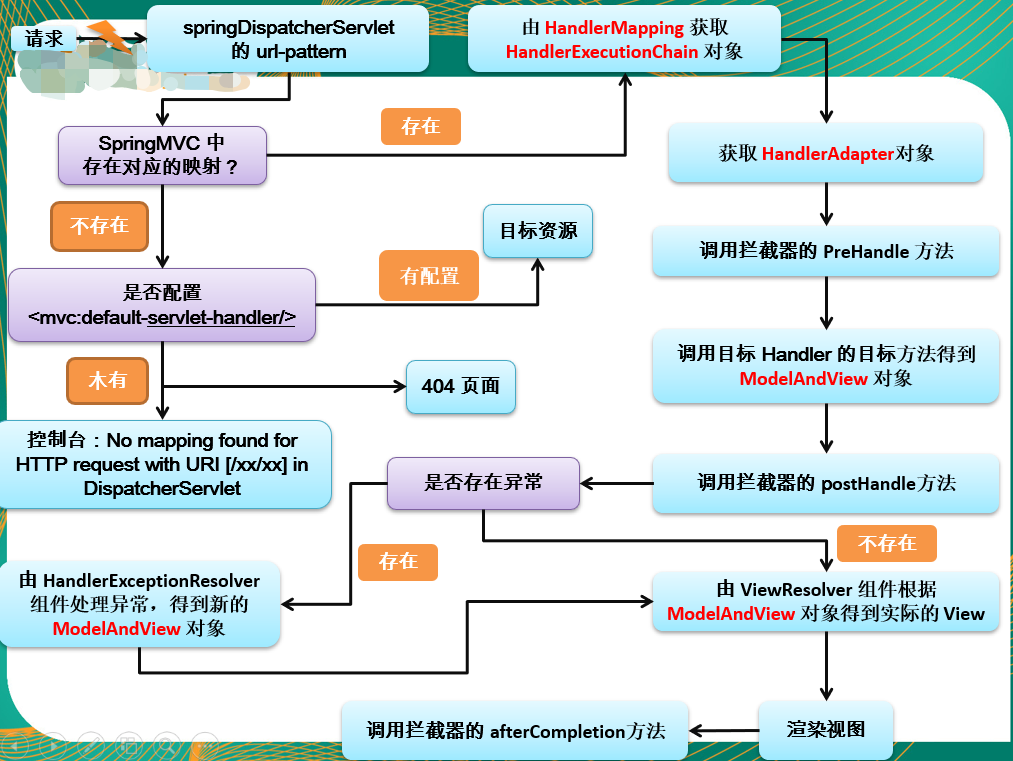
十四、SpringMVC与Spring整合
1、目的(分工明确)
2、配置文件
| 配置文件 | 配置相关 |
|---|---|
| SpringMVC | 网站转发逻辑、网站功能(视图解析器,文件上传解析器,支持ajax,等等) |
| Spring | 业务(事务控制,数据源,等等) |
- springmvc.xml中加入
<import resource="spring.xml"/>可以合并配置文件
3、SpringMVC和Spring分容器
- Spring管理业务逻辑组件

- SpringMVC管理控制器组件
use-default-filters="false":禁用默认行为,让include-filter起作用

4、 Spring MVC 配置文件中引用业务层的 Bean
-
多个 Spring IOC 容器之间可以设置为父子关系,以实现良好的解耦。
-
Spring MVC WEB 层容器可作为 “业务层” Spring 容器的子容器
- 即 WEB 层容器可以引用业务层容器的 Bean,而业务层容器却访问不到 WEB 层容器的 Bean